


.webp)


In the world of network cabling, understanding how to properly terminate an Ethernet cable is a fundamental skill. This guide consolidates the essentials of RJ45 connectors, Cat6 cable wiring, and the critical color codes that ensure a reliable network connection.
Understanding the RJ45 Connector and Pinout
An RJ45 connector is a modular 8-position, 8-pin connector used for terminating twisted pair cables, such as Cat5e or Cat6. A pinout is the specific arrangement of wires that dictates how the connector is terminated. This arrangement, often referred to as the RJ45 color code, is essential when you need to make or repair Ethernet cables, as it specifies the order in which the individual wires should be connected to the connector's pins.
There are several types of RJ45 pinouts for specialized network applications, including crossover, rolled, T1, and loopback. However, the most common by far is the straight-through cable, used for connecting computers to switches and routers.
The Two Straight-Through Wiring Standards: T568A vs. T568B
Within the family of straight-through cables, two wiring standards are recognized by ANSI, TIA, and EIA:
( 1 ) T568A Standard: The first established standard.
( 2 ) T568B Standard: This has surpassed T568A in popularity and is now widely considered the default wiring scheme for twisted-pair structured cabling, particularly in the U.S.
The only difference between the two is the order of the green and orange wire pairs. If you are unsure which to use, choose T568B. For a consistent and functional network, it is crucial to use the same wiring standard on both ends of a straight-through cable.
T-568A RJ45 Pinout / Color Code
| Pin | 1 | 2 | 3 | 4 | 5 | 6 | 7 | 8 |
| Wire Color | White/Green | Green | White/Orange | Blue | White/Blue | Orange | White/Brown | Brown |

T-568B RJ45 Pinout / Color Code
| Pin | 1 | 2 | 3 | 4 | 5 | 6 | 7 | 8 |
| Wire Color | White/Orange | Orange | White/Green | Blue | White/Blue | Green | White/Brown | Brown |
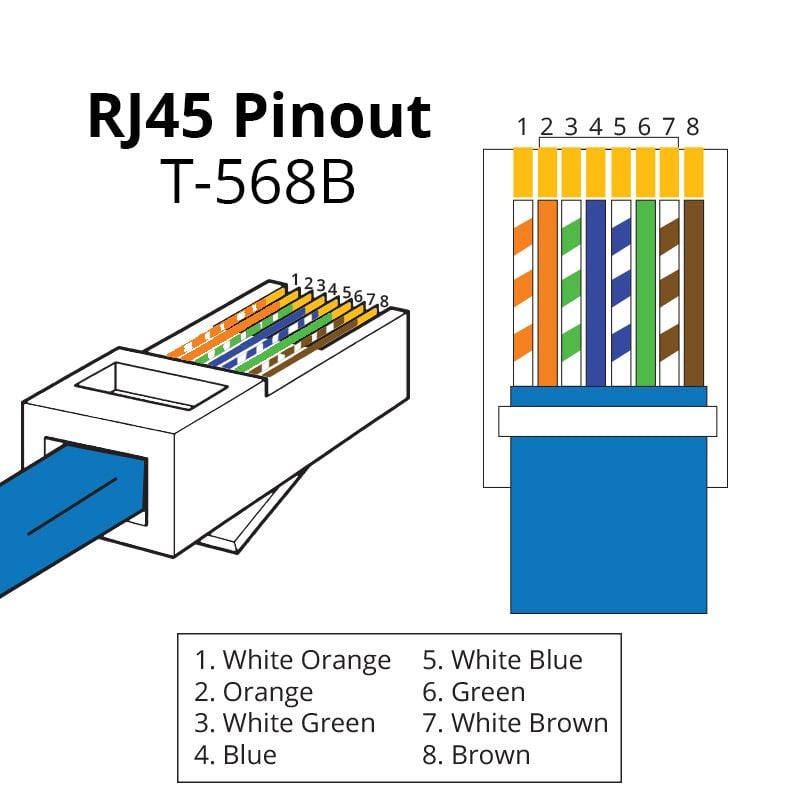
Cat6 Wiring Diagram and Its Components
A Cat6 wiring diagram illustrates the internal layout and connections of a Category 6 cable, which is defined by the EIA/TIA for high-speed Ethernet networks. Understanding this diagram is key to setting up a reliable and high-performance network.
The core components highlighted in a Category 6 wiring diagram include:
( 1 ) Twisted Pairs: Cat6 cables contain four pairs of twisted copper wires. This twisting is vital for canceling out electromagnetic interference (EMI). Each pair is color-coded for easy identification:
Pair 1: Blue & White/Blue
Pair 2: Orange & White/Orange
Pair 3: Green & White/Green
Pair 4: Brown & White/Brown
( 2 ) RJ45 Connectors: The diagram clearly shows the proper alignment of the color-coded wires within the RJ45 connectors at each end of the cable.
( 3 ) Wiring Standards (T568A/B): The diagram will specify which of the two standards (T568A or T568B) is being used to arrange the wires in the connector.
Specialty Cable: The Crossover Pinout
While straight-through cables are the norm, a crossover cable uses two different RJ45 pinouts for the two ends of the cable. One end is wired to the T568A standard, and the other to the T568B standard. This type of cable is used to connect two similar devices directly to each other without a switch, for example, connecting one computer to another or one switch to another switch. If you need to connect 568A equipment to 568B equipment, a crossover cable is the solution.

Benefits of Proper Wiring and Practical Tips
Correctly following the Cat6 wiring diagram and RJ45 color codes provides significant benefits:
( 1 ) Error Minimization: It prevents mistakes during the cable termination process.
( 2 ) Enhanced Performance: Adherence to standards ensures optimal signal integrity and network speed, meeting the demands of today's digital age.
( 3 ) Ease of Maintenance: A clear understanding of the wiring makes troubleshooting and maintenance simpler and more efficient.
For a successful installation, consider these tips:
( 1 ) Choose the Right Standard: Select either T568A or T568B and stick with it consistently throughout your entire network installation.
( 2 ) Quality Matters: Use high-quality Cat6 cables and RJ45 connectors to ensure the highest performance and durability.
( 3 ) Seek Assistance: If you are unsure about the wiring process, do not hesitate to consult with a professional or contact technical support.
Conclusion
The RJ45 pinout, Cat6 wiring diagram, and associated color codes are indispensable tools for anyone working with network cabling. By understanding the components, standards, and proper termination techniques, you can install and maintain a robust, high-performance network that caters to all your connectivity needs.





No comments have been posted yet.