


.webp)


Todos sabemos que é necessário um cabo Ethernet para conectar um computador a uma rede por meio de uma conexão com fio. Mas como escolher o cabo certo corretamente? Cabos diretos e cabos cruzados são tipos de cabos Ethernet, então qual a diferença entre eles? Qual tipo de cabo você deve escolher para conectar dois computadores?
Neste artigo, discutiremos cabos Ethernet crossover, como fazer um e como ele difere de um cabo direto.
O que é um cabo crossover Ethernet?
Um cabo Ethernet crossover é um tipo de cabo cruzado usado em redes Ethernet para conectar dispositivos de rede Ethernet diretamente uns aos outros. É mais comumente usado para conectar dois dispositivos do mesmo tipo, como dois computadores. Um cabo crossover é semelhante a um cabo direto, exceto pelo fato de que os pares de fios são cruzados em um cabo crossover.
Cabo crossover vs. cabo direto: qual a diferença?
#1. Aplicação
Cabos crossover Ethernet são normalmente usados para conectar dispositivos de rede semelhantes, como conectar um computador a outro.
Cabos diretos são normalmente usados para conectar diferentes tipos de dispositivos de rede, como conectar um switch a um roteador ou um computador a um switch.

#2. Normas de fiação
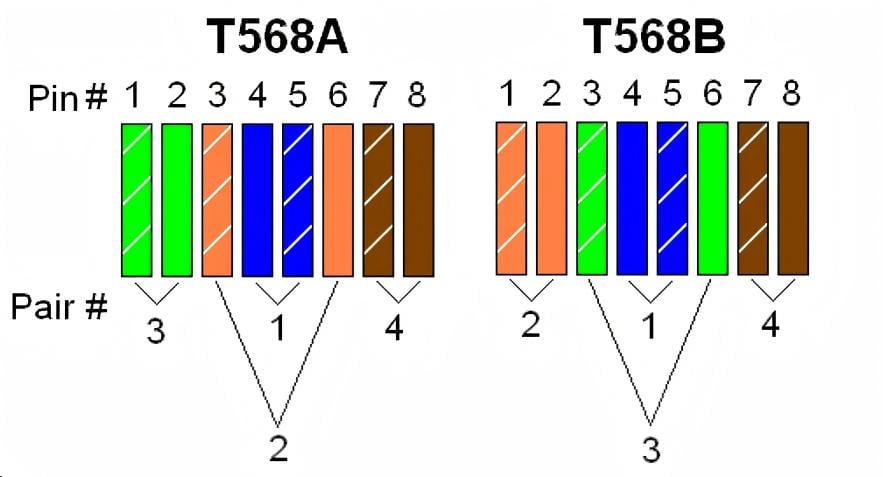
As we know, T568A and T568B are wiring standards for Ethernet cables recognized by ANSI, TIA, and EIA. They differ in the color sequence of the eight individual wires, as shown in the diagram below.
For T568A, the color order for the eight pins is as follows: green/white - 1, green - 2, orange/white - 3, blue - 4, blue/white - 5, orange - 6, brown/white - 7, brown - 8.
For T568B, the color order for the eight pins is as follows: orange/white - 1, orange - 2, green/white - 3, blue - 4, blue/white - 5, green - 6, brown/white - 7, brown - 8.
Compared to T568A, T568B swaps pins 1 and 3, and pins 2 and 6.
An Ethernet crossover cable uses different wiring standards on each end (Connector A and Connector B); one end uses T568A and the other uses T568B, as illustrated below.

An Ethernet straight-through cable uses the same wiring standard on both ends (Connector A and B), either T568A or T568B. In practice, most applications use the T568B standard on both ends, which is generally considered to have better electromagnetic interference shielding, as shown below.
#3. Visual Differences
Ethernet crossover cables are often printed with the word "Crossover" or "Xover" to distinguish them from straight-through cables. Alternatively, we can look at the RJ-45 connector to see if the wire order is the same on both ends to tell them apart.

How to Make an Ethernet Crossover Cable?
Step 1, Use a cable stripper to strip off the cable jacket in right length
Strip about 1.5 cm of the cable jacket from both ends of the cable. A crimping tool has a circular area to accomplish this.
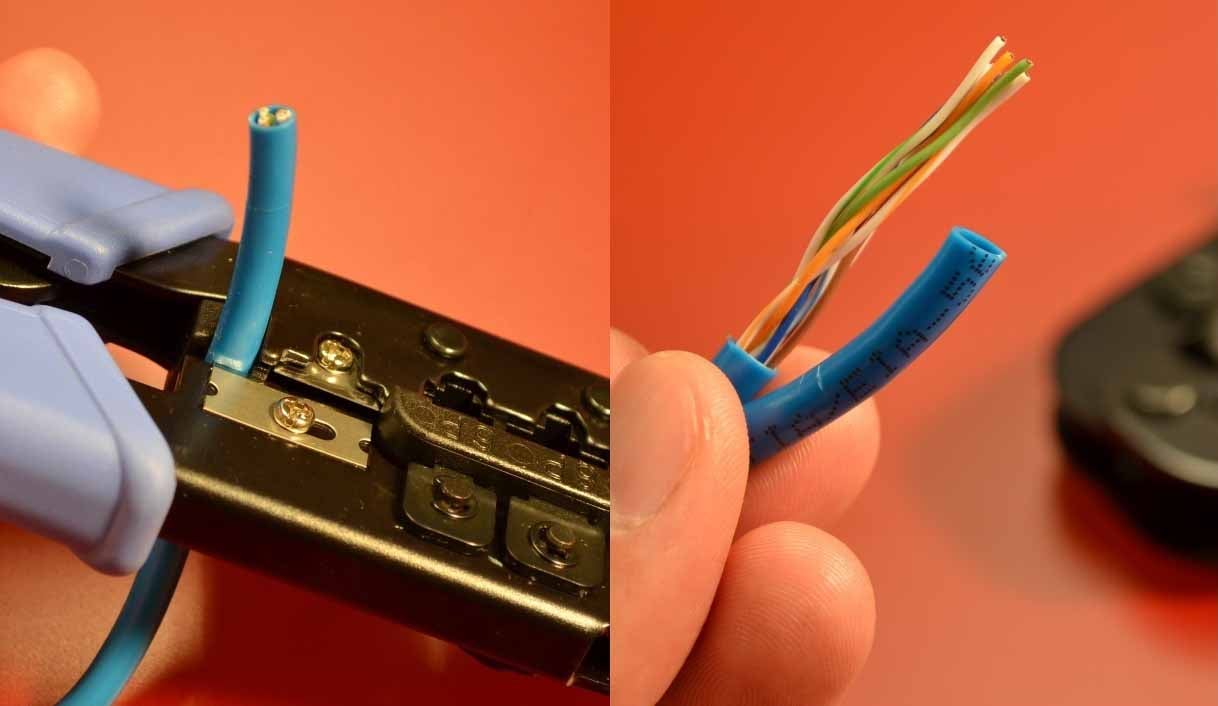
Step 2, Untwist the wires and arrange the wires into correct position
After that, you need to untwist the wires, which consist of four "twisted pairs." Straighten them out and arrange them according to the wiring standard. One end should be arranged according to the T568A standard, and the other end according to the T568B standard.

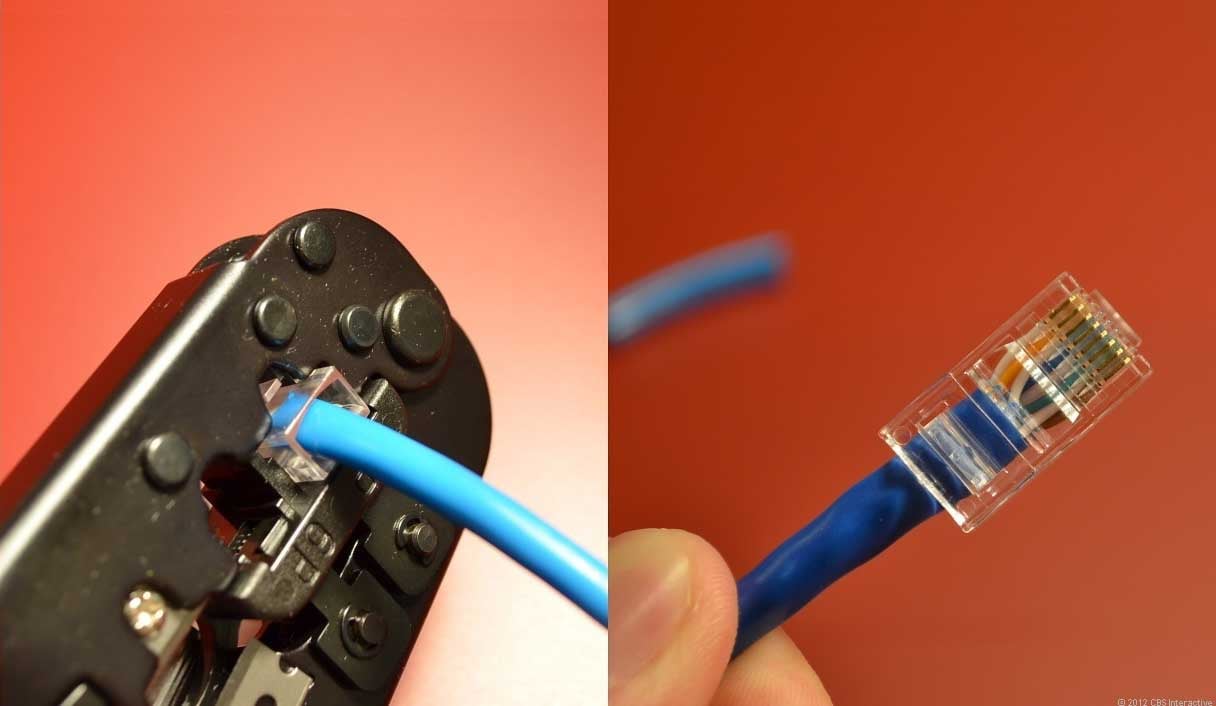
Step 3, Use the Crimper to crimp the wires into RJ45 connector
If some wires are longer than others, trim them to create a uniform, flat plane. The challenge is to not mess up the order when inserting them into the RJ45 plug. Hold the plug with the clip side facing away from you and the gold contacts facing towards you.
Next, push the cable in straight. The copper cores at the end of the cable should be right up against the end of the RJ45 connector. If not, it means you have stripped too much jacket off. Cut the cable back a little more. Once the cable is firmly inserted into the plug, insert it into the crimping tool and press down. Be careful, as too much force can crack the fragile plastic plug.
Step 4, Final test the ethernet cable with tester
After both ends of the cable have been prepared following the steps above, use a professional cable tester to determine if the cable was made successfully.

Conclusion
As semelhanças entre cabos crossover e cabos straight-through são óbvias. Ambos são cabos Ethernet que atendem aos padrões de cabeamento T568A e T568B, e cada lado do conector possui oito pinos de cores diferentes. O primeiro conecta dois tipos diferentes de dispositivos, como um computador a um switch, enquanto o segundo conecta dois dispositivos do mesmo tipo, como um computador a outro computador.
Veja mais cabos Ethernet e soluções de rede na Fibermart.
.jpg "DWDM vs CWDM: Qual é a diferença?")





Nenhum comentário foi postado ainda.