


.webp)


Before discussing SFP transceiver, let's first explain what SFP means. The "S" in SFP stands for Small, the "F" for Form-factor, and the "P" for Pluggable. Thus, SFP = Small Form-factor Pluggable, defined by a Multi-Source Agreement (MSA). It was initially defined by the SFF Committee in the INF-8074i agreement.
An SFP transceiver is a small, hot-pluggable optical transceiver that plugs into an SFP port on a network switch or other device. Sometimes, it's referred to as a mini-GBIC (Gigabit Interface Converter) or an SFP transceiver. However, some technicians might also mistakenly call it an SPF module, which refers to the same thing.
A typical SFP optical transceiver consists of a cage, a PCBA (Printed Circuit Board Assembly), chips, and a TOSA+ROSA (Transmit Optical Sub-Assembly + Receive Optical Sub-Assembly, or sometimes a BOSA (Bi-Directional Optical Sub-Assembly) for BiDi transceivers). See the image below.
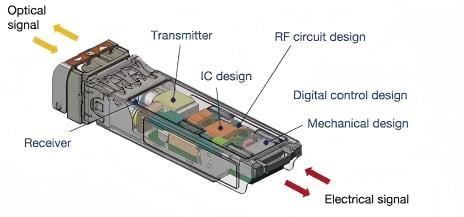
Although SFP emerged later than the GBIC and SFF form factors, it holds an extremely high market share and is still growing. Furthermore, it is rapidly replacing those two older types. We believe the most critical influencing factors are:
-
Hot-pluggable: Insert and remove without restarting the switch
-
Compact size: High port density, providing more bandwidth
-
Intelligent real-time monitoring: Enhanced DDM (DOM) functionality makes operation simple
-
Lower cost: Mass production and numerous suppliers make its price much lower than GBIC and SFF formats
To help understand the basics, we briefly introduce the SFP MSA. It stands for Small Form-factor Pluggable Multi-Source Agreement—this is the key MSA for SFP transceivers, encompassing INF-8074i, SFF-8431, and SFF-8472. This agreement defines the mechanical dimensions, electrical/optical interfaces, and diagnostic monitoring interface.
Why are SFP Transceiver Important?
Imagine your switch doesn't have optical transceivers. How would you achieve high-speed connections? The answer might be via copper cables. However, due to thickness, cost, and distance limitations, this isn't always feasible.
This is where SFP transceivers come into play. Plug a transceiver into the switch port, and you can establish communication with another switch over distances ranging from tens to hundreds of kilometers. It is a crucial conversion medium for connections between almost all network switches and routers.
For example, using a 1G SFP SX transceiver, you can achieve a maximum distance of 550 meters over multimode OM2 fiber. Meanwhile, using a 1G SFP LX transceiver, the maximum span over single-mode fiber can reach 20 kilometers.
How Many Types of SFP Transceivers?
With so many SFP transceivers on the market, many people often need to understand the different classifications. Therefore, choosing the right transceiver becomes a challenge.
Next, we will attempt to classify them according to various criteria.
Classification by SFP Speed Rate
-
100BASE SFP: Typically represents 100Mbps and 155Mbps speeds, widely used for Fast Ethernet, SDH/SONET, and ATM. Most equipment has been upgraded to 1G or higher speeds. Thus, few suppliers still offer this type.
-
622M SFP: Specifically for SDH/SONET equipment. Similar to the type above, few manufacturers offer this type.
-
1000BASE SFP: Also known as 1G or Gigabit, this is the most popular transceiver in data communications, with the most supplier options.
-
2G SFP: Includes 2G Fibre Channel and 2.5G speeds, suitable for 2x FC SAN switches and SDH/SONET equipment.
-
3G SFP: Includes 2.97G and 3.07G speeds, suitable for video transmission, CPRI (Common Public Radio Interface), OBSAI (Open Base Station Architecture Initiative).
-
4G SFP: Specific speed of 4.25G, suitable for 4x FC SAN switches.
-
6G SFP: Specific speed of 6.14G, suitable for CPRI (Common Public Radio Interface) or OBSAI (Open Base Station Architecture Initiative) applications.
-
8G SFP: Specific speed of 8.5G, suitable for 8x FC SAN switches.
Classification by SFP Media Type
-
Copper SFP: Uses traditional copper cables (like Ethernet cables or DAC cables) to transmit signals.
-
Multimode SFP: Also known as MM SFP, supports OM1, OM2, OM3, OM4, and OM5 cabling. Higher-grade fibers provide better performance.
-
Single-mode SFP: Sometimes called SM SFP, works with 9/125 single-mode fiber (SMF) cabling and provides the maximum link distance. Typical distances are 10km or 20km. But in some cases, it can even reach 180km.
Classification by SFP Distance
-
SFP T: Includes 100BASE-T, 1000BASE-T, 2.5GBASE-T, 5GBASE-T, with a typical distance of 100 meters on Cat5 cable.
-
SFP SX: Stands for Short Reach. Defined in IEEE 802.3z; 1000BASE-SX reaches 550 meters over multimode fiber. Typical wavelength is 850nm.
-
SFP LX: Stands for Long Reach. Defined in IEEE 802.3z, 1000BASE-LX reaches 10 kilometers over single-mode fiber. Typical wavelength is 1310nm.
-
SFP EX: Stands for Extended Reach. Defined in IEEE 802.3z. 1000BASE-EX reaches 40 kilometers over single-mode fiber. Typical wavelength is 1310nm.
-
SFP ZX: Also stands for Extended Reach. Defined in IEEE 802.3z, 1000BASE-ZX reaches 70 kilometers (or 80 km) over single-mode fiber.
-
SFP EZX is not a standard type but is defined by some manufacturers and accepted by most customers. The "E" stands for Extended, meaning it is an extended, very long-reach transceiver. With a wavelength of 1550 nm, the maximum distance can reach 120 kilometers or even 160 kilometers.
-
SFP BX: Refers to Bidirectional (BiDi) SFP transceivers; typical transmission distances can range from 10km to 80km. It uses WDM technology to transmit two wavelengths over a single fiber. BX usually includes BX-U (Up) and BX-D (Down), using opposite wavelengths for each direction, e.g., 1310nm-TX/1490nm-RX and 1490nm-TX/1310nm-RX.
| SFP Type | Media | Wavelength | Max Distance |
|---|---|---|---|
| T | Copper | N/A | 100m |
| SX | MMF OM1/OM2/OM3/OM4/OM5 | 850nm |
1Gbps: 550nm 155Mbps: 2km |
| LX | SMF OS1/OS2 | 1310nm | 10km or 20km |
| EX | SMF OS1/OS2 | 1310nm or 1550nm | 40km |
| ZX | SMF OS1/OS2 | 1550nm | 70km or 80km |
| EZX | SMF OS1/OS2 | 1550nm | 160km |
| BX | SMF OS1/OS2 or MMF | 1310/1490nm, 1310/1550nm,1490/1550nm | 80km |
Classification by Connector Port Type
-
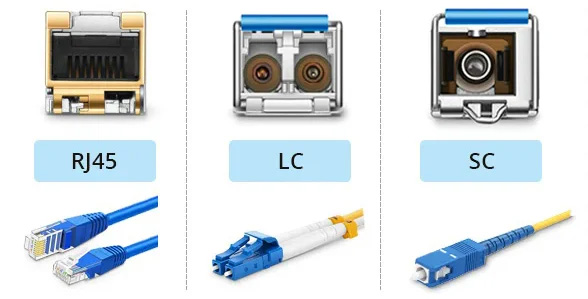
LC SFP: LC is the default connector for most SFP transceivers.
-
SC SFP: Some BiDi transceivers are assembled with SC connectors, but shipments are very small.
-
RJ45 SFP: This transceiver has a female RJ45 connector, allowing for the insertion of an Ethernet cable.
Classification by Operating Temperature
-
Commercial Grade (C-Temp): This is the typical transceiver, supporting 0~70°C temperature. Usually has the best price and cost-effectiveness, suitable for standard indoor environments like data centers or enterprises.
-
Industrial Grade (I-Temp): This is a ruggedized transceiver, supporting -40~85°C temperature. Suitable for industrial switches in outdoor environments. But their price is much higher.
-
Extended Grade (E-Temp): This is not a standard type. It can handle temperatures from -10~85°C.
In practice, there are many other ways to classify them. However, the most common methods are by data speed and application.
It is worth noting that the same transceiver may fall into multiple types depending on the classification method. For example, a compatible Cisco GLC-TE would be classified into multiple charts, including 1G, Copper, T, RJ45, and Industrial Grade SFP transceivers.
SFP Compatibility
In practice, most users will inevitably face SFP compatibility issues. In previous paragraphs of this article, we mentioned that all SFPs are released based on the SFP Multi-Source Agreement. In other words, all SFPs must follow the same standards for size, connector, electrical, and optical interfaces. Of course, later advanced SFPs, such as SFP28, QSFP, and QSFP28, also need to follow these standards in the industry.
However, some leading manufacturers in the industry, such as Cisco®, HP®, and Juniper®, have implemented software locks on the SFP ports of their networking equipment. As a result, these ports reject industry-standard SFP transceivers. This is why we emphasize the importance of SFP compatibility. If the port is locked, the switch will not work properly even if an MSA-compliant SFP transceiver is inserted.
Only specially coded SFPs can work in these locked ports. A compatible SFP must be an MSA SFP, but an MSA SFP is not necessarily compatible. The main difference lies in the internal code of the SFP.
To ensure optimal compatibility, users should purchase original transceivers or buy third-party SFPs that have undergone compatibility testing. This approach helps avoid guesswork and saves time.
How to Choose the Right SFP Transceiver for Your Network?
We Fibermart have helped over 1,400 customers quickly select suitable transceivers. Here are some basic tips.
-
Check the speed supported by your switch (or other network device) port and ensure it matches the correct SFP.
-
Know your existing network cabling type. If you have a multimode fiber cabling structure, choose a Multimode SFP. If you have a single-mode fiber cabling structure, a Single-mode SFP is the only choice.
-
Know your target link distance and link budget. But remember to choose an SFP that supports a longer transmission distance than expected. Otherwise, poor-quality fiber cables or dirty fiber end faces can cause link failure.
-
Consider the operating temperature; Commercial Grade transceivers are sufficient for typical indoor environments. In harsh outdoor applications, you should use Industrial Grade transceivers.
-
Remember to confirm compatibility with the supplier before ordering. Because a switch cannot recognize an incompatible transceiver, which wastes your money and valuable time. So, always choose proven compatible transceivers.
SFP Transceiver Color Code
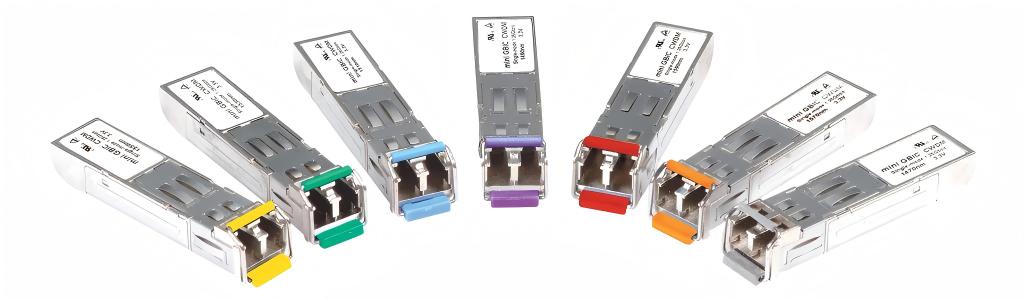
To quickly distinguish SFP transceivers, industry manufacturers follow a universal color code based on wavelength. The table below lists the common coding for available channels. Most manufacturers follow the same color code, but others may have different codes based on their application.
| Wavelength | Color Code |
| 850nm | Black |
| 1310nm | Blue |
| 1550nm | Green |
| CWDM 1470nm | Gray |
| CWDM 1490nm | Violet |
| CWDM 1510nm | Blue |
| CWDM 1530nm | Green |
| CWDM 1550nm | Yellow |
| CWDM 1570nm | Orange |
| CWDM 1590nm | Red |
| CWDM 1610nm | Brown |
| 1310nm-TX/1490nm-RX | Blue |
| 1310nm-TX/1550nm-RX | Blue |
| 1550nm-TX/1310nm-RX | Yellow |
| 1550nm-TX/1490nm-RX | Violet |
Evolution of SFP Transceiver
As the most popular optical transceiver package on the market, SFP plays a crucial role. Today, the optical communication industry has released various enhanced SFP transceivers based on this package—for example, CSFP, SFP+, SFP28, SFP-DD, SFP56, DSFP, etc. They all look very similar. If you look at them, it's hard to tell the difference. The significant distinction between them is the supported data rate.
FAQ
How does the SFP differ from the GBIC module?
A: They are two different form factors and can not replace each other. GBIC is an older version of the form that is bigger. Instead, SFP utilizes a compact size, providing around double port density. In addition, it supports enhanced DDM function for easy operating status tracking.
Is SFP and SFP+ compatible?
A: They are generally not compatible. Because SFP+ usually stands for enhanced SFP, it provides a high speed of 8G/10G/16G. Both modules share the same mechanical dimension.
Are SFP modules vs. media converters the same?
A: Definitely different. While both serve to connect network devices and convert the copper to fiber media and vice versa, they are different. Generally speaking, the SFP transceiver can not work as a standalone device; you must install it in the SFP port of the switch and then start to work. In contrast, media converters are standalone devices that convert signals from one media type to another.





No comments have been posted yet.