


.webp)


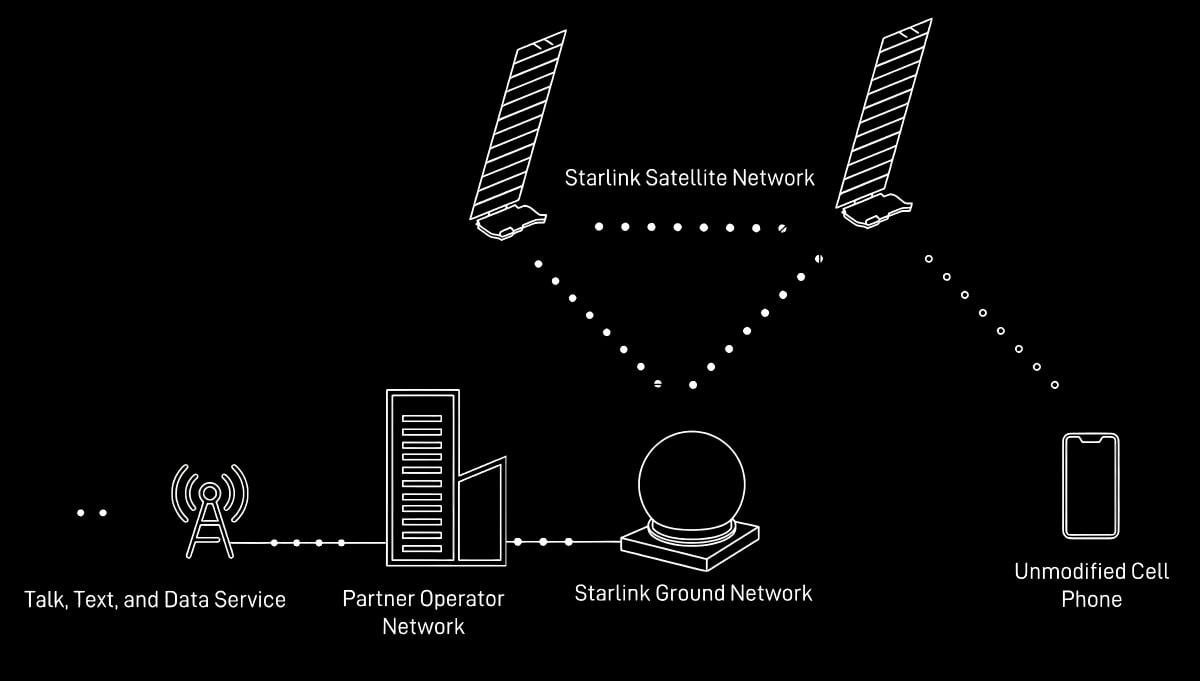
Starlink is a low-Earth orbit (LEO) satellite internet constellation project launched by American company SpaceX, aiming to provide high-speed, low-latency internet service to any location globally through a massive network of satellites in near-Earth orbit. This technology is fundamentally changing traditional communication methods, especially bringing a revolutionary connectivity experience to remote areas and regions with underdeveloped traditional network infrastructure.
Starlink Project Overview
The Starlink project was announced in 2015 by SpaceX CEO Elon Musk, with the goal of building a globally covered, high-capacity, low-latency space-based communication system.
According to the plan, SpaceX will build a "Starlink" network of approximately 12,000 satellites in space between 2019 and 2024, with 1,584 of them deployed in low-Earth orbit at an altitude of 550 kilometers. Documents show the company also plans to add another 30,000 satellites, bringing the total to around 42,000.
By early 2024, SpaceX had successfully launched over 6,000 satellites, with some already decommissioned or deorbited. As of December 2023, the number of global Starlink users had exceeded 2.3 million, demonstrating the service's rapid global adoption.
Technical Principles and System Composition of Starlink
Starlink Communication Principles
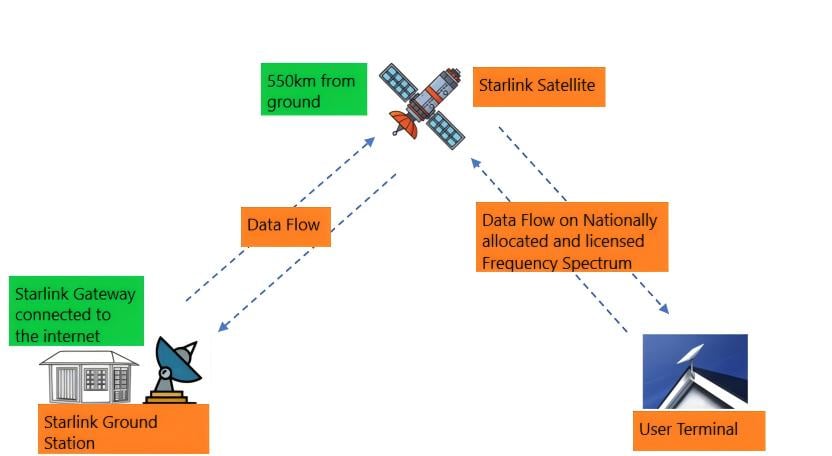
Each satellite in the Starlink system essentially functions as a wireless access point or router. When a user attempts to access a website, the request is sent from their computer to the satellite antenna, then relayed to a satellite. The satellite passes this request to a ground station that locates the website's server, retrieves the relevant data, and then sends it back via the satellite to the user's antenna and router.
Unlike traditional satellite internet, Starlink uses low-Earth orbit satellites at an altitude of only about 550 km, far lower than the 35,000 km of traditional geostationary orbits. This design significantly reduces transmission latency, enabling support for applications requiring high real-time performance like video calls and online gaming.
Starlink Constellation Architecture Plan
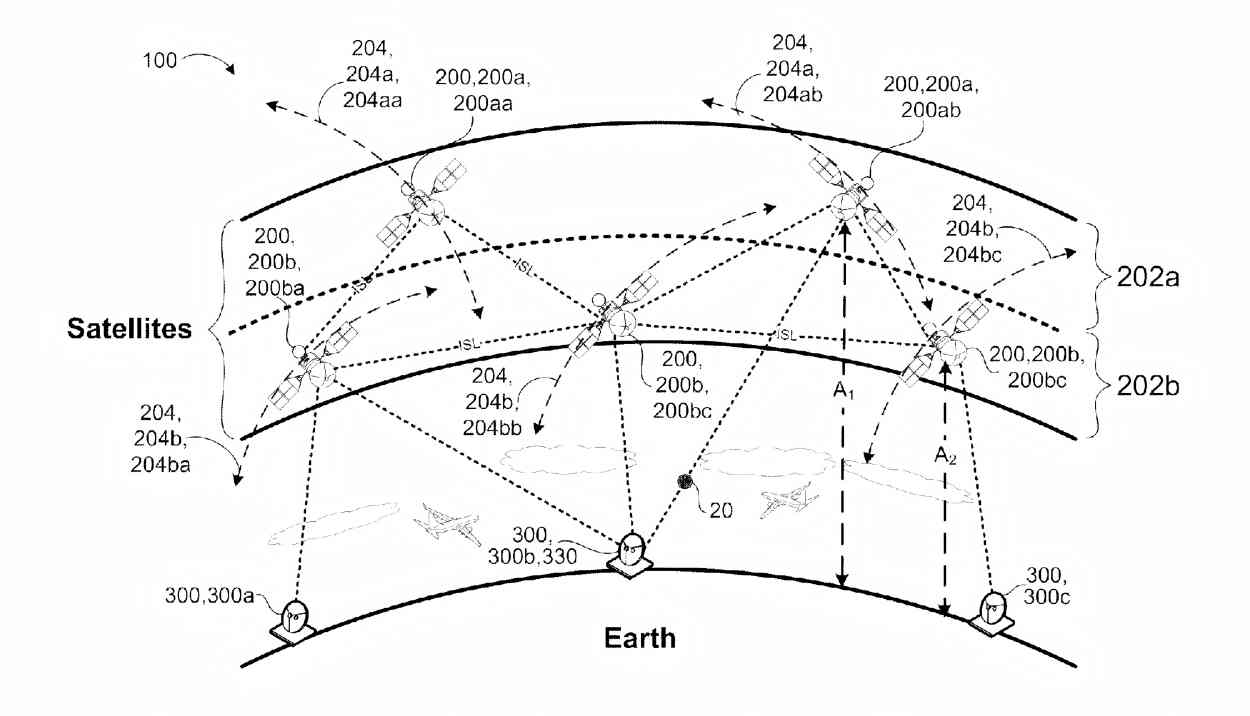
The Starlink plan has undergone several rounds of adjustments. As of early 2022, a total of 3 system phases were planned:
-
Phase 1 Constellation: Consists of 4,408 satellites at an orbital altitude of around 550 km, using Ku and Ka bands. Single satellite communication capacity is about 20 Gbps, with total system data throughput reaching up to 100 Tbps.
-
Phase 2 Constellation: Consists of 7,518 satellites operating at very low orbits around 340 km altitude, adding the V band to the original Ku and Ka bands.
-
Phase 3 Constellation: Consists of 30,000 satellites, adding the E band to the previous bands, tripling the available bandwidth and significantly enhancing system capacity.
Satellite Design of Starlink
Starlink spacecraft are much smaller than traditional satellites, each weighing only about 250 kg, leading some to call them "flying routers". This miniaturized, mass-production design philosophy significantly reduces the manufacturing and launch cost per satellite.
Starlink Performance Characteristics
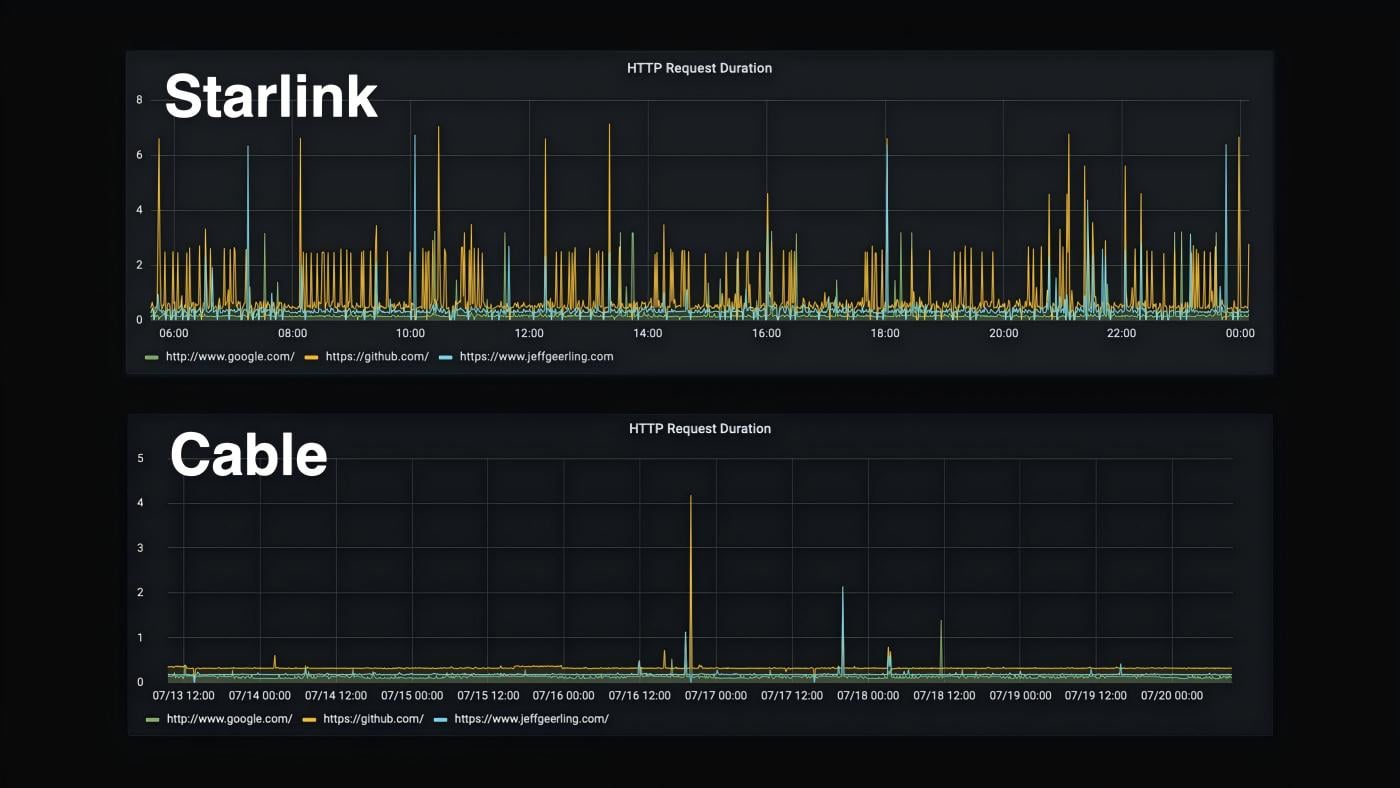
Starlink's performance is impressive. Test results from May 2022 showed the service achieved download speeds of 301 Mbps. Ultimately, Starlink aims to provide download speeds between 100 Mb/s and 200 Mb/s in most locations, with latency as low as 20ms.
This level of performance makes Starlink suitable not only for general web browsing and email but also for high-bandwidth applications like video conferencing, online gaming, and large file downloads.
How to Use Starlink
Standard Residential Use
For typical home users, using the Starlink service requires the following equipment:
-
Starlink Satellite Antenna (Dish): For receiving satellite signals.
-
Starlink Router: Receives the signal from the antenna and creates a Wi-Fi network.
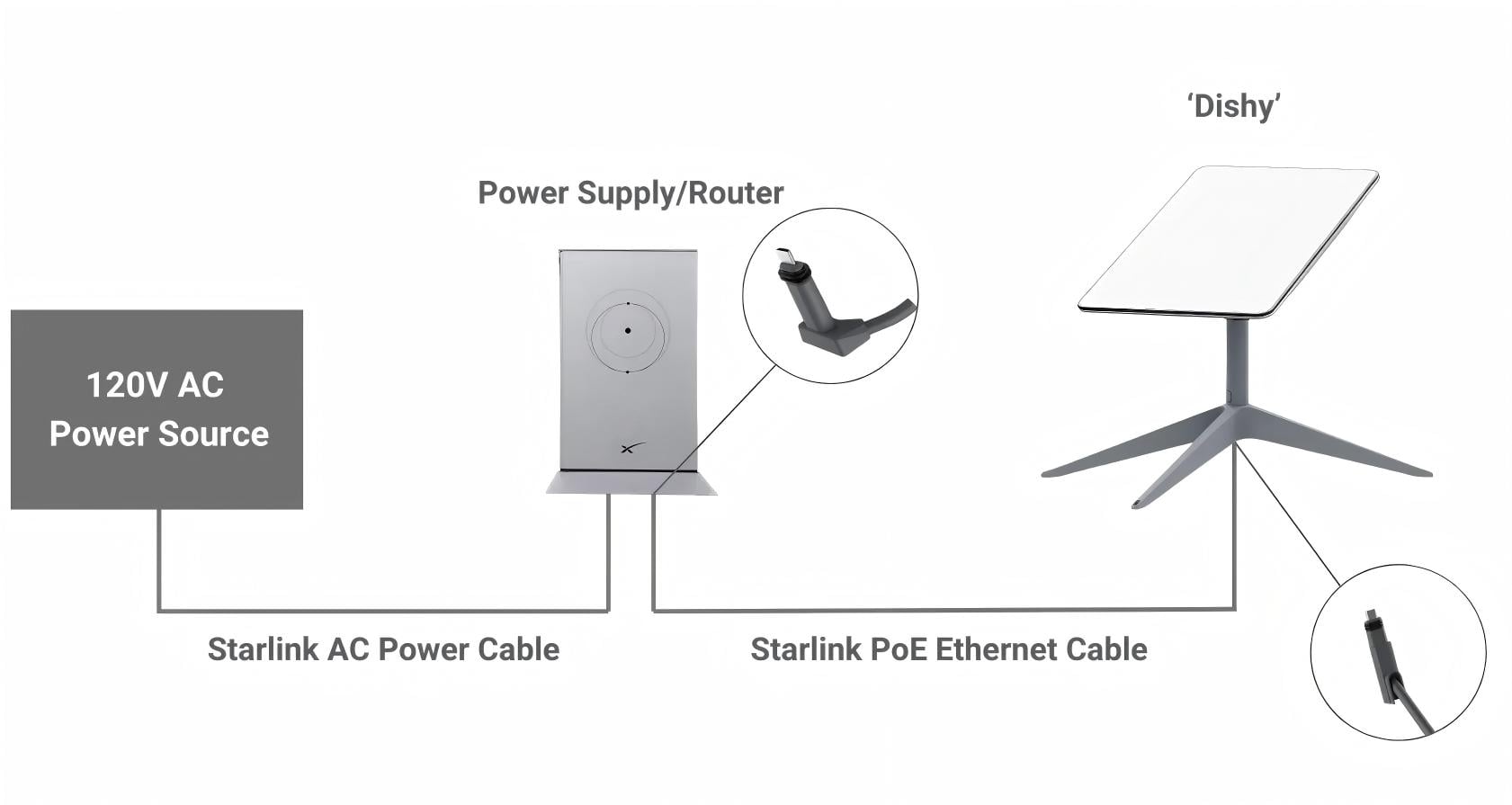
The connection steps are straightforward:
-
Install the Equipment: Install the Starlink antenna in an open location with a clear, unobstructed view of the sky. Connect it to power.
-
Find the Network: The antenna's signal comes from Starlink satellites. Look for the Starlink network (usually named "Starlink" or similar) in the Wi-Fi settings on your phone or computer.
-
Enter the Password: When connecting, enter the password found on the router's label or within the Starlink app.
-
Test the Connection: Open a browser or app to test if the internet connection is working.
Emergency Communication Service
In recent years, Starlink has launched a free emergency internet access service, designed specifically for remote areas not covered by traditional carriers. Activating this service requires three steps:
-
Device Check: Verify that your phone is on Starlink's list of compatible devices (most recent Android/iOS phones are supported).
-
Update Operating System: Keep Android or iOS fully updated, as the satellite emergency connection requires the latest firmware.
-
Enable Automatic Connection: Go to Settings > Connections/Mobile Network > Enable "Auto-connect to emergency satellite".
Once activated, the phone will automatically connect to the Starlink network when outside of regular coverage areas. It's important to note that the current free plan is limited to emergency messaging and SOS signals and does not yet support web browsing, streaming, or regular calls.
Integration with Business Networks
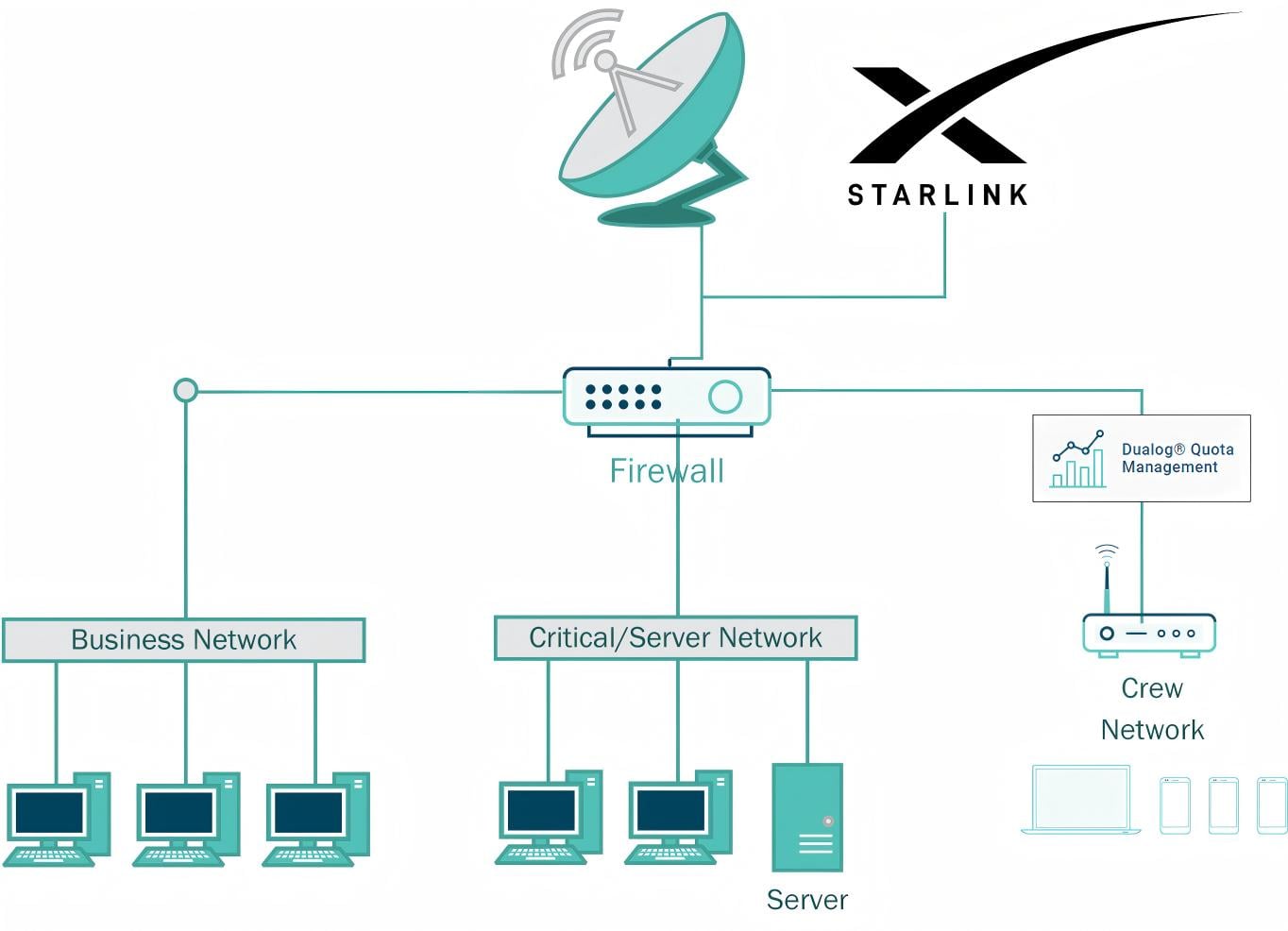
For users requiring more complex network setups, Starlink can be integrated with professional networking equipment. For example, you can connect a Ubiquiti UAP-AC-M mesh network to Starlink via the following steps:
-
Establish Starlink Network: Ensure the Starlink system is working normally.
-
Configure Mesh Network: Configure the main access point via the Ubiquiti controller.
-
Wired Connection: Use a high-quality Ethernet cable to connect the main UAP-AC-M's Ethernet port to the Starlink router's LAN port.
-
Extend Network: Add additional UAP-AC-M devices to extend the mesh network coverage.
How to Purchase Starlink, Where to get it?
Preparation Before Purchase
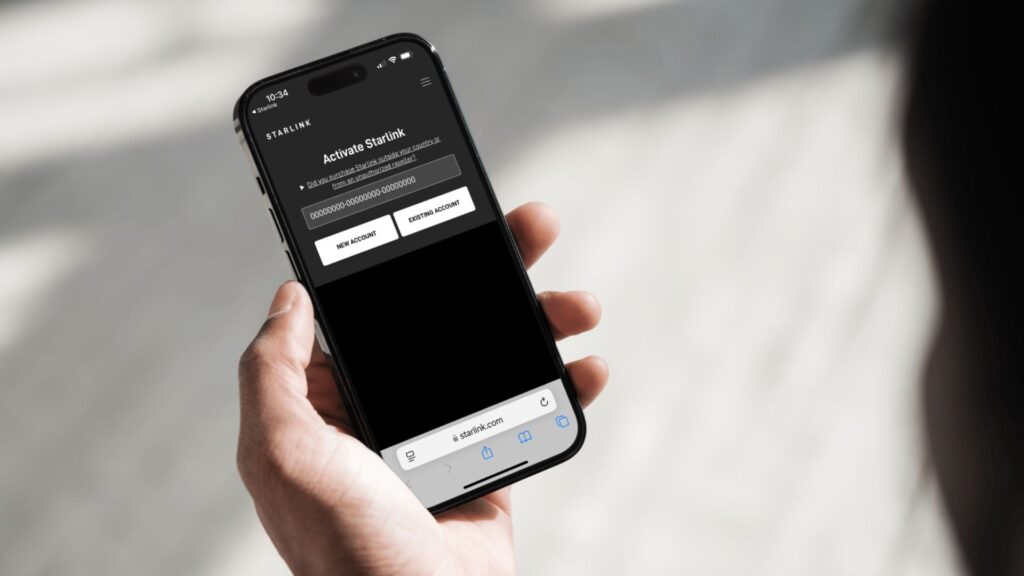
Before ordering Starlink service, some preparatory steps are needed. The most important step is to check the coverage in your area. Visit the Starlink website (starlink.com), enter your address to check service availability. The website displays coverage maps in different colors: green areas indicate strong signal and immediate service availability, while yellow areas might require a wait. This step is crucial as it determines whether you can get service immediately or need to join a waitlist.
Simultaneously, you should evaluate your internet needs: Is it for a fixed residence, or do you need a mobile, portable solution? Is the primary use for everyday browsing, video conferences, or high-intensity downloading/online gaming? Defining your needs helps in selecting the most suitable plan, avoiding waste or insufficient performance.
Purchase Channels and Process
Direct ordering via the official website is the most recommended purchasing method. The specific steps are:
-
Visit the Official Website: Go to the order page via the Starlink website (starlink.com).
-
Select a Plan: Choose the appropriate service plan based on your needs (detailed plan types below).
-
Enter Shipping Address: Ensure the address is accurate; the equipment kit will be delivered by courier.
-
Pay Fees: Includes the equipment fee and the first month's service fee.
Equipment Kit Contents: The standard kit includes the satellite antenna (phased array antenna), mount, Wi-Fi router, and all necessary cables. The antenna has a futuristic design and can automatically rotate to find satellites.
Besides the official website, Starlink equipment is also sold through some authorized retailers, such as Best Buy and Home Depot, offering a more convenient purchasing option for some users.
Equipment and Plan Selection
Starlink offers various device types to meet different user needs:
-
Standard Kit: Ideal for fixed residential use, offering the best performance.
-
Starlink Mini: A portable device designed for travelers, campers, and outdoor enthusiasts, about the size of a backpack, with a setup time of under 10 minutes. Its price in the US was reportedly reduced from $499 to $299.
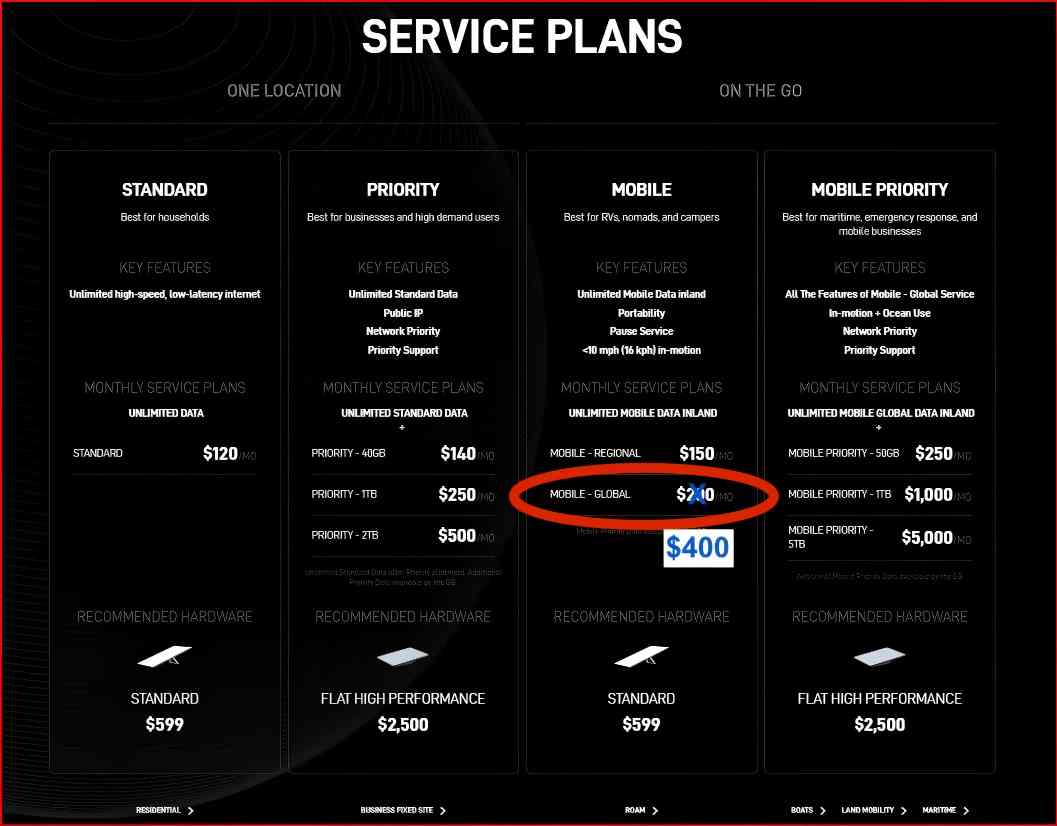
Regarding plan selection, Starlink has introduced various options to suit different user groups and budgets:
-
$40 per Month Residential Plan: A new budget-friendly option launched in parts of the US in November 2025, offering speeds up to 100Mbps with no upfront equipment cost.
-
Standard Plan: Monthly fee around $99-$120, offering higher speeds (typically up to 100-200 Mbps), meeting most household needs.
-
Priority/Premium Plan: Monthly fee around $500, aimed at business-grade users, offering prioritized service and higher performance.
-
Mobile Plans: Such as the Roam plan, costing around $150 per month in the US, suitable for users needing connectivity anywhere.
It's worth noting that Starlink periodically runs promotions, like the Starlink Mini price drop in the US. Check the official website or authorized retailers for the latest offers.
Conclusion
Starlink represents a paradigm shift in communication technology, achieving global high-speed internet coverage through a massive LEO satellite constellation. Despite facing multiple challenges like space safety and astronomical observation, it provides an innovative solution to the problem of global digital inequality.
As the technology continues to improve and the service area expands, Starlink is poised to fundamentally change internet access in remote areas and play a significant role in emergency communications, maritime connectivity, in-flight connectivity, and more. For professional users, understanding and mastering the use of Starlink will become an important skill for maintaining communication in an increasingly connected world.
Whether for home office use, business network expansion, or emergency communication backup, Starlink offers a flexible and powerful solution, giving us a glimpse into the boundless possibilities of future global communications.





No comments have been posted yet.