


.webp)


Technically, when you start the planning stage of a new cabling installation, you should not have to worry about the types of applications used. Still, it is a good idea to have an understanding of the networking application you are cabling for and how that can effect the use of the cabling system. How to choose the correct cabling? This article may give you some suggestions.
Identify Important Network Topologies for Commercial Buildings
Topology refers to the physical layout of the wiring and key connection points of a network, and it also refers to the network’s method of transmitting data and to the logical, or virtual, layout of itsconnection points. Before the advent of structured wiring, physical and logical topology were often the same. For example, a network that had a ring topology actually had the wiring running from point to point in a ring. This can be confusing these days. The implementation of structured wiring standardized a hierarchical star configuration as the physical topology for modern networks, and network electronics take care of the logical topologies.
Choosing the right topology is important because the topology affects the type of networking equipment, cabling, growth path, and network management. There are three types of topology:Hierarchical star, Bus and Ring. Topologies are tricky because some networking architectures appear to be one type of technology but are in reality another. Token Ring is a good example of this because Token Ring uses hubs. All stations are connected to a central hub, so physi-cally it is a hierarchical star topology; logically, though, it is a ring topology. Often two topology types will be used together to expand a network.
Hierarchical Star TopologyThe hierarchical star topology is now almost universal. It is also the easiest of the three networking architectures to cable. Hierarchical star topology can be implemented in home, offices or even in a building. All the computers in the star topologies are connected to central devices like hub, switch or router. The functionality of all these devices is different. Computers in a network are usually connected with the hub, switch or router with the unshielded twisted-pair (UTP) or Shielded Twisted-pair cables . Typically in commercial buildings, there is a horizontal cross-connection with a workgroupswitch located in a telecommunication room (TR) that allows backbone cabling to intercon-nect with horizontal cabling.
A lower cost method involves placing horizontal cross connections and workgroup switches in telecommunications enclosures. This is standardized in ANSI/TIA-568-C and is commonly referred to as fiber to the telecommunications enclosure (FTTE). These house mini-patch panels and switches and are located in enclosures, installed overhead or on wall space, very close to clusters of equipment outlets. There are two benefits and one disadvantage of this implementation. One benefit of this implementation of the hierarchical star is that the utilization of switch ports is typically 90 percent or greater. Another benefit is that TRs canbe smaller, reducing power and HVAC requirements since TRs do not house the equipment and patch panels. One practical disadvantage of FTTE that has been raisedby some users is the need to service equipment out in the work space environment (for example,above office cubes) as opposed to in a TR.
Another alternative implementation of a hierarchical star topology per ANSI/TIA-568-C is called centralized cabling. Centralized cabling is a hierarchical star topology that extends from the main cross-connection in an equipment room directly to an equipment outlet by allowing a cable to be pulled through a telecommunications room (or enclosure) without passing through a switch. The cable can be a continuous sheath of cable from the equipment room, or two separate cables may be spliced or interconnected in the TR. In either case, there is no need to use a work group switch in a TR to interconnect a backbone cable to a horizontal cable since all electronics are centralized in the main equipment room. This subset of the hierarchical star topology is commonly referred to as fiber-to-the-desk (FTTD) since it employs fiber to support the greater than 100 meter distances from the main equipment room/cross-connection to the equipment/ telecommunications outlet.

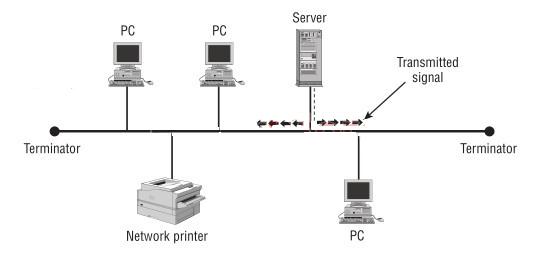
This is used in LANs with each device connected to a single cable (bus cable) through different types of connectors. When a device sends a signal, the signal will travel in all directions and reach every machine attached to the bus cable until is established or discarded by the targeted device. This creates a possible loop environment, and terminators are needed at bus cable ends to stop signals from looping. The bus topology is the cheapest to set up, but has a single point of failure. Simply, if the main cable is down, the entire domain goes down with it. Bus topology is further subdivided into:
Every node connects to a single transmission medium with two endpoints. The medium is referred to as the backbone or trunk. The linear bus is subject to broadcasts, and terminators are needed to absorb signals to prevent looping. The linear bus topology has a single point of failure.
Every node connects to a common transmission medium but the medium has two or more endpoints. These are achieved by adding branches to the main section (trunk, backbone). It works like the linear bus but offers redundancy. The distributed bus can easily be confused with the tree topology discussed later.
A ring topology requires that all computers be connected in a contiguous circle, as shown in the picture below. The ring has no ends or hub. Each computer in the ring received signals (data) from it neighbor, repeats the signal, and passes it along to the next node in the ring. Because the signal through each computer on the ring, a single node or cable fault can be the whole ring.
A real ring topology is a pain in the neck to install cable, because it is difficult to expand cyclic nature of the ring makes it difficult to expand a ring over a large physical area. Token Ring is a ring topology. Even if the Token Ring stations can be connected to a central MAU (and therefore there is a star topology), the data in the Token Ring travel from one node to another. It passes through the MAU every time.
Understand the Basic Differences of UTP and Fiber Optic Cabling and Their Place in Future Proofing Networks
The common networking technologies today (Ethernet, Token Ring, FDDI, and ATM) can all use either UTP or optical fiber cabling, and IT professionals are faced with the choice. In the early 1990s network managers thought they were future-proofing their cabling system when they installed Category 4 rather than Category 3 cabling. Today, decision makers who must choose between Category 6 and 6A cabling components are thinking about future-proofing. Each category is an improvement in potential data through-put and therefore a measure of future-proofing. Deciding whether to use optical fiber adds to the decision.
When considering optical fiber cable, remermber that you are trying to guarantee that the cabling system will not have to be replaced for a very long time, regardless of future networking technologies. Some questions you should ask yourself when deciding if fiber optic is right for you include the following:
As network applications are evolving, better UTP and optical fiber cabling media are required to keep up with bandwidth demand. As you will see from standards, the end user has many options in a media category. There are many types of UTP and optical fiber cabling. Standards will continue to evolve, but it's always a good idea to install the best grade of cabling since the cost of the structured cabling systems (excluding installation cost) is usually only 5-10 percent of the total project cost. Therefore, making the right decisions today can greatly future-proof the network.

Identify Key Network Applications and the Preferred Cabling Media for Each
Network applications include Ethernet, Token Ring, Fiber Distributed Data Interface (FDDI), and Asynchronous Transfer Mode (ATM). Understanding the different types of cable that these architectures utilize is important.
EthernetEthernet is the most mature and common of the network applications. According to technology analysts IDC (International Data Corporation, 2007), Ethernet is used in over 80 percent of all network installations. Why is Ethernet so popular? The reason is that on a properly designed and cabled network, Ethernet is fast, easy to install, reliable, and cheap. Ethernet can be installed on almost any type of structured cabling system, including unshielded twisted-pair and fiber optic cable.
Token RingDeveloped by IBM, Token Ring uses a ring architecture to pass data from one computer to another. Token Ring operates at either 4Mbps or 16Mbps; however, a ring only operates at a single speed. (That’s unlike Ethernet, where 10Mbps and 100Mbps nodes can coexist on the same network.) Care must be taken on older Token Ring hardware that a network adapter operating at the wrong speed is not inserted into a ring because doing so can shut down the entire network.
Fiber Distributed Data interface (FDDI)Fiber Distributed Data Interface (FDDI) is a networking specification that was produced by the ANSI X3T9.5 committee in 1986. It defines a high-speed (100Mbps), token-passing network using fiber-optic cable. In 1994, the specification was updated to include copper cable. The copper cable implementation was designated TP-PMD, which stands for Twisted Pair-Physical Media Dependent. FDDI was slow to be widely adopted, but for a while it found a niche as a reliable, high-speed technology for backbones and applications that demanded reliable connectivity.
FDDI can operate as a true ring topology, or it can be physically wired like a star topology. The following picture shows an FDDI ring that consists of dual-attached stations (DASs). This is a true ring topology. FDDI networks can also be cabled as a hierarchical star topology, though they would still behave like a ring topology.

ATM (asynchronous transfer mode, not to be confused with automated teller machines) first emerged in the early 1990s. ATM was designed to be a high speed communications protocol that does not depend on any specific LAN topology. It uses a high-speed cell-switching technology that can handle data aswell as real-time voice and video. The ATM protocol breaks up transmitted data into 48-byte cells that are combined with a 5-byte header. ATM supports very high speeds because it is designed to be implemented by hardware rather than software and is in use at speeds as high as 10Gbps.
Conclusion
Avoiding expensive network failures requires matching your application requirements to the appropriate cable characteristics. Choosing the right cable can make the difference between success and failure of the system. Keep in mind the tips mentioned above when choosing the cabling for your network system and it may help you make the right decisions.
Copper Cables Cat3, Cat5e, Cat6 & Cat6A, Cat7 Cables |
Fiber Optic Patch Cables 10G Patch Cable, Single Mode, Multimode, Armored, MPO/MTP Trunk Cables, Pigtails |
Bulk Fiber Optic Cables OM3, OM4 Fiber, Tight Buffer, Indoor & Outdoor, LSZH, Figure8, ADSS Fiber Cables |
-consulting for technical supports or relevent product buying guide
Email for Sales





No comments have been posted yet.