


.webp)


Analog video has been used for years in recording/editing studios and television broadcasting. For the purpose of incorporating video content in multimedia production, video needs to be converted into the digital format. Digitizing video concern using some related Video Multiplexers with digital analog video signal connectors such as VGA connector, DVI connector, HDMI connector, and SDI connector. This paper is a Wiki of these connectors.
VGA Connector

VGA (Video Graphics Array) connector is a three-row 15-pin DE-15 connector. The 15-pin VGA connector is found on many video cards, computer monitors, and high definition television sets. On laptop computers or other small devices, a mini-VGA port is sometimes used in place of the full-sized VGA connector. DE-15 is also conventionally called RGB connector, D-sub 15, mini sub D15, mini D15, DB-15, HDB-15, HD-15 or HD15 (High Density, to distinguish it from the older and less flexible DE-9 connector used on some older VGA cards, which has the same shell size but only two rows of pins). VGA connectors and cables carry analog component RGBHV (red, green, blue, horizontal sync, vertical sync) video signals, and VESA DDC (Display Data Channel) data. In the original version of DE-15 pinout, one pin was keyed by plugging the female connector hole; this prevented non-VGA 15 pin cables from being plugged into a VGA socket. Four pins carried Monitor ID bits which were rarely used; VESA DDC redefined some of these pins and replaced the key pin with +5 V DC power supply.
The VGA interface is not engineered to be hotpluggable (so that the user can connect or disconnect the output device while the host is running), although in practice this can be done and usually does not cause damage to the hardware or other problems. However, nothing in the design ensures that the ground pins make a connection first and break last, so hotplugging may introduce surges in signal lines which may or may not be adequately protected against. Also, depending on the hardware and software, detecting a monitor being connected might not work properly in all cases.
Reference: WIKIPEDIA
DVI Connector

DVI (Digital Visual Interface) is an interface connector for digital display devices, designed by the DDWG (Digital Display Working Group) to replace the VGA standard connector. Its purpose is to provide an industry standard for digital interfacing between a PC and a display device, and is designed to carry uncompressed video data. This enables the user to simply plug and play the display into the DVI connector regardless of the actual display technology. DVI is based on a protocol called TMDS (Transition Minimized Differential Signaling) designed for transmitting high-speed serial data, developed by the DDWG. TMDS uses differential signaling to reduce electromagnetic interference and allows faster signal transfers with increased accuracy. TMDS also uses twisted-pair cables for noise reduction. TMDS can operate in two modes: single-link and dual-link. A single-link consists of three data channels (data0, data1, data2) and a clock channel (clock) transmitted over four twisted-pair cables. The resolutions possible with single-link are limited to 1920 × 1200 @ 60 Hz. A dual-link DVI consists of three additional data channels (data3, data4, data5) sharing a single clock to double the bandwidth, increasing the resolution to 2560 × 1600 @ 60 Hz.
There are two types of DVI connectors: digital-only (DVI-D) and integrated (DVI-I), both having the same outer physical dimensions. The DVI-D connector contains 24 pins arranged in three rows of 8 pins. The DVI-I connector contains 29 pins, out of which the first 24 pins are the same as before and additional 5 pins for carrying analog signals. Depending on permissible bandwidth, DVI-I connectors can again be divided into single-link and dual-link. With single-link connectors, the largest resolution possible is 1915 × 1436, i.e., 2.75 megapixels @ 60 Hz, thereby providing a total bandwidth of (2.75 megapixels/frame × 24 bits/pixel × 60 frames/second) 3.96 Gbps. With the dual-link connectors, bandwidth effectively doubles to 7.92 Gbps. The mini-DVI connector is used on certain Apple computers as a digital alternative to the mini-VGA connector. It is used mainly to save physical space on devices and can only support single-link connections at resolutions not more than 1920 × 1200 @ 60 Hz. See the figure below: (a) Standard DVI connector; (b) Mini-DVI connector; (c) 24-pin DVI-D connector; (d) 29-pin DVI-I connector; (e) Single-link DVI-I connector; (f) Dual-link DVI-I connector.

HDMI Connector
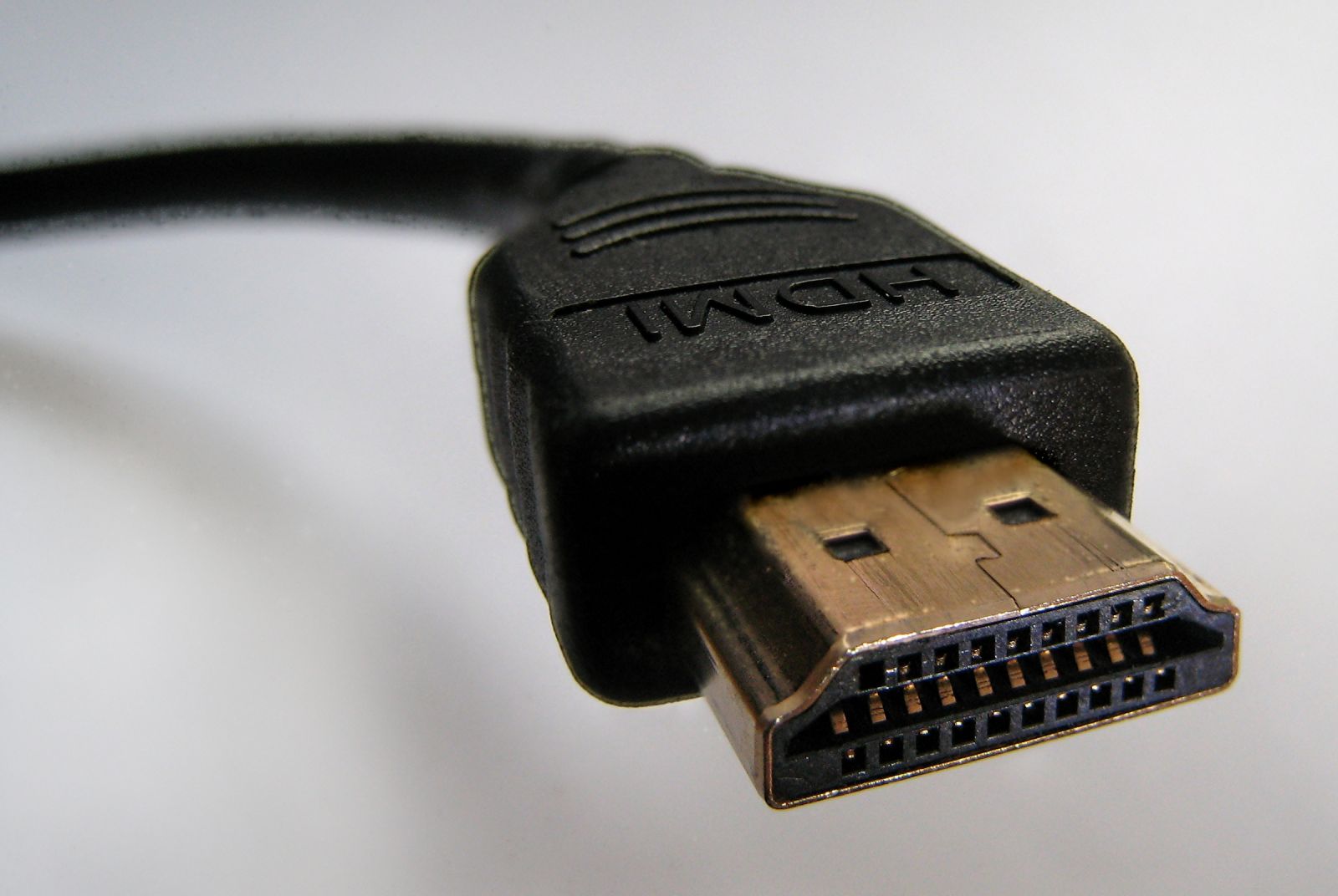
HDMI (High Definition Multimedia Interface) is an audio/video interface for transmitting uncompressed digital data between devices, presenting digital alternative to composite video, component video, S-video, SCART and VGA connetors. HDMI connects set-top boxes, Blu-Ray disc players, HD DVD players, personal computers, games consoles, etc. The HDMI 1.0 defines a clock rate of 165 MHz and can support 1080p and wide-screen ultra extended graphics array (WUXGA), i.e., 1920 × 1200 @ 60 Hz. HMDI 1.3 increased the clock rate to 340 Hz with support for higher resolutions like wide quad extended graphics array (WQXGA), i.e., 2560 × 1600 @ 60 Hz. HDMI connectors are of 4 types, shown as following.
1. Type-A HDMI connector has 19 pins with bandwidth needed to support SDTV, EDTV, and modes. Type-A is electrically compatible with single-link DVI connector, hence no conversion or quality loss occurs in an HDMI-DVI adapter. See the figure below: (a) Type-A HDMI connector; (b) Connector pins; (c) HDMI to DVI adapter.
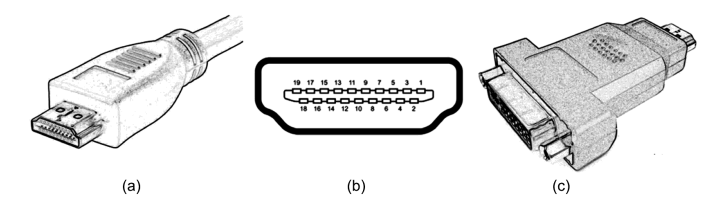
2. Type-B HDMI connector has 29 pins and carries double the bandwidth of Type-A, and is electrically compatible with a dual-link DVI connector.
3. Type-C HDMI connector is a mini version of Type-A, also with 19 pins, but having physical dimensions smaller than Type-A.
4. Type-D HDMI connector is a microconnector which also has 19 pins but is even smaller than Type-C.
SDI Connector
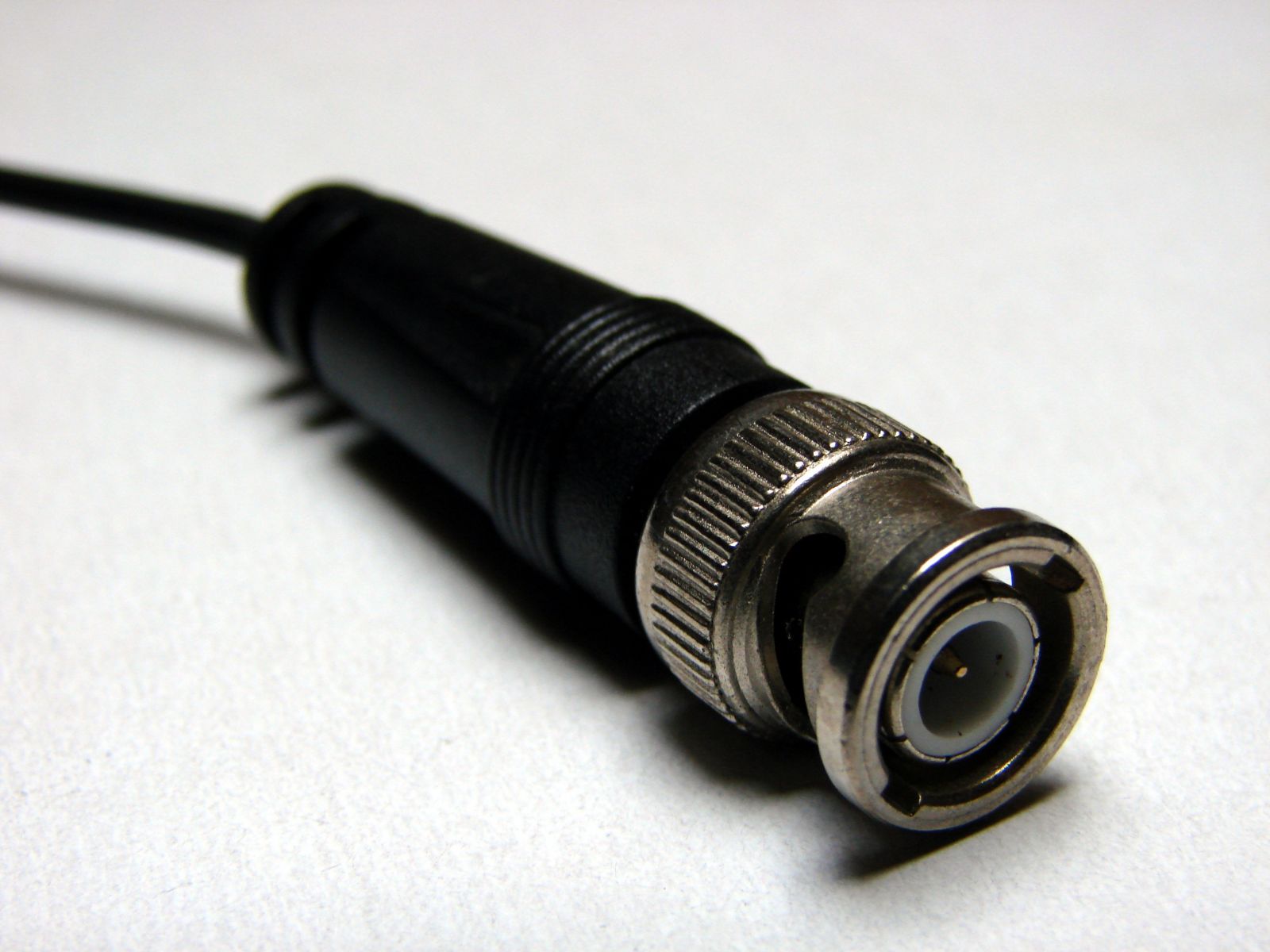
SDI (Serial Digital Interface) refers to a family of video interfaces standardized by Society of Motion Picture and Television Engineers (SMPTE). The SDI uses coaxial cables with BNC connectors, with a nominal impedence of 75 ohms. See the figure on the left. The signal amplitude is 800 mV ± 10% peak to peak. Standardized by the SMPTE 259M standard, Standard Definition (SD) SDI cables are used for transmission of uncompressed video signals, usually for TV transmission over short distances of 300 m with coaxial cables at bit rates of 143, 177 and 270 Mbps and resolutions of 480i and 576i. For transmission of Enhanced Definition (ED) video, ED-SDI cables have been standardized by the SMPTE 344M standard allowing bit rates of 540 Mbps and resolutions of 480p and 576p. For transmission of HD video, HD-SDI cables standardized by SMPTE 292M allow bit rates of 1.485 Gbps and 1.485/1.001 Gbps and resolutions of 720p. The factor of 1/1.001 is provided to allow fractional frame rates of 59.94 Hz, 29.97 Hz, 23.98 Hz in order to be upward compatible with existing NTSC systems. For very high-definition applications, SMPTE 372M standard defines a dual-link HD-SDI interface consisting of two SMPTE 292M interfaces operating in parallel and providing bit rates of 2.97 Gbps and 2.97/1.001 Gbps and resolutions of 1080p.

SFP Transceiver CWDM, DWDM, BiDi, SONET, SDH, 100M,1G,4G, Copper SFP |
MTP/MPO Cable.jpg "Fiber-Mart") 12 Fiber, 24Fiber MPO/MTP Trunk Cables & Cassettes |
CWDM MUX DEMUX 1-18 Channels Mux & Demux, LGX, ABS, Rack Chassis Types |
-consulting for technical supports or relevant product buying guide
Email for Sales





No comments have been posted yet.