


.webp)


We all know that you need an Ethernet cable to connect a computer to a network via a wired connection. But how do you choose the right cable correctly? Both straight-through and crossover cables are types of Ethernet cables, so what is the difference between them? Which type of cable should you choose to connect two computers?
In this article, we will discuss Ethernet crossover cables, how to make one, and how it differs from a straight-through cable.
What is Crossover Cable?
An Ethernet crossover cable is a type of crossover cable used in Ethernet networks to connect Ethernet network devices directly to each other. It is most commonly used to connect two devices of the same type, such as two computers. A crossover cable is similar to a straight-through cable, except that the wire pairs are crossed in a crossover cable.
Crossover Cable vs. Straight-Through Cable: What's the Difference?
#1. Application
Ethernet crossover cables are typically used to connect similar network devices, such as connecting a computer to another computer.
Straight-through cables are typically used to connect different types of network devices, such as connecting a switch to a router, or a computer to a switch.

#2. Wiring Standards
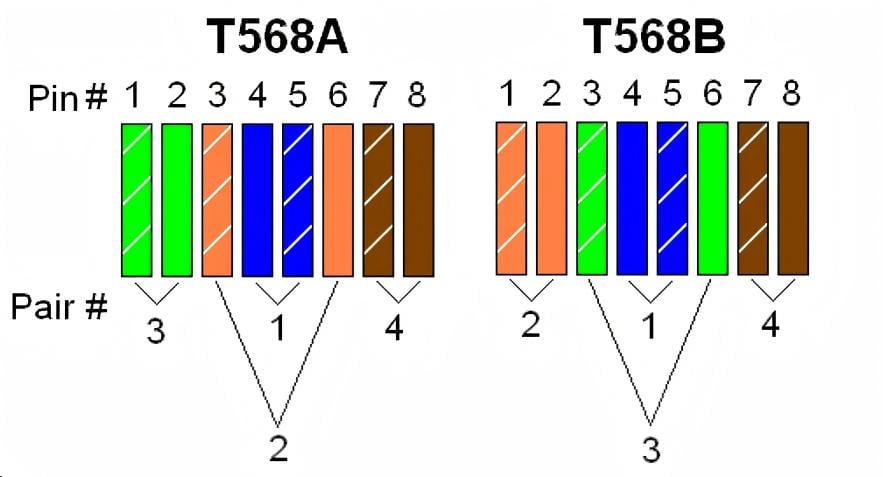
As we know, T568A and T568B are wiring standards for Ethernet cables recognized by ANSI, TIA, and EIA. They differ in the color sequence of the eight individual wires, as shown in the diagram below.
For T568A, the color order for the eight pins is as follows: green/white - 1, green - 2, orange/white - 3, blue - 4, blue/white - 5, orange - 6, brown/white - 7, brown - 8.
For T568B, the color order for the eight pins is as follows: orange/white - 1, orange - 2, green/white - 3, blue - 4, blue/white - 5, green - 6, brown/white - 7, brown - 8.
Compared to T568A, T568B swaps pins 1 and 3, and pins 2 and 6.
An Ethernet crossover cable uses different wiring standards on each end (Connector A and Connector B); one end uses T568A and the other uses T568B, as illustrated below.

An Ethernet straight-through cable uses the same wiring standard on both ends (Connector A and B), either T568A or T568B. In practice, most applications use the T568B standard on both ends, which is generally considered to have better electromagnetic interference shielding, as shown below.
#3. Visual Differences
Ethernet crossover cables are often printed with the word "Crossover" or "Xover" to distinguish them from straight-through cables. Alternatively, we can look at the RJ-45 connector to see if the wire order is the same on both ends to tell them apart.

How to Make Crossover Cable?
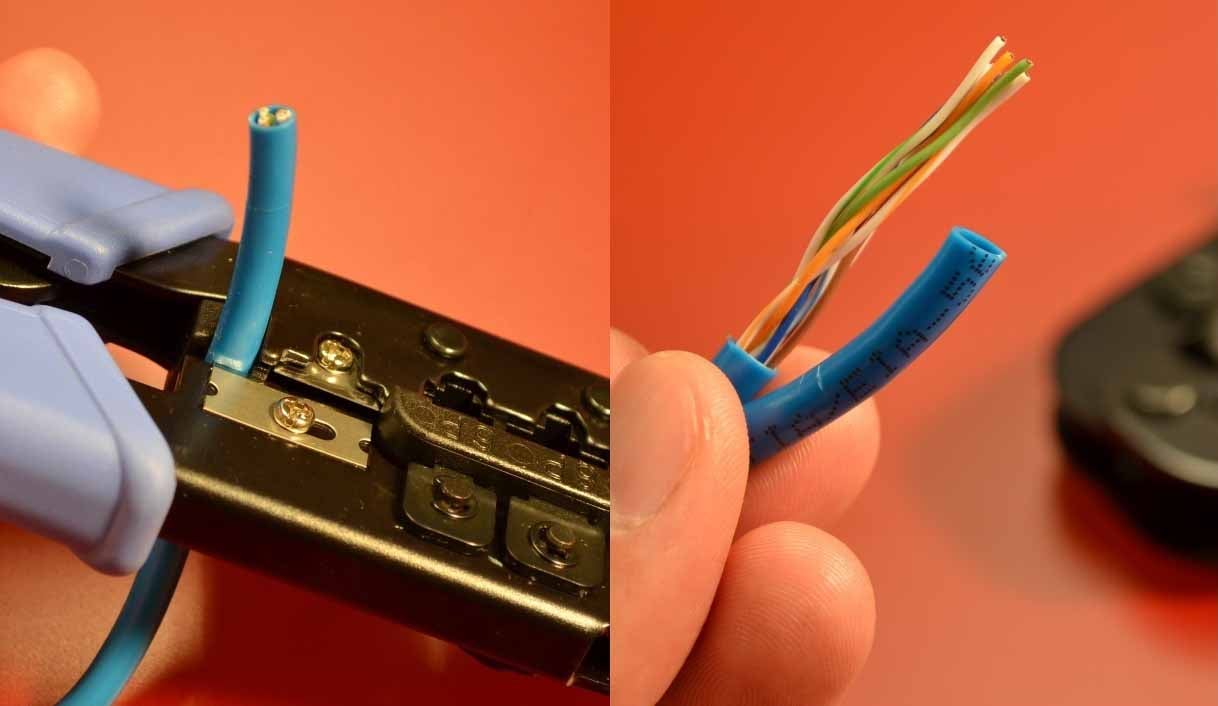
Step 1, Use a cable stripper to strip off the cable jacket in right length
Strip about 1.5 cm of the cable jacket from both ends of the cable. A crimping tool has a circular area to accomplish this.
Step 2, Untwist the wires and arrange the wires into correct position
After that, you need to untwist the wires, which consist of four "twisted pairs." Straighten them out and arrange them according to the wiring standard. One end should be arranged according to the T568A standard, and the other end according to the T568B standard.

Step 3, Use the Crimper to crimp the wires into RJ45 connector
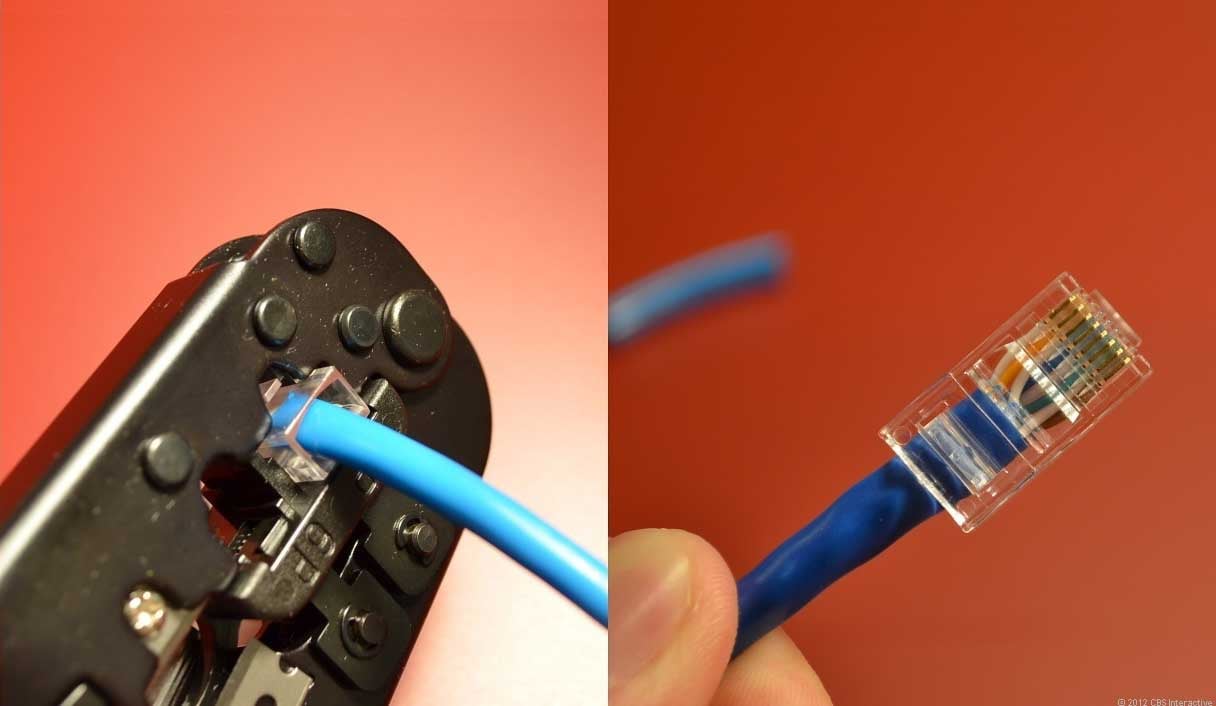
If some wires are longer than others, trim them to create a uniform, flat plane. The challenge is to not mess up the order when inserting them into the RJ45 plug. Hold the plug with the clip side facing away from you and the gold contacts facing towards you.
Next, push the cable in straight. The copper cores at the end of the cable should be right up against the end of the RJ45 connector. If not, it means you have stripped too much jacket off. Cut the cable back a little more. Once the cable is firmly inserted into the plug, insert it into the crimping tool and press down. Be careful, as too much force can crack the fragile plastic plug.
Step 4, Final test the ethernet cable with tester
After both ends of the cable have been prepared following the steps above, use a professional cable tester to determine if the cable was made successfully.

Conclusion
The similarities between crossover cables and straight-through cables are obvious. Both are Ethernet cables that comply with the T568A and T568B wiring standards, and each side of the connector has eight pins of different colors. The former connects two different types of devices, such as a computer to a switch, while the latter connects two devices of the same type, such as one computer to another computer.
See more ethernet cables and network solutions at Fibermart
.jpg "DWDM vs CWDM: What is the difference?")





No comments have been posted yet.