


.webp)


In network infrastructure, Ethernet patch cables and crossover cables are two common yet frequently confused cable types. While they may look similar, they have significant differences in their wiring, use cases, and functionality.
This article will provide an in-depth analysis of the differences between these two cable types and introduce how Fiber-mart's related products can meet various network connection needs.
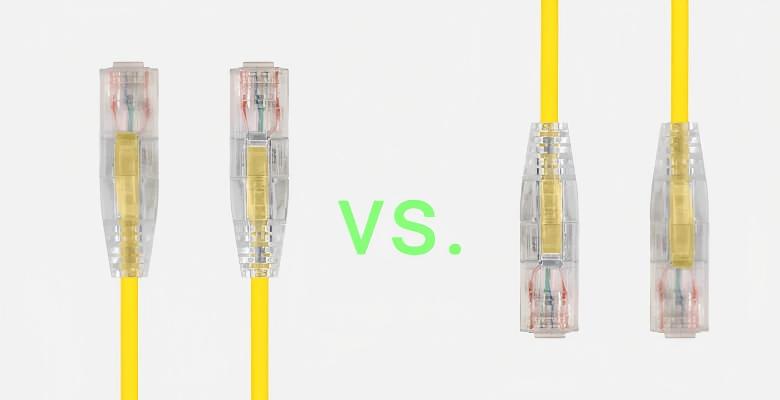
Patch Cable vs. Crossover Cable, From Appearance to Wiring Sequence
What is an Ethernet Patch Cable?
An Ethernet patch cable, also known as a straight-through cable, is a twisted-pair cable where both ends use the same wiring standard. Depending on the networking application, Ethernet patch cables are typically categorized as either crossover or straight-through cables.

Straight-through cables use the same wiring standard on both ends—either T568A or T568B. They are primarily used to connect different types of devices, such as:
-
Computer to switch/hub
-
Computer to the LAN port of a cable/DSL modem
-
Router's WAN port to modem's LAN port
-
Router's LAN port to a switch/hub uplink port
What is a Crossover Cable?
A crossover cable is a specific type of Ethernet cable where the two ends use different wiring standards—one end is T568A, and the other is T568B. This wiring scheme effectively crosses the transmit and receive wire pairs, swapping pins 1 & 3 and 2 & 6.

Crossover cables are mainly used to connect the same type of devices:
-
Computer to computer
-
Switch to switch
-
Hub to hub
-
Router's LAN port to a switch/hub regular port
Ethernet Patch Cable vs. Crossover Cable Wiring Standards and Signal Transmission
T568A vs. T568B Standards
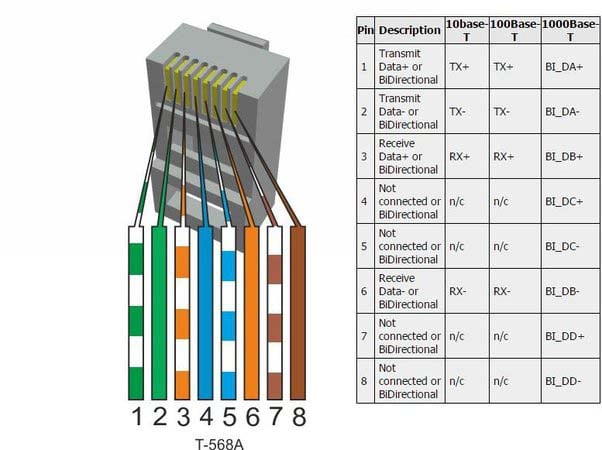
EIA/TIA defines two wire sequence standards for twisted-pair cables: T568A and T568B. The pinout arrangements for these standards are as follows:
-
T568A Standard: Green-White, Green, Orange-White, Blue, Blue-White, Orange, Brown-White, Brown
-
T568B Standard: Orange-White, Orange, Green-White, Blue, Blue-White, Green, Brown-White, Brown

Visually, the T568B standard swaps two color sequences compared to T568A: Pin 1 is swapped with Pin 3, and Pin 2 is swapped with Pin 6. This is also the principle behind how a crossover cable works, by using T568A on one end and T568B on the other to achieve the wire pair crossover.
Signal Transmission Principle
In Ethernet, data is transmitted through specific wire pairs within the cable:
-
10M Ethernet uses only the wires numbered 1, 2, 3, and 6 to transmit data, where pins 1 & 2 are for transmitting (Tx), and pins 3 & 6 are for receiving (Rx).
-
100M and 1000M network interface cards require the use of all four pairs, meaning all 8 wires are used for data transmission.
The crossover cable enables two devices of the same type to communicate directly by swapping the transmit and receive pairs, eliminating the need for an intermediate device.
When to Use Ethernet Patch Cable and Crossover Cable?
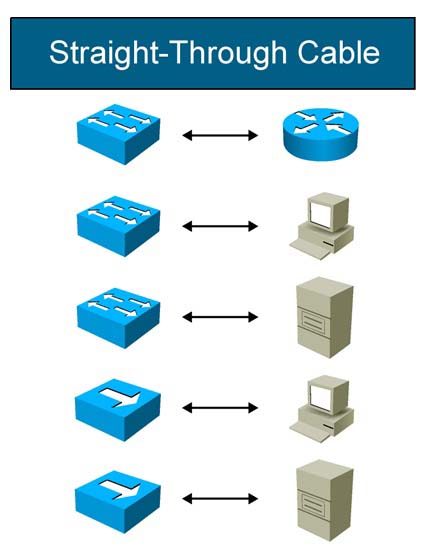
Straight-Through Cable Applications
Straight-through cables are used to connect different types of devices. Typical applications include:
-
Connection between a computer and a switch/hub
-
Connection between a router and a switch
-
Connection between a computer and a modem
In these cases, the transmit port of one device naturally corresponds to the receive port of the other device, so a crossover wiring scheme is unnecessary.
Crossover Cable Applications
Crossover cables are used to connect the same type of devices. Typical applications include:
-
Directly connecting two computers
-
Interconnecting two switches/hubs
-
Directly connecting two routers
When connecting similar devices, the transmit ports of both devices would face each other; therefore, a crossover wiring scheme is needed to match the transmit end of one device to the receive end of the other.

Changes in Modern Networking: Auto MDI-X Technology
With advancements in networking technology, most modern network devices now support the Auto MDI-X (Medium Dependent Interface Crossover) feature. This technology allows network devices to automatically detect and adapt to the cable type, whether it's straight-through or crossover, and adjust the transmit and receive pairs accordingly.
Auto MDI-X technology initially became a standard feature in Gigabit Ethernet and is now widespread in most network devices. This means that using a straight-through cable to connect similar devices with modern equipment will typically work fine.
However, understanding the difference between straight-through and crossover cables remains important, especially when dealing with older equipment or troubleshooting specific network issues.
Ethernet Cable Products from Fibermart
Fiber-mart offers a variety of high-quality Ethernet cable products to meet different network connection needs:
-
Fibermart Cat6 Super Five Straight-Through Patch Cable: Suitable for modern Gigabit network environments, supports Auto MDI-X, and can be used for most inter-device connections.
-
Fibermart Cat6 Shielded Crossover Cable: Designed for specific application scenarios, suitable for connecting older devices that do not support Auto MDI-X.
-
Fibermart Industrial Grade Waterproof Ethernet Patch Cable: Suitable for network deployments in harsh environments, providing extra physical protection.
When selecting Fiber-mart products, it's advisable to consider your specific device types and usage environment. For most modern network applications, standard straight-through patch cables are sufficient because Auto MDI-X technology automatically handles the wire pair mapping.
Ethernet Patch Cable vs. Crossover Cable Making and Testing
Making Straight-Through and Crossover Cables
Making a twisted-pair cable requires tools and materials like a crimping tool, RJ-45 connectors, twisted-pair cable, and a cable tester. The process involves cutting the cable, arranging the wires, inserting them into the connector, and crimping.
When making a straight-through cable, use the same wiring standard on both ends (T568B is recommended). When making a crossover cable, use the T568A standard on one end and the T568B standard on the other.
Testing Cable Connectivity
Use a network cable tester to check the newly made cable. Insert the RJ-45 connectors from both ends of the cable into the tester's ports. If the tester's 8 indicators light up sequentially in green, the cable has been made successfully.
If any indicator shows red or yellow, it indicates an open circuit or poor contact, and the cable end needs to be re-made.
Summary
Ethernet patch cables (straight-through) and crossover cables each have their specific application scenarios in network cabling. The main differences are:
-
Wiring Scheme: Straight-through cables have the same pinout on both ends; crossover cables have different pinouts on each end (pins 1-3, 2-6 are swapped).
-
Application Scenario: Straight-through cables connect different types of devices; crossover cables connect the same type of devices.
-
Modern Relevance: Auto MDI-X technology has reduced the necessity to distinguish between these two cables, but differentiation is still needed in specific scenarios.
As network technology evolves, although Auto MDI-X functionality has reduced the demand for crossover cables, understanding their differences and principles remains crucial for network engineers and IT professionals. Correctly selecting and using cables is fundamental to ensuring stable network operation.
We hope this article provides you with a comprehensive understanding of the differences between Ethernet patch cables and crossover cables, enabling you to make the right choices in practical network deployments. The variety of Ethernet cable products offered by Fiber-mart can provide reliable support for your network infrastructure.


-on-the-Poincaré-Sphere.jpg "What is Polarization Extinction Ratio? How to Measure the PER in PM Fibers?")





No comments have been posted yet.