


.webp)


Need faster, cleaner data centre connections? Discover how MTP and MPO trunk cables can transform speed, scalability, and performance in high-density environments.

What’s standing between your data centre and peak performance—slowdowns, downtime, or limits on scalability? In today’s always-on world, a single delay in data transmission can affect operations, customer satisfaction, and even bottom lines. The need for robust, fast, and scalable fibre optic infrastructure in data centres is more urgent than ever. This is where MTP trunk cables become essential.
At Fibermart, we understand how critical high-performance fibre optic cabling is to modern data centres. Our advanced MPO and MTP cabling solutions are built for speed, density, and reliability.
In this article, we’ll walk through the best practices for deploying MTP trunk cables to enhance data centre efficiency, maintain performance integrity, and ensure long-term scalability.
Why MTP and MPO Trunk Cables Are the Backbone of Modern Data Centres
Before we get into how to deploy MTP cabling properly, let’s clarify why this type of cabling matters in the first place.
MTP and MPO are multi-fibre connectors designed to support high-density, high-speed environments. Whether we’re running a QSFP56 cable in a 400G network or upgrading an older system with MPO 12 cables, the goal remains the same: optimize transmission while simplifying installation.
Key benefits of using MTP or MPO trunk cabling include:
· Space-saving design: One MTP 12 cable can carry 12 fibres in a single connector.
· Time efficiency: Pre-terminated trunk cables reduce installation time.
· High density: Ideal for structured cabling in tight data centre pathways.
· Future-ready: Supports migration from 10G to 40G, 100G, 400G, and beyond.
Now that we’ve established the importance of these solutions, let’s cover the best practices for deploying them effectively.
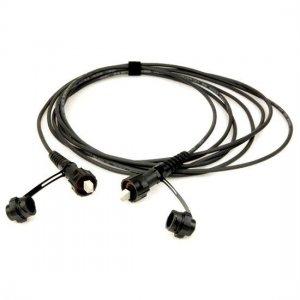
Discover how MTP trunk cables simplify large-scale fiber optic installations.
1. Start with a Scalable Design Plan
Scalability isn’t a luxury anymore—it’s a requirement. One of the first and most important best practices for deploying MTP trunk cables is to plan with growth in mind.
· Use modular hardware: Choose hardware that allows for modular upgrades without a full redesign.
· Leave room for expansion: Ensure cable trays and patch panels have available capacity.
· Map port usage and density needs: Align cabling choices with current and anticipated transceiver types like QSFP28 and QSFP56 cables.
We always recommend working with design tools or software to visually lay out the entire cabling plan before installation.
2. Match Cable Type to Application Needs
Not all MPO or MTP cables are interchangeable. Choosing the right variant—like MTP 12 cables versus MPO 12 cables—depends on the network's exact requirements.
· For high-speed switches: MTP 12 cables are often the preferred option for connecting devices such as NVIDIA and Mellanox hardware.
· For backbone connections: MPO trunk cables are a solid choice for connecting core routers and switches across the data hall.
· Use single-mode or multimode fibre depending on transmission distance and signal loss tolerances.
Choosing the right cable type early prevents mismatches and potential delays in your deployment.
3. Keep Polarity Management Front and Center

Correct polarity ensures that signals are transmitted and received on the proper fibre pairs. Errors in polarity are one of the most common—and most avoidable—issues in MTP deployments.
Tips for managing polarity:
· Use clearly labeled MPO cable configurations (Type A, B, or C).
· Standardize polarity across all connections.
· Follow the same polarity method from start to finish in the link.
· Document polarity layouts so future upgrades are seamless.
By managing polarity with discipline, we avoid costly and time-consuming troubleshooting down the road.
4. Minimize Insertion Loss with High-Quality Connections
Insertion loss—signal power loss due to connector misalignments—is a silent performance killer in fibre optic networks. This makes connector quality and proper cable handling crucial.
To reduce insertion loss:
· Select high-performance MTP connectors with low-loss tolerances.
· Use clean and dust-free connectors.
· Limit the number of connection points in each link.
· Avoid excessive tension and bending in fibre jumper cables.
When deploying MPO trunk cables, it's worth the investment in low-loss connectors and patch panels to maintain optimal transmission quality.
5. Simplify Patch Management with Clear Labelling
MTP trunk cables often terminate in high-density panels. When patch cords multiply, even simple maintenance can become complicated.
Make things easier by:
· Using a consistent naming scheme for each trunk and patch cable.
· Labelling both ends of every fibre patch cable and jumper.
· Creating a documented map for port-to-port connections.
Good labelling saves time, reduces error rates, and makes moves, adds, and changes smoother.
6. Choose Trunk Lengths Carefully to Avoid Slack or Stretch
Pre-terminated trunk cables are made to order, but selecting the wrong length can lead to cable congestion or stress.
When measuring for MTP trunk cable lengths:
· Allow for proper routing, slack management, and connector access.
· Avoid excess slack that can clog cable trays.
· Don’t pull cables too tightly—this can affect performance or even break fibres.
Cable management isn’t just about appearance; it affects airflow, performance, and maintenance efforts.
7. Enable Future Migration with Modular Patch Panels
One of the best practices for deploying MTP trunk cables is to think ahead—especially when it comes to port migration.
· Modular patch panels allow us to upgrade from 10G to 100G or even 400G by swapping cassettes or modules without re-running trunks.
· Choose panels that support MPO to LC conversion.
· Use cassettes for breakout applications (like splitting an MPO 12 cable into multiple LC ports).
· Design with flexibility for changes in connector types as new hardware (like NVIDIA or Mellanox servers) gets added.
We future-proof today to avoid downtime tomorrow.
8. Consider Compatibility with Active Hardware
Cabling is only half the picture—our MTP and MPO deployments need to match the transceivers and hardware ports they're plugged into.
· Confirm cable compatibility with devices like QSFP28 cables for 100G transceivers or QSFP56 cables for 200G/400G setups.
· Verify connector types for NVIDIA and Mellanox cable connections.
· Test connections at installation to avoid costly outages later.
Taking a few extra minutes to verify compatibility upfront helps us avoid configuration mismatches that slow down deployments.
Ready to Improve Performance Without the Headaches?
Optimizing fibre optic infrastructure doesn’t have to be complicated—but it does require a smart approach. From selecting the right MTP 12 cable to managing polarity and ensuring smooth patching, each step contributes to performance, scalability, and reliability.
At Fibermart, we offer one of the most reliable selections of MTP and MPO trunk cabling solutions to meet high-density data centre needs. Whether you need structured MTP cable deployments for core routing or MPO 12 cables that connect seamlessly to your NVIDIA or Mellanox systems, we provide solutions designed for speed and long-term performance.
Looking to enhance your data centre's fibre optic backbone? Contact Fibermart at +1 (205)-282-9089 to find the right MPO and MTP solutions for your setup. Let us help you deploy with confidence, reduce installation time, and support your future network growth—without compromise.





No comments have been posted yet.