


.webp)


In the intricate ecosystem of modern optical communication networks, the Optical Circulator emerges as a foundational passive component, facilitating bidirectional signal transmission over a single fiber and safeguarding data integrity across critical systems such as WDM (Wavelength Division Multiplexing) networks, erbium-doped fiber amplifiers (EDFAs), Raman amplifiers, and high-precision fiber optic sensors. Its non-reciprocal design, rooted in the magneto-optic Faraday effect, ensures light travels in a fixed circular path—from Port 1 to 2, Port 2 to 3, and so forth—making it indispensable for minimizing signal interference and maximizing network efficiency. However, even with its robust engineering, this precision device can encounter performance anomalies that disrupt operations. This comprehensive guide explores the most prevalent issues, their underlying causes, and systematic troubleshooting methodologies to restore peak functionality, ensuring uninterrupted network performance.
Excessive Insertion Loss: Identifying and Resolving Signal Attenuation
Insertion loss, defined as the reduction in optical signal power as light propagates through the Optical Circulator, is a top concern for network engineers. Industry standards typically specify insertion loss thresholds of less than 1.0 dB for Grade P units and 1.3 dB for Grade A models, with low polarization-dependent loss (PDL) as low as 0.05 dB for high-performance variants. When insertion loss exceeds these limits, it can lead to signal degradation, reduced transmission distances, and compromised data throughput—issues that demand prompt attention.
Common Causes
Contaminated or Damaged Connectors: The device supports versatile connector options, including FC, SC, and LC types with PC, UPC, or APC polish. Dust, oil residues, or microscopic scratches on connector end-faces can scatter or block light, significantly increasing attenuation. Even minor contamination can disrupt signal flow, as optical signals are highly sensitive to surface irregularities.
Fiber Axis Misalignment: For Polarization-Maintaining (PM) variants, precise alignment with the input fiber’s polarization axes (slow or fast axis) is critical. Misalignment—whether due to improper installation, fiber bending, or component shifting—breaks the signal’s polarization continuity, elevating insertion loss. This issue is particularly pronounced in coherent communication systems and quantum optics applications, where polarization stability is non-negotiable.

Environmental Stress Factors: Operating temperatures outside the recommended range (-10°C to +70°C) can degrade the internal components, such as magneto-optic materials and fiber bonds. Extreme heat may soften adhesives, while cold temperatures can cause material contraction, both leading to increased signal attenuation. Additionally, exposure to humidity or corrosive environments can damage internal optics over time.
Overloaded Power Handling: While most models can withstand up to 300mW (or customized high-power ratings like 1W or 5W), exceeding the specified power limit can damage fiber cores or internal components, resulting in permanent insertion loss. This is common in high-power amplifier systems where residual pump light recycling is a key function of the device.
Troubleshooting Steps
Connector Inspection and Cleaning: Begin by disconnecting the component and inspecting all connectors with a fiber optic microscope. Use lint-free wipes saturated with specialized fiber optic cleaning fluid to remove contaminants, ensuring no residue remains. If scratches, cracks, or excessive wear are detected, replace the connectors immediately—even minor damage can cause irreversible loss.
Fiber Alignment Verification: For PM models, use a polarization analyzer to confirm alignment with the fiber’s slow or fast axis. Adjust the device’s position using precision mounting hardware to ensure the polarization axes match the system’s requirements. In multi-component setups, verify alignment across the entire fiber link, as misalignment in adjacent components can also contribute to loss.
Environmental Optimization: Relocate the component to a temperature-controlled enclosure if operating conditions exceed the recommended range. Use humidity barriers or waterproof packaging for outdoor installations to prevent moisture intrusion. Monitor environmental parameters with sensors to detect fluctuations and address them proactively.
Power Handling Validation: Measure the input signal power using an optical power meter to ensure it stays within the rated limit. If power levels are excessive, install a variable optical attenuator (VOA) to reduce signal strength before it reaches the device. For high-power applications, confirm that the unit is rated for the specific power range (e.g., 1W or 5W PM variants) to avoid component damage.
Performance Testing: After addressing potential causes, re-test insertion loss with a power meter or optical spectrum analyzer (OSA) to confirm it falls within the manufacturer’s specifications. Compare results to the device’s individual testing report (provided with all CE, RoHS, FCC, and ISO9001-certified units) to ensure consistency.
Poor Isolation: Mitigating Signal Crosstalk
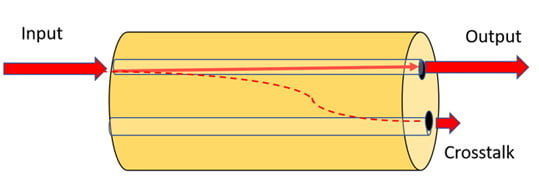
Isolation refers to the Optical Circulator’s ability to prevent signal leakage between non-adjacent ports—a critical function for maintaining signal integrity in bidirectional systems. Specifications mandate a minimum isolation of 35 dB across all operating wavelengths and temperatures, with typical values of 40 dB or higher at 23°C. Poor isolation leads to signal crosstalk, where data from one port interferes with signals in another, causing errors, reduced throughput, and compromised network reliability.
Common Causes
Magneto-Optic Component Degradation: The device’s non-reciprocal functionality relies on the Faraday effect, where a magnetic field rotates the polarization of light in a direction fixed by the field itself. Over time, magnets may weaken, or magneto-optic materials (such as yttrium iron garnet, YIG) may degrade due to environmental exposure or age, reducing the effectiveness of polarization rotation and lowering isolation.
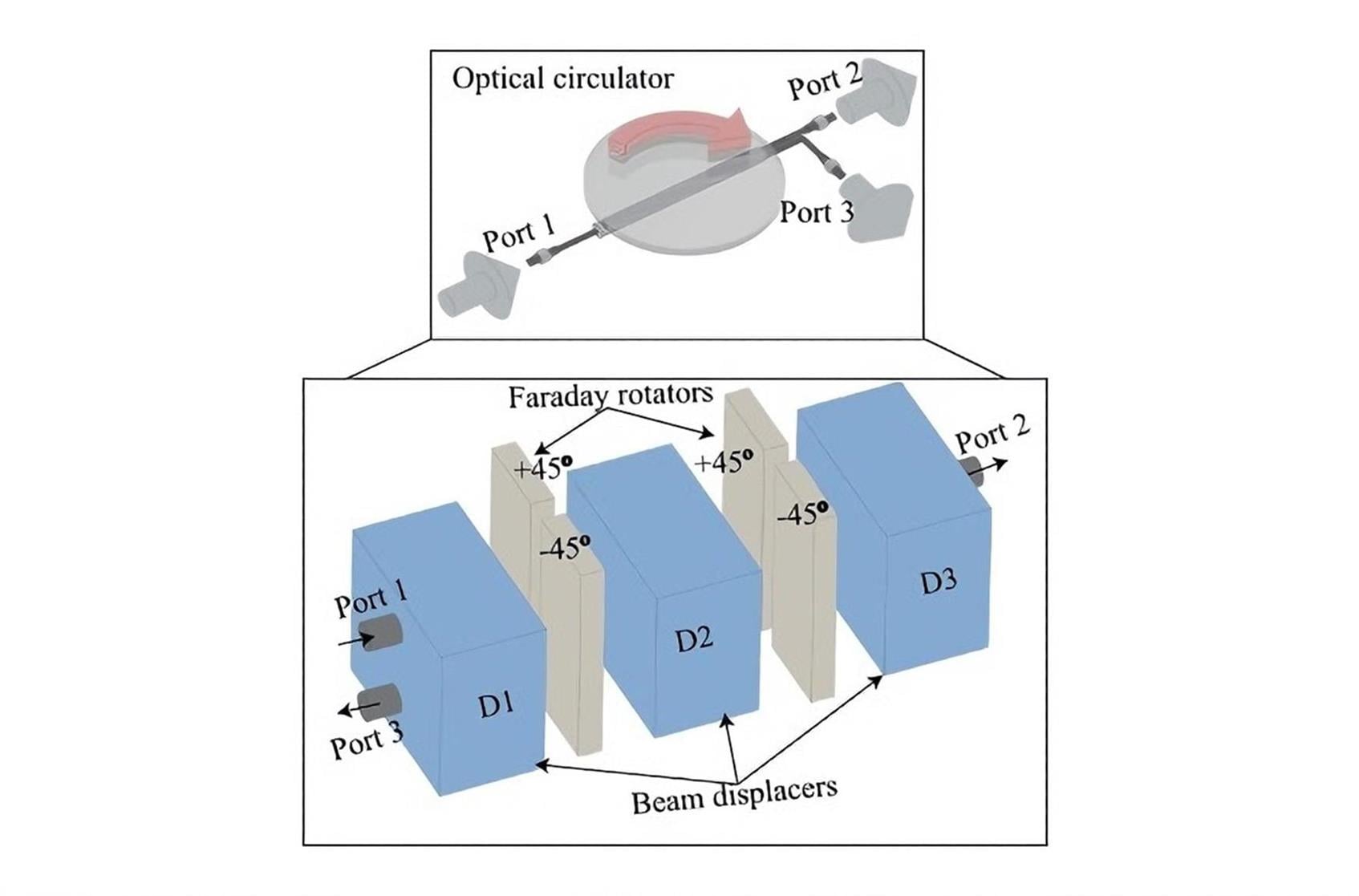
Incorrect Port Configuration: Misconnecting fibers to the ports—for example, reversing Port 1 and Port 3 in a 3-port model or misaligning the signal path in 4-port (2x2) variants—bypasses the one-way routing mechanism. This results in signal leakage, as light is not directed along the intended circular path.
Wavelength Mismatch: Each unit is engineered for specific wavelength bands, such as 1310nm, 1550nm (±30nm), or the S+C+L bands (1460–1625nm). Using the device outside its designated wavelength range disrupts the Faraday effect’s efficiency, leading to reduced isolation. For instance, a 1310nm unit used with 1064nm signals will not provide adequate isolation, as the magneto-optic response is wavelength-dependent.
Physical Damage to Internal Optics: Shock, vibration, or improper handling can misalign internal lenses, prisms, or fiber pigtails, disrupting the signal path and allowing leakage between ports. This is particularly common in industrial settings or during equipment transportation, where the device may be exposed to mechanical stress.
Troubleshooting Steps
Isolation Testing: Use an OSA to measure isolation between all non-adjacent port pairs (e.g., Port 1 to Port 3 in 3-port models). Identify specific leakage points to pinpoint the root cause. If isolation is consistently low across all pairs, internal component degradation is likely.
Magnet and Magneto-Optic Inspection: Contact the manufacturer to arrange for professional inspection of the magnets and magneto-optic materials. Weakened magnets may need replacement, while damaged YIG crystals or other components may require repair or device replacement. Leverage the lifetime zero-failure warranty offered by most reputable suppliers to ensure cost-effective servicing.
Port Connection Validation: Refer to the device’s datasheet to confirm the correct port routing scheme (e.g., Port 1→Port 2→Port 3 for 3-port units, Port 1→Port 2 and Port 3→Port 4 for 4-port models). Reconnect fibers carefully, ensuring each cable is securely fastened to the correct port. Use color-coding or labeling to avoid future misconnections.
Wavelength Alignment: Verify that the operating wavelength matches the component’s specifications. Use a wavelength meter to confirm the signal’s wavelength and adjust the system to stay within the designated range. For multi-band applications, select a unit rated for S+C+L bands to ensure isolation across the entire spectrum.
Mechanical Stability Checks: Inspect the packaging and mounting to ensure it is secure and free from vibration. Use vibration-damping brackets or shock-absorbing materials to protect internal optics from mechanical stress. For bare fiber or 900um loose tube models, ensure fibers are not bent beyond their minimum bend radius, as this can cause microcracks and signal leakage.
Polarization-Dependent Loss (PDL) Fluctuations
PDL is the variation in insertion loss caused by changes in the input signal’s polarization state. The Optical Circulator is designed to minimize PDL, with typical specifications of ≤0.15 dB (and as low as 0.05 dB for high-performance units). Excessive PDL destabilizes signal strength in systems with variable polarization, such as WDM networks or fiber optic sensors, leading to inconsistent performance and data errors.
Common Causes
Polarization State Instability: For polarization-insensitive units, sudden changes in the input signal’s polarization—caused by fiber bending, temperature fluctuations, or external interference—can increase PDL. These devices are engineered to tolerate minor polarization variations, but extreme or rapid changes exceed their compensation capabilities.
Damage to PM Fibers: In PM variants, the fiber pigtails are specially designed to preserve linear polarization. Bending, crushing, or twisting these fibers disrupts polarization preservation, leading to higher PDL. Even small deformations can alter the fiber’s birefringence, compromising performance.

Mismatched Polarization Axes: When integrating a PM unit into a system, improper alignment between the device’s polarization axes and the input/output fibers’ axes causes PDL spikes. This is common in systems where fibers are replaced or reconnected without re-verifying alignment.
Aging or Degraded Components: Over time, internal components such as polarization controllers or waveplates may degrade, reducing the device’s ability to stabilize polarization. This is more likely in units exposed to harsh environmental conditions or excessive power levels.
Troubleshooting Steps
Polarization Stabilization: Install a polarization controller in the signal path to maintain a consistent polarization state at the input. Monitor PDL in real time using a PDL meter, adjusting the controller to minimize fluctuations. For systems with dynamic polarization changes, consider upgrading to a high-performance unit with ultra-low PDL (≤0.05 dB).
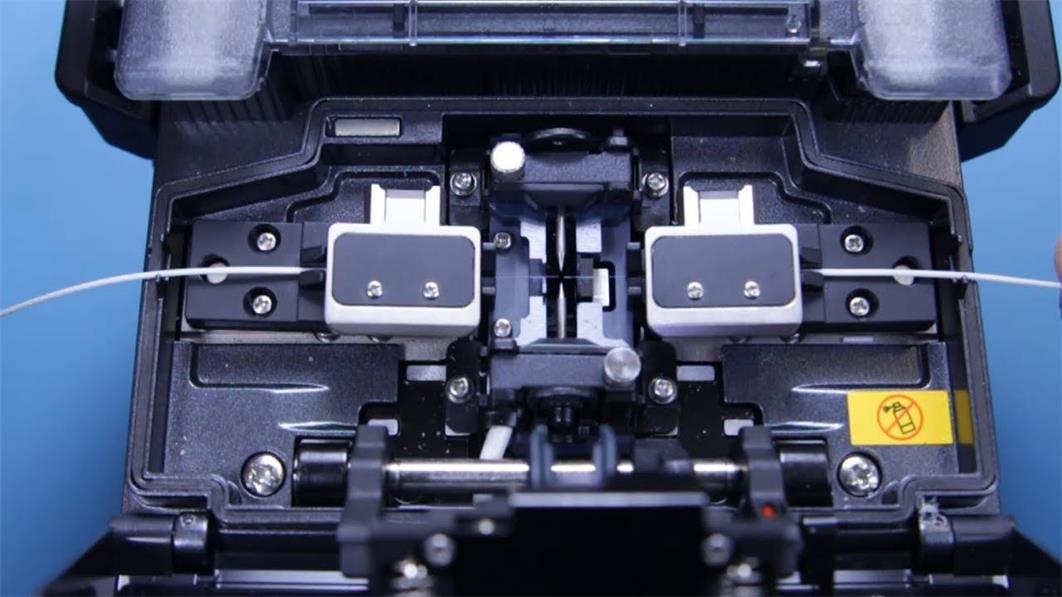
PM Fiber Inspection and Repair: Examine the PM fiber pigtails for physical damage, including bends, kinks, or crushing. Replace any damaged fiber segments, ensuring the new fibers are compatible with the device’s polarization axes (slow or fast axis). Use a fusion splicer to create low-loss splices, avoiding misalignment during installation.
Axis Alignment Verification: Use a polarization analyzer to confirm alignment between the device’s polarization axes and the system’s fibers. Adjust the position or rotate the fiber connectors (if applicable) to achieve optimal alignment. Document the alignment settings for future reference during maintenance.
Component Aging Assessment: If PDL issues persist, compare current performance data to the manufacturer’s original test report. If degradation is evident, contact technical support to evaluate whether component replacement or device replacement is necessary. For critical applications, consider proactive replacement of aging units to avoid unexpected downtime.
Environmental Stability Issues: Ensuring Reliability in Harsh Conditions
The Optical Circulator is engineered for robust environmental stability, with a storage temperature range of -40°C to +85°C and an operating range of -10°C to +70°C. However, exposure to extreme temperatures, humidity, vibration, or corrosive substances can degrade performance over time, leading to issues like increased insertion loss, poor isolation, or complete device failure.
Common Causes
Moisture Intrusion: Humidity or water exposure can corrode internal metal components, damage fiber coatings, and degrade magneto-optic materials. This is a significant risk in outdoor installations, coastal environments, or data centers with poor humidity control. Unsealed packages—such as bare fiber or 900um loose tube models—are particularly vulnerable.
Extreme Temperature Fluctuations: Operating the unit outside its recommended temperature range causes thermal expansion or contraction of internal components, leading to misalignment, adhesive degradation, or fiber bond failures. High temperatures can also weaken magnets, while freezing temperatures may cause brittle fracture in fiber coatings.
Mechanical Vibration and Shock: In industrial settings, transportation, or high-traffic data centers, vibration can loosen connectors, misalign internal optics, or damage fiber pigtails. Sudden shocks—such as equipment drops or impacts—can cause irreversible damage to delicate components like lenses or prisms.

Corrosive or Contaminated Environments: Exposure to dust, chemicals, or corrosive gases (e.g., in manufacturing facilities or coastal areas) can coat internal optics, block signal paths, and degrade materials. This is especially problematic for units with exposed connectors or unsealed enclosures.
Troubleshooting Steps
Moisture Protection: For outdoor or high-humidity environments, use waterproof enclosures or heat-shrink boots to seal connectors and the housing. Select models with sealed packages (e.g., 2.0mm or 3mm cable packages) instead of bare fiber variants. Regularly inspect enclosures for water damage and replace seals if they become worn.
Temperature Control: Relocate the unit to a climate-controlled area if operating temperatures exceed the recommended range. Use thermal insulation or heating/cooling systems to maintain stable temperatures in extreme environments. For industrial applications, choose industrial-grade models rated for wider temperature ranges.
Vibration and Shock Mitigation: Mount the component on a stable, vibration-damping surface using shock-absorbing brackets. Avoid installing the device near high-vibration equipment (e.g., pumps, fans) or in areas prone to impacts. During transportation, use padded packaging to protect the device from shocks.
Environmental Cleaning and Maintenance: Regularly clean the exterior and connectors to remove dust, debris, or chemical residues. Use compressed air to blow out dust from crevices, and avoid using harsh chemicals that may damage the housing or optics. In corrosive environments, schedule more frequent maintenance checks to prevent buildup.
Long-Term Reliability Testing: Conduct periodic performance tests (insertion loss, isolation, PDL) to monitor the unit’s stability over time. Compare results to baseline measurements taken at installation to identify gradual degradation. Use environmental sensors to track temperature, humidity, and vibration levels, enabling proactive adjustments to operating conditions.

As a linchpin of modern optical communication networks, the Optical Circulator plays an irreplaceable role in enabling bidirectional transmission, enhancing signal integrity, and optimizing system efficiency. By addressing common issues—such as excessive insertion loss, poor isolation, PDL fluctuations, and environmental instability—with systematic troubleshooting, network operators can ensure the device delivers consistent, reliable performance. Key to success is adhering to manufacturer specifications, conducting regular maintenance, and leveraging tools like optical power meters, OSAs, and polarization analyzers to diagnose issues accurately. When persistent problems arise, partnering with the manufacturer’s technical support or utilizing lifetime warranty services ensures timely resolution. With proper care and proactive troubleshooting, this critical component will continue to be a reliable workhorse in optical networks, supporting seamless data transmission for years to come.





No comments have been posted yet.