


.webp)


As the global rollout of 5G, IoT, high-definition video, and cloud computing drives explosive business growth, enterprises worldwide are facing unprecedented bandwidth pressures—once-reliable 10G networks are increasingly plagued by high latency, packet loss, and insufficient concurrency, evolving into significant bottlenecks to global digital expansion. Upgrading from 10G to 100G is no longer a "choice" but a must-have for businesses aiming to stay competitive in the digital age.
Many network operations engineers fall into common pitfalls during upgrades: overspending on premium hardware, overlooking compatibility issues, or facing unstable links after deployment. This comprehensive guide walks you through pre-upgrade checks, core steps, critical component selection, and avoidance strategies to ensure a smooth, cost-effective transition. We’ll also highlight a leading brand’s high-performance, cost-efficient solutions to help you avoid detours and control expenses.
Pre-Upgrade Essentials: 3 Critical Checks to Avoid Blind Investment
A successful upgrade isn’t just about swapping hardware; proactive pre-checks prevent compatibility failures and resource waste, laying the foundation for a seamless transition.

1. Bandwidth Requirement Assessment: Confirm if 100G Is Truly Needed
First, evaluate your current and projected bandwidth needs over the next 3–5 years. 10G may suffice for basic office tasks and light data transfer, but a 100G upgrade is mandatory if your business faces these global scenarios:
● Intensive data center server cluster interconnects, virtualization/containerization workloads, with sustained link utilization exceeding 70%.
● High demand for cross-border HD video conferencing, remote work, and large-file transfers (e.g., engineering drawings, medical imaging).
● Global cloud integration, private cloud deployment, or multi-national branch connectivity requiring low latency and stable bandwidth.
● Plans to scale into AI and big data analytics—100G future-proofs your infrastructure for growth.
Practical Formula: Required Bandwidth = Current Peak Bandwidth × 1.5 × (1 + 30%)
The 1.5 factor accounts for peak redundancy, and 30% covers 3-year business growth. If the result meets or exceeds 10G, it’s time to initiate the 100G upgrade. This framework applies to businesses of all sizes globally.
2. Existing Infrastructure Compatibility Audit
A 100G upgrade doesn’t require a full system overhaul. Focus on these three areas to maximize existing resource utilization and reduce costs:
● Fiber Optic Cables: Existing multi-mode fibers (OM3/OM4) support 100G short-reach transmission (70m for OM3, 100m for OM4), while single-mode fibers (OS2) handle 100G long-reach (10km and beyond)—no new cabling needed. If using OM1/OM2 multi-mode fibers, upgrade to OM3/OM4 to avoid distance and speed limitations. This is a global standard for 100G deployment.
● Device Interfaces: Verify if core routers and aggregation switches support 100G ports (e.g., QSFP28). Many legacy devices can be upgraded via board replacement to enable 100G, eliminating the need for full system replacement.
● Power & Cooling: 100G devices consume slightly more power than 10G devices. It is necessary to check whether the power supply capacity and heat dissipation system of the data center meet the standards to avoid equipment failure due to overheating or insufficient power supply, especially to adapt to data center environments in different climate regions around the world.
3. Budget & Timeline Planning
Plan budgets and timelines in advance to avoid deployment delays:
● Budget Priority: Allocate funds to core components (transceivers) and link optimization first, then auxiliary equipment.
● Timeline: Phase the upgrade (core links first, then branch links) to minimize business disruption. Small-to-medium global enterprises can complete the upgrade in 1–2 weeks; large organizations or global distributed data centers may need 3–4 weeks.
Upgrade Steps: 4 Phases for a Smooth 10G-to-100G Transition
Adopt the principle of "phased migration with minimal downtime" for a seamless transition. These four steps are actionable for businesses of all scales globally.
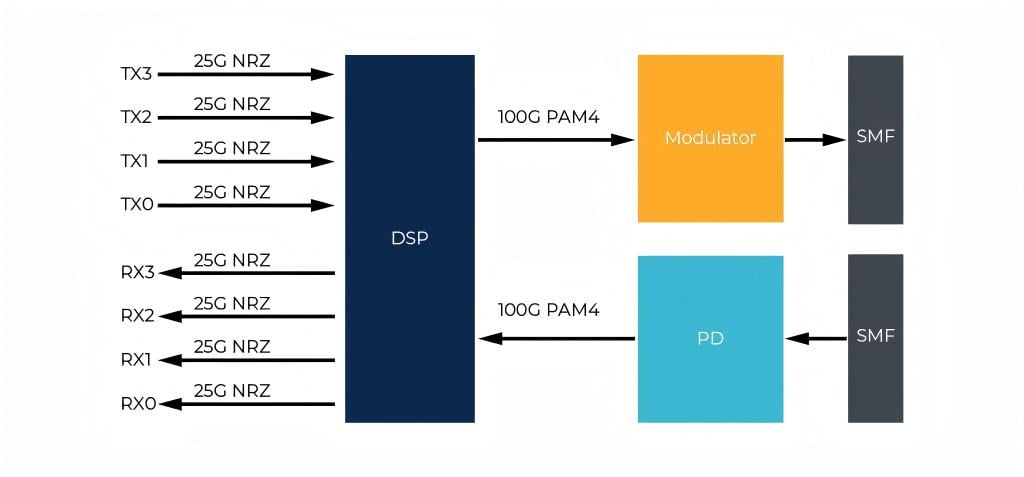
Step 1: Core Device Upgrade
Core devices—primarily core routers and aggregation switches—are the "heart" of your 100G network. Focus on port compatibility and forwarding performance; avoid overinvesting in "premium tier" hardware that exceeds your needs. Key requirements:
● Support for QSFP28 100G ports and backward compatibility with 10G SFP+ modules for smooth migration.
● Sufficient forwarding capacity to handle peak workloads, with support for virtualization and SDN technologies to scale with global business growth.
● Compliance with global standards (e.g., IEEE 802.3bm) and compatibility with leading vendor hardware to eliminate interoperability risks.
Step 2: Transceiver Selection
Transceivers act as the "bridge" converting electrical signals to light, directly impacting transmission reliability. The golden rule: match distance, interface type, and hardware compatibility. Avoid overpaying for premium brands; opt for solutions that cover all scenarios with strong cost-performance ratios.
Fibermart’s 100G Transceiver & Fiber Jumper Solutions
Fibermart is a leading provider of fiber communication equipment, offering a comprehensive lineup of 100G transceivers and fiber jumpers engineered for global compatibility, stable performance, and exceptional value. Their products span all transmission distances, making them ideal for diverse enterprise needs:
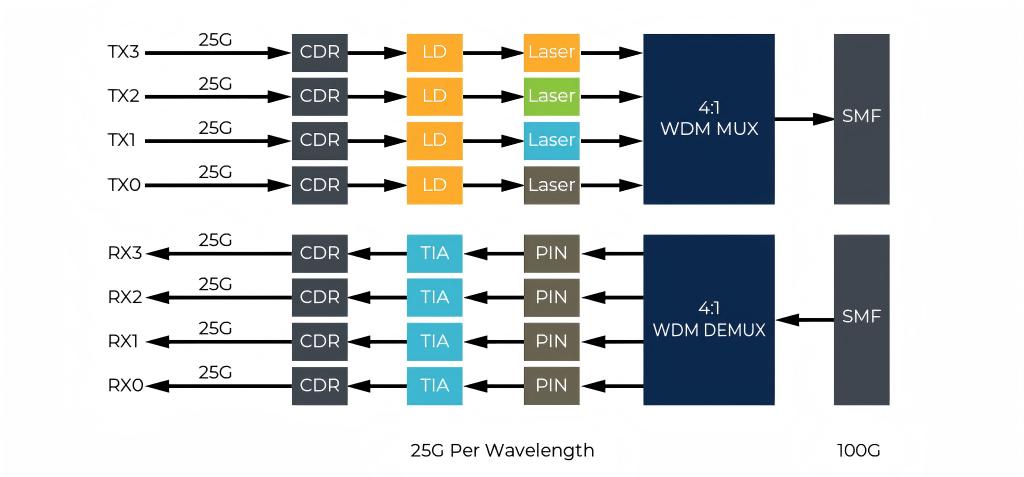
● QSFP28 SR4 100G Transceiver (QSFP28-SR4-100GFM): Designed for short-reach interconnection (0–100m) in data centers and between cabinets. Features an MPO12 interface, 850nm wavelength, and 4-channel parallel transmission. Compatible with OM3/OM4 multi-mode fibers, it includes digital diagnostic monitoring (DDM) for real-time performance tracking, low power consumption, and hot-pluggable functionality. It works seamlessly with all major QSFP28 port devices globally.
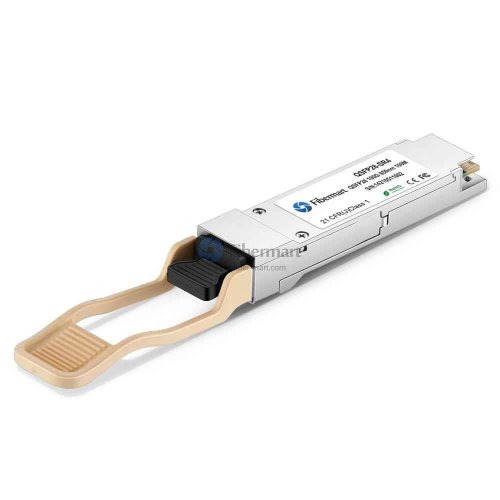
● QSFP28 LR4 100G Transceiver (QSFP28-BLR4-100GFM): Ideal for mid-range interconnection (1–10km) between buildings or campus core links. Equipped with a dual LC interface, 1310nm wavelength, and WDM technology, it operates with OS2 single-mode fibers. Boasting strong anti-interference capabilities and wide-temperature operation (0–70°C), it delivers reliable performance for outdoor deployments.
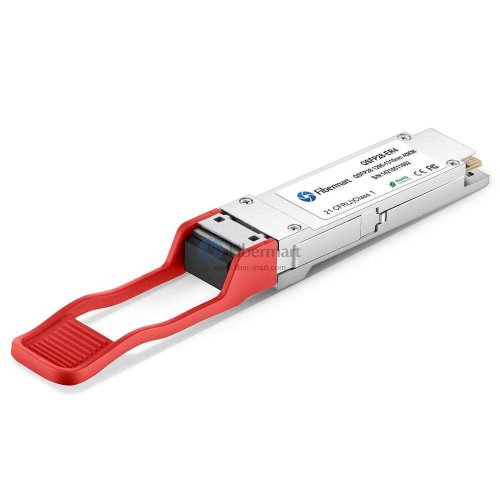
● QSFP28 ER4 100G Transceiver (QSFP28-100G-ER4L-S): Built for long-reach interconnection (10–40km) across regional borders or metro-area networks. Uses a dual LC interface, 1550nm wavelength, and coherent detection with no need for dispersion compensation. High receiving sensitivity and robust anti-interference performance make it perfect for cross-regional branch connectivity.
● 10G/100G Compatible Transceiver (FM-QSFP28-SFP+): Enables seamless communication between 10G and 100G devices, eliminating the need to replace existing 10G hardware and reducing upgrade costs.
● Fiber Jumpers: Includes MPO-MPO multi-mode jumpers (FM-MPO-MPO-OM4) for short-reach applications and LC-LC single-mode jumpers (FM-LC-LC-OS2) for mid-to-long ranges. These low insertion loss, high-stability jumpers are optimized for global fiber link standards.
Step 3: Fiber Link Optimization
As noted earlier, existing OM3/OM4 multi-mode and OS2 single-mode fibers directly support 100G transmission. Focus on these two optimizations:
● Fiber Jumper Replacement: Replace legacy 10G LC-LC jumpers with 100G-specific variants: MPO-MPO multi-mode jumpers for short-reach (paired with SR4 transceivers) and LC-LC single-mode jumpers for mid-to-long ranges (paired with LR4/ER4 transceivers). Ensure strict alignment with transceivers and fiber types.
● Link Testing: Use optical power meters and OTDR testers to verify link loss post-upgrade. Adhere to global standards: ≤1.5dB for short-reach and ≤2.5dB for mid-to-long ranges to avoid transmission instability from excessive loss.
Step 4: Configuration & Cutover
The final phase—configuration and cutover—is critical. Follow the "test first, cut later" principle to avoid global business downtime:
● Configuration Testing: Connect core devices, transceivers, and fiber links. Configure VLANs, routing, and 100G full-duplex port speeds. Test link connectivity and simulate global workloads to confirm no latency or packet loss.
● Phased Cutover: Align cutovers with non-peak hours across all time zones (e.g., late nights or weekends). Migrate non-critical traffic (e.g., office networks) first, validate stability, then switch core traffic (e.g., data centers, business systems).
● Post-Deployment Maintenance: Monitor performance for 1–2 weeks, tracking port traffic, optical power, and device temperatures. Use DDM functionality for remote monitoring to reduce maintenance costs across global branches.
Pitfall Avoidance: 5 Common Mistakes for First-Time Upgraders
Most post-upgrade issues stem from these errors. Proactively avoid them to streamline the process:
● Mistake 1: Over-engineering the Network. Don’t overspend on high-end hardware. Small-to-medium global enterprises can reliably use short/mid-range transceivers to meet needs.
● Mistake 2: Neglecting Compatibility. Ensure transceivers and core devices match QSFP28 interfaces and IEEE 802.3bm standards. Prioritize solutions compatible with global vendor hardware to avoid "unrecognized device" errors.
● Mistake 3: Skipping Link Testing. Failing to verify link loss leads to unstable transmission. Always test against global standards before full deployment.
● Mistake 4: All-at-Once Cutover. This risks widespread business disruption, especially for global multinationals. Stick to phased, time-zone-aligned cutovers.
● Mistake 5: Ignoring Long-Term Maintenance. 100G networks require more oversight than 10G. Choose brands with remote monitoring and lifelong technical support to reduce global maintenance burdens.
Conclusion: A Successful Upgrade Depends on Right Product + Right Method
Upgrading from 10G to 100G is achievable for global businesses of all scales by following "pre-checks → core device upgrade → transceiver selection → link optimization → configuration cutover." The key is balancing smooth migration, cost control, and long-term reliability.
Choosing the right products accelerates deployment and cuts costs. Fibermart offers a full suite of 100G transceivers and fiber jumpers designed for global compatibility, stable performance, and competitive pricing compared to leading brands. With lifelong technical support, they deliver tailored solutions for small global enterprises and large distributed data centers alike.
Final Note: Network upgrades are not one-size-fits-all. Plan for 3–5 years of growth to avoid frequent re-upgrades. For support with selection or deployment, consult dedicated technical teams for personalized solutions.
Follow for more insights on global network upgrades and fiber device selection to master enterprise network operations effortlessly!
Frequently Asked Questions (FAQs)
When is it mandatory to upgrade from 10G to 100G?
You need to initiate the upgrade when the bandwidth utilization of a single link consistently exceeds 70% year-round, you have high-frequency cross-border large file transfer or multi-branch interconnection requirements, you are deploying cloud services or AI computing power scenarios, and the peak bandwidth calculated by standard formulas is close to the 10G limit.
Do I have to replace my existing fiber cables and equipment to upgrade to 100G?
No. OM3/OM4 multimode and OS2 single-mode fiber cables can be directly reused. Legacy equipment that supports QSFP28 can be upgraded via line cards, with only the compatible optical modules and dedicated patch cords needing to be replaced.
How do I select the best-fit 100G optical module for my use case?
Make a precise selection based on transmission distance: choose SR4 for in-data center applications of 0–100m; LR4 for campus or building interconnection of 1–10km; ER4 for cross-regional or cross-border transmission of 10–40km. Prioritize universal models compatible with your existing equipment.
What are the most common critical pitfalls when upgrading from 10G to 100G?
Blindly pursuing high-end top-tier configurations that exceed your budget, overlooking interface protocol compatibility, failing to perform link loss testing prior to the upgrade, and executing a full one-time service cutover.
Is there a one-stop, cost-effective complete upgrade solution available?
Fibermart provides a full line of 100G optical modules, 10G/100G compatible modules, and matching fiber patch cords. These products are compatible with mainstream equipment worldwide, cover all transmission scenarios, deliver exceptional cost performance, and come with lifetime technical support.
After the upgrade is complete, how do I ensure the long-term stability of the link?
Continuously monitor core link metrics for 1–2 weeks after the cutover, leverage the DDM (Digital Diagnostic Monitoring) function of the optical modules for remote risk early warning, and reserve bandwidth redundancy to support 3–5 years of business growth to avoid frequent secondary upgrades.





No comments have been posted yet.