


.webp)


In this article, you will learn many components used in a cabling system. For example, you will know the differences between the various types of network cable and their application in the network. Let's read it seriously.
The Cable Components
Horizontal cable, backbone cable, and patch cords are major cable components used in cross-connections and for connecting to network devices. A typical telecommunications-cabling infrastructure is shown below:

Horizontal Cables
Horizontal cables run between cross-connect panel in a telecommunications room and a telecommunications outlet located near the work area. Horizontal runs are most often implemented with 100 ohm, four-pair, unshielded twisted-pair(UTP), solid-conductor copper cables, as specified in the ANSI/TIA-568-C.2 standard for commercial buildings. The standard also provides for horizontal cabling to be implemented using 62.5/125 micron or 50/125 micron multimode optical fibers. Optical fiber is typically used when electromagnetic interference (EMI) or radio-frequency interference (RFI) is a problem and when security is critical. Coaxial cable is not a recognized horizontal cable type for voice or data installations.
.jpg)
Backbone Cables
Backbone cables run between telecommunications rooms, and enclosures, and the main cross-connect point of a building (usually located in the equipment room). Backbone cables can be implemented using 100 ohm UTP, ScTP or STP and 62.5/125 micron or 50/125 micron multimode optical fiber or 8.3/125 micron single-mode optical cable. Neither 150 ohm STP nor coaxial cable is allowed. Fiber optics are the preferred cabling medium because of distance limitations associated with copper wiring (90 meters is the maximum distance). Optical fiber cable can transmit over distances up to 40,000 meters depending on fiber type and transmission speed! Another plus for running a fiber backbone is that glass does not conduct electricity, nor is it subject to EMI and RFI like copper is.

Patch Cords
Patch cords are used in patch panels to provide the connection between field-terminated horizontal cables and network connectivity devices (such as switches and hubs) and connections betwee the telecommunications outlets and network devices (such as computers, printers, and other Ethernet-based devices). They are the part of the network wiring you can actually see. As the saying goes, a chain is only as strong as its weakest link. Because of their exposed position instructured cable infrastructures, patch cords are almost always the weakest link. Whereas horizontal UTP cables contain solid conductors, patch cords are made with stranded conductors because they are more flexible. The flexibility allows them to withstand the abuse of frequent flexing and reconnecting. Although you could build your own field-terminated patch cords, we strongly recommend against it.

Wall Plates and Connectors
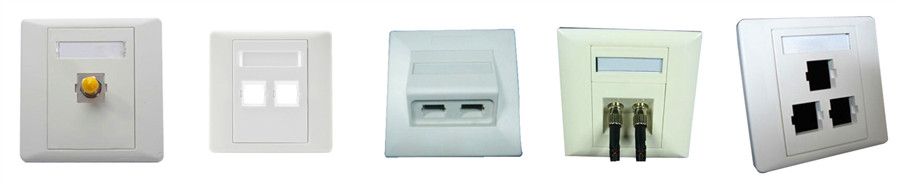
Telecommunications outlets can be located on a wall or surface and/or floor-mounted boxes in your work area. Telecommunications outlets located on a wall are commonly referred to as wall plates. Wall plates, or surface and/or floor-mounted boxes, and connectors serve as the work-area endpoints for horizontal cable runs. Using these telecommunications outlets helps you organize your cables and aids in protecting horizontal wiring from end users. Without the modularity provided by telecommunications outlets, you would wind up wasting a significant amount of cable trying to accommodate all the possible computer locations within a client’s work area—the excess cable would most likely wind up as an unsightly coil in a corner. Modular wall plates can be configured with outlets for UTP, optical fiber, coaxial, and audio/visual cables.
Cabling Pathways
In this section, we’ll describe the components used in work areas and telecommunications rooms and for horizontal and backbone cable runs.
Conduit
Conduit is pipe. It can be metallic or nonmetallic, rigid or flexible (as permitted by the applicable electrical code), and it runs from a work area to a telecommunications room and a telecommunications room to an equipment room. One advantage of using conduit to hold your cables is that conduit may already exist in your building.
Cable TraysAs an alternative to conduit, cable trays can be installed to route your cable. Cable trays are typically wire racks specially designed to support the weight of a cable infrastructure. They provide an ideal way to manage a large number of horizontal runs. Cables simply lie within the tray, so they are very accessible when it comes to maintenance and troubleshooting. The TIA-569-B standard provides for cable trays to be used for both horizontal and backbone cables.
RacewaysRaceways are special types of conduits used for surface-mounting horizontal cables. Raceways are usually pieced together in a modular fashion with vendors providing connectors that do not exceed the minimum bend radius. Raceways are mounted on the outside of a wall in places where cable is not easily installed inside the wall; they are commonly used on walls made of brick or concrete where no telecommunications conduit has been installed. To provide for accessibility and modularity, raceways are manufactured in components.
Cabling Racks and Enclosures
Racks are the pieces of hardware that help you organize cabling infrastructure. They range in height from 39˝ to 84˝ and come in two widths: 19˝ and 23˝. Nineteen-inch widths are much more commonplace and have been in use for nearly 60 years. These racks are commonly called just 19˝ racks or, sometimes, EIA racks. Mounting holes are spaced between 5⁄8˝ and 2˝ apart, so you can be assured that no matter what your preferred equipment vendor is, its equipment will fit in your rack. In general, three types of racks are available for purchase: wall-mounted brackets, skeletal frames,and full equipment cabinets.
Wall-Mounted Brackets
For small installations and areas where economy of space is a key consideration, wall-mounted brackets may provide the best solution. Wall-mounted racks such as MilesTek’s Swing Gate wall rack in Figure 5.9 have a frame that swings out 90 degrees to provide access to the rear panels and includes wire guides to help with cable management.
Skeletal Frames (19˝ Racks)Skeletal frames, often called 19˝ racks or EIA racks, are probably the most common type of rack.
Full Equipment CabinetsThe most expensive of your rack options, full equipment cabinets, offer the security benefits of locking cabinet doors.
Cable Management AccessoriesIf your rack equipment does include wire management, numerous cable management accessories can suit your organizational requirements. Large telecommunications rooms can quickly make a rat’s nest out of your horizontal cable runs and patch cables. Cable hangers on the front of a rack can help arrange bundles of patch cables to keep them neat and orderly. Rear-mounted cable hangers provide strain-relief anchors and can help to organize horizontal cables that terminate at the back of patch panels.

Cross-Connect Devices
Cross-connect devices are cabling components you can implement to make changes to your network less painfu.
The 66 Punch-Down BlocksFor more than 25 years, 66 punch-down blocks have been used as telephone system cross-connect devices. They support 50 pairs of wire. Wires are connected to the terminals of the block using a punch-down tool. When a wire is “punched down” into a terminal, the wire’s insulation is pierced and the connection is established to the block. Separate jumpers then connect blocks. When the need arises, jumpers can be reconfigured to establish the appropriate connections. The use of 66 punch-down blocks has dwindled significantly in favor of 110-blocks.
The 110 and S-210 Punch-Down Blocks110-blocks, another flavor of punch-down media; they are better suited for use with data networks. The 110-blocks come in sizes that support anywhere from 25 to 500 wire pairs. Unlike 66-blocks, which use small metal jumpers to bridge connections, 110-blocks are not interconnected via jumpers but instead use 24 AWG cross-connect wire.
Modular Patch PanelsAs an alternative to punch-down blocks, you can terminate your horizontal cabling directly into RJ-45 patch panels. This approach is becoming increasingly popular because it lends itself to exceptionally easy reconfigurations. To reassign a network client to a new port.
.jpg)
Both the ANSI/TIA-568-C and ISO/IEC 11801 Ed. 2 standards allow for a single transition point or consolidation point in horizontal cabling. The consolidation point is usually used to transition between a 25-pair UTP cabling (or separate four-pair UTP cables) that originated in the telecommunications room and cable that spreads out to a point where many networked or voice devices.
Fiber-Optic Connector Panels
If your organization is using optical fiber cabling (either for horizontal or backbone cabling), then you may see fiber-optic connector panels. These will sometimes look similar to the UTP RJ-45 panels seen earlier in this chapter, but they are commonly separate boxes that contain space for cable slack.
Conclusion
To create a reliable and effective cabling system, all components mentioned above paly an important role. Every component has different functions. Fiber-Mart provides most of these components with high quality and low price. It may satisfy your needs.
Bulk Fiber Optic Cables OM3, OM4 Fiber, Tight Buffer, Indoor & Outdoor, LSZH, Figure8, ADSS Fiber Cables |
Fiber Optic Patch Cables 10G Patch Cable, Single Mode, Multimode, Armored, MPO/MTP Turnk Cables, & Pigtails |
Fiber Optic Transceivers SFP, SFP+, XFP, XENPAK, DWDM, CWDM, 40G QSFP+ & CFP Modules |
-consulting for technical supports or relevant product buying guide
Email for Sales





No comments have been posted yet.