


.webp)


Discover the significance of NVIDIA cables in high-performance computing environments. This guide covers cable types, features, and selection tips for optimal performance.
In the realm of high-performance computing (HPC), every component matters. Among these, NVIDIA cables play a pivotal role in ensuring that systems operate at their peak efficiency. These cables are more than just conduits for power and data; they are integral to the performance and reliability of GPU-heavy applications. This blog delves into the types of NVIDIA cables, their features, and how to select the right ones to maximize your computing capabilities.
Understanding NVIDIA Cables
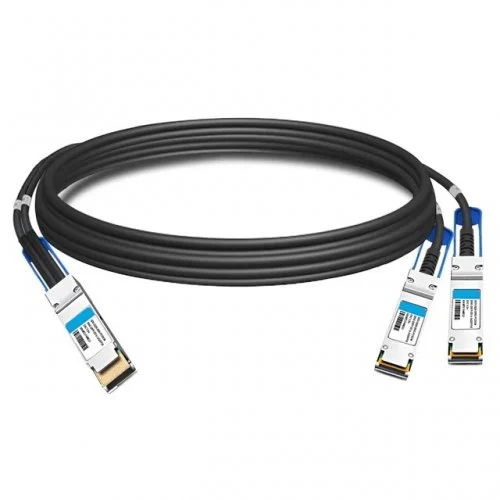
NVIDIA cables are designed specifically for connecting NVIDIA GPUs to various components within a computer system, such as motherboards, power supplies, and other GPUs in multi-GPU setups. Their design and construction are optimized to support the high data transfer rates and power requirements of modern GPUs, making them essential in high-performance computing environments.
Types of NVIDIA Cables
1. Power Cables
Power cables are crucial for delivering the necessary electricity to NVIDIA GPUs. The most common types include the 6-pin, 8-pin, and the newer 12-pin power cables. Each type is designed to handle specific wattage, ensuring that your GPU operates smoothly without overheating. Understanding the power requirements of your specific NVIDIA model is key to choosing the right power cables.
2. Data Cables
Data cables, such as Display-Port and HDMI, are essential for transmitting video signals from the GPU to the monitor. With advancements in technology, cables that support higher resolutions and refresh rates, such as Display-Port 1.4, are now standard. These cables ensure that high-resolution graphics are rendered smoothly, which is vital for gaming, 3D rendering, and data visualization.
3. NVLink Cables
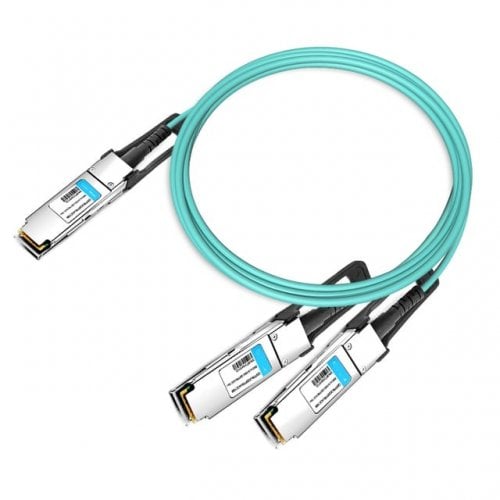
For users utilizing multiple GPUs, NVIDIA NVLink cables are indispensable. NVLink technology allows multiple GPUs to work together, providing increased bandwidth and performance. These cables are designed to facilitate high-speed data transfer between GPUs, significantly boosting the performance of applications that can leverage multi-GPU setups.
4. Custom Cables
Some users may opt for custom NVIDIA cables tailored to their specific setups. These cables can offer improved aesthetics, better cable management, and sometimes enhanced performance features. Custom cables can be particularly beneficial in professional environments where space and organization are crucial.
Features of NVIDIA Cables
The effectiveness of NVIDIA cables is not just about the type; it also involves several key features:
· Durability: High-quality materials ensure longevity and reliability, which is crucial for high-performance computing where equipment is under constant stress.
· Shielding: Good shielding reduces interference, ensuring that data integrity is maintained during transmission.
· Flexibility: The design of the cables can facilitate better routing and management within the case, making installations cleaner and more efficient.
Selecting the Right NVIDIA Cables
Choosing the correct NVIDIA cables for your setup involves considering several factors:
· Compatibility: Ensure that the cables match the requirements of your GPU and other components. Always refer to the specifications of your GPU to determine the necessary power connectors and data interfaces.
· Length: Cable length is important for layout and installation. Measure your setup to avoid any short cables that could impede airflow or create clutter.
· Quality: Opt for reputable brands or certified cables to avoid performance issues. Low-quality cables can lead to overheating or signal loss, which can compromise performance.
The Impact of Cable Management
While the right NVIDIA cables are crucial, effective cable management is equally important in high-performance computing setups. Properly managing your cables not only improves airflow within your system but also enhances the overall aesthetics of your build. Here are some tips for better cable management:
1. Use Cable Ties: Bundle cables together using cable ties to reduce clutter. This helps in organizing the cables making your setup look neat.
2. Routing: Plan the routing of cables to minimize the distance they need to travel. This not only looks better but can also prevent unnecessary wear on the cables.
3. Cable Covers: For particularly long runs of cables, consider using cable covers or sleeves. These not only protect the cables but also provide a unified look.
4. Accessibility: Ensure that critical cables, like power and data cables, are easily accessible. This can save time during troubleshooting and upgrades.

Key Takeaways
Investing time in proper cable management can lead to enhanced airflow, lower temperatures, and, ultimately, a longer lifespan for your components. Additionally, a tidy setup can improve your overall computing experience, whether you're gaming, rendering, or working on intensive computational tasks.
In the ever-evolving landscape of high-performance computing, the significance of NVIDIA cables cannot be overstated. They are essential components that facilitate the optimal performance of modern GPUs, ensuring that your system can handle the demands of graphics-intensive applications. By understanding the different types of cables, their features, and how to select the right ones, you can significantly enhance your computing capabilities.
Maximizing Performance with NVIDIA Cables
Using the right NVIDIA cables can significantly enhance your computing experience. Whether you're gaming, designing graphics, or performing complex computations, the choice of cables affects everything from frame rates to rendering times. For instance, using an inadequate power cable might limit the GPU's performance, while high-quality data cables can ensure a smooth visual output without lag.
Moreover, in environments where multiple GPUs are used, the benefits of NVLink cables become evident. They allow for seamless data sharing, significantly boosting computational speed and efficiency in tasks like machine learning and scientific simulations.
Take The Next Step
Looking to take your high-performance computing setup to the next level? Fibermart is here to help.
As experts in high-quality cables and connectors, we understand the unique needs of tech enthusiasts and professionals alike. Fiber-Mart wide range of NVIDIA cables and accessories is designed to ensure you get the best possible performance from your equipment.
We're committed to providing not just products but solutions tailored to your specific needs. Our team can guide you through selecting the right cables to enhance performance, durability, and reliability.
Don't compromise on quality. Trust Fibermart for your high-performance computing needs. Contact us today to learn more.





No comments have been posted yet.