


.webp)


The RJ45 connector is a common connector type for twisted-pair cables. Therefore, a twisted-pair cable with RJ45 connectors on both ends is also called an RJ45 network cable. This type of cable connects to the RJ45 port on network devices for data transmission. So, how much do you know about the RJ45 connector? Besides the RJ45 connector, what other types of connectors are there for twisted-pair cables? What are the differences? Read this article to find the answers to these questions.
RJ45 Connector (crystal head) Overview
Before understanding the RJ45 connector, we first need to figure out what the RJ45 interface is.
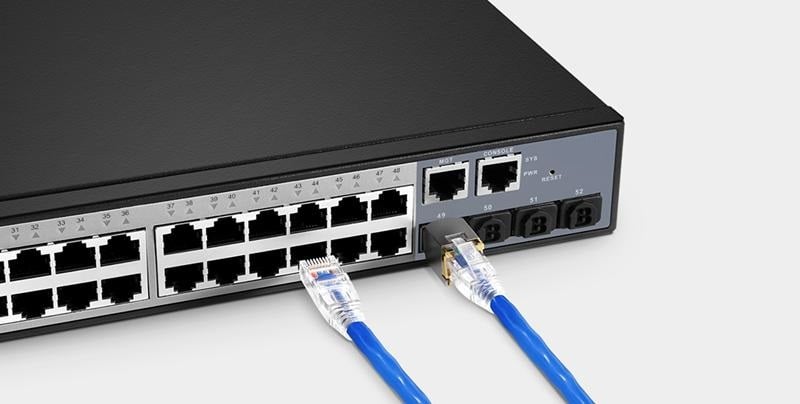
The RJ45 interface is a commonly used Ethernet interface, commonly found on network devices such as gigabit routers and gigabit switches. "RJ" stands for Registered Jack, a standardized network interface; "45" represents the serial number of the interface standard. Physically, registered jacks primarily use two types of connectors: modular connectors and 50-pin miniature ribbon connectors. The RJ45 connector (technically known as the RJ45 connector) is an 8P8C (eight grooves and eight metal contacts) modular connector made of plastic. It contains eight pins, four of which are used to send and receive data, and the other four are used for power or other transmission. It is suitable for Gigabit Ethernet or Power over Ethernet.
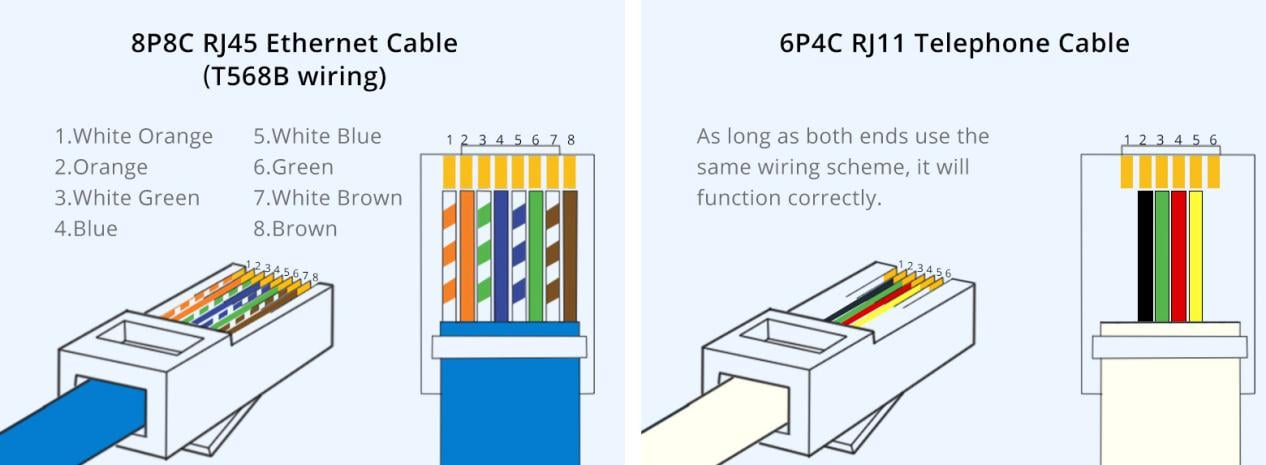
RJ45 vs. RJ11: What's the difference?
In addition to RJ45 crystal plugs, twisted pair cables also have other types of crystal plugs, such as the equally common RJ11 crystal plug. So what is the difference between these two common crystal plugs?
Different structures
From the above, we can see that the RJ45 wire crystal head is an 8P8C connector, which means it has 8 grooves and 8 contacts; while the RJ11 crystal head is a 6P4C or 6P2C connector, which means it has 6 grooves and 4 contacts or 2 contacts. Therefore, relatively speaking, the size of the RJ45 crystal head will be larger than that of the RJ11 crystal head.
Different wiring order
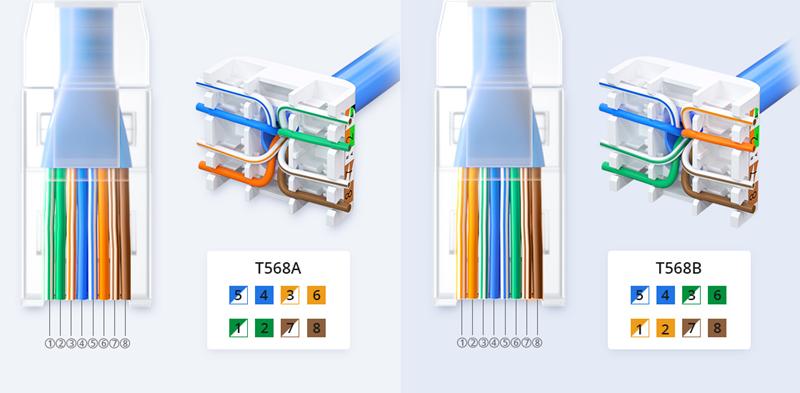
Due to the structural differences between RJ45 and RJ11 connectors, their wiring sequences differ. There are two RJ45 connector wiring standards: T-568A and T-568B. The T-568A standard has a wiring sequence of "white-green-green-white-orange-blue-white-blue-orange-white-brown-brown," while the T-568B standard has a wiring sequence of "white-orange-orange-white-green-blue-white-blue-green-white-brown-brown," as shown below. Currently, T-568B is the most commonly used wiring method. A twisted-pair cable with the same wiring standard at both ends of the RJ45 connector is a straight-through cable and is commonly used to connect two different network devices, such as a computer and a switch. A twisted-pair cable with different wiring standards at both ends is a crossover cable and is commonly used to connect two identical network devices, such as switches. For more information, please visit "Straight-Through vs. Crossover Cables: What's the Difference? How to Choose? "
Because RJ11 connectors can have either four or two contacts, there are two ways to connect an RJ11 phone cable. The first method involves creating a two-core RJ11 phone cable. The wiring order is arbitrary; just keep it the same on both ends. The second method involves creating a four-core RJ11 phone cable. The wiring order on both ends can either be the same or reversed. For example, the order can be "black-green-red-yellow" on both ends, or "black-green-red-yellow" on one end and "yellow-red-green-black" on the other. (Note: Regardless of how you connect the cables, the current is DC because the phone's rectifier automatically converts the current to DC.)
Different applications
As can be seen from the above, RJ45 crystal plugs are generally used to terminate network cables and connect computers, routers, switches and other network devices, and can support transmission rates up to 10Gbps; while RJ11 crystal plugs are used to terminate ADSL and telephone lines, connect telephones and modems, and have a transmission rate of about 24Mbps.
Simply put, RJ45 crystal plugs and RJ11 crystal plugs are not universal. They differ in structure, size, wiring sequence and application, and special attention should be paid during daily use.
|
|
RJ45 |
RJ11 |
|
picture |
|
|
|
structure |
8P8C |
6P4C/6P2C |
|
size |
Large Square |
Small square |
|
Transfer rate |
10Gbps |
24Mbps |
|
application |
Computers, routers, switches |
Telephone, modem |
Note: In principle, RJ45 crystal plugs cannot be used on RJ11 interfaces, but RJ11 crystal plugs can be used on RJ45 interfaces. However, this is not recommended because it may damage the equipment.
RJ45 Network Cable Types
Nowadays, RJ45 network cables can be seen everywhere in our daily lives. Common ones include Category 5e, Category 6, Category 6a and Category 7.
Category 5e network cable : Category 5e network cable consists of four pairs of twisted pair cables, can support 100MHz bandwidth, the maximum transmission rate can reach 1000Mbps, the maximum transmission distance is 100m, and is commonly used in gigabit home networks or small business networks.
Category 6 network cable : Compared to Category 5e network cable, Category 6 network cable has a certain improvement in transmission performance. For example, the bandwidth is increased to 250MHz, the maximum transmission rate can reach 10Gbps, and the maximum transmission distance is 55m. At the same time, Category 6 network cable can also be used in Gigabit networks, with a maximum transmission distance of 100m.
Category 6a network cable : Category 6a network cable is further optimized based on Category 6 network cable, and has good resistance to external electromagnetic interference and crosstalk between line pairs; when used in a 10G network, the maximum transmission rate can reach 100m.
Category 7 network cable : Category 7 network cable is a double-shielded network cable with a bandwidth of up to 600MHz, a maximum transmission rate of 10Gbps, and a maximum transmission distance of 100m. It is commonly used in computer rooms, Internet cafes, and large enterprise networks.
Summarize
The RJ45 connector is a key component in network data transmission. Compared to the RJ11 connector, the RJ45 connector is more widely used and can be used to connect network devices such as modems, computers, printers, switches, and routers. It is commonly used in telecommunications and factory automation. With its advantages such as simple installation, convenient operation, and plug-and-play functionality, the RJ45 connector is gradually replacing the old telephone line installation method.





No comments have been posted yet.