


.webp)


In modern data centers and enterprise networks, high-density cabling has become the backbone of efficient data transmission, supporting the ever-increasing demand for speed and capacity from 10G to 400G and beyond. MTP-LC cables, with their ability to convert high-fiber-count MTP connectors into multiple LC duplex connections, are the ideal solution for simplifying cable management, optimizing rack space, and ensuring seamless network performance. However, proper installation is crucial to unlock their full potential—poorly executed setup can lead to signal loss, connectivity issues, and costly downtime.
Pre-Installation Preparation
Before initiating the installation process, thorough preparation is essential to ensure safety, compatibility, and efficiency. Rushing into installation without proper groundwork can result in errors that compromise network integrity.
Verify Equipment and Cable Compatibility
First, confirm that all components meet the required specifications and are compatible with your network infrastructure:
● MTP-LC Cable: Ensure the cable is rated for your network’s fiber mode (single-mode OS2 or multimode OM3/OM4/OM5) and fiber count (8 to 144 cores, as per your needs). Check that the cable jacket type (LSZH or PVC, Plenum OFNP or Riser) complies with local building codes and environmental requirements. Verify polarity (Type A, B, or C) to align with your system’s transmit/receive channels—mismatched polarity will cause communication failures.
● High-Density Panel: The panel should support MTP and LC connectivity, with sufficient port density to accommodate the cable’s fiber count. Ensure the panel is rated for the same fiber mode and wavelength (1310/1550nm for single-mode, 850/1300nm for multimode) as the cable.
● Auxiliary Components: Confirm compatibility of transceivers (e.g., QSFP for MTP, SFP for LC), patch cords, and cleaning tools with the cable and panel. All components must meet CE, RoHS, FCC, and ISO9001 certifications for reliability.

Gather Essential Tools and Materials
Equip yourself with the following tools to ensure a smooth installation:
● Fiber optic cleaning kit (including lint-free wipes, cleaning sticks, and fiber optic cleaner) to remove dust and debris from connectors—contamination is a leading cause of insertion loss.
● Cable management tools: Cable ties (non-abrasive, flame-retardant), cable organizers, and strain relief brackets to prevent excessive tension on fibers.
● Precision cutting tool (for trimming cable jackets, if needed) and a cable stripper (designed for fiber optic cables to avoid damaging the glass core).
● Insertion loss (IL) and return loss (RL) testing equipment (e.g., optical power meter and light source) to verify performance post-installation.
● Personal protective equipment (PPE): Safety glasses and gloves to protect against fiber shards and electrostatic discharge (ESD).
Inspect the Installation Environment
Assess the installation site to address potential challenges:
● Rack Space: Ensure the high-density panel is securely mounted in a rack with adequate clearance for cable routing (minimum 7.5mm bend radius for Corning® bend-insensitive fiber, as specified by industry standards). Avoid overcrowding, as this can lead to increased temperature and signal interference.
● Temperature and Humidity: Confirm the environment falls within the cable’s operating range (-10°C to +60°C) and storage range (-10°C to +70°C). Extreme temperatures or humidity can degrade cable performance over time.
● Cable Path: Plan a clear path for the MTP-LC cable, avoiding sharp edges, heavy machinery, and sources of electromagnetic interference (EMI) such as power cables. Ensure the path allows for the cable’s custom length (as ordered) without excessive stretching or coiling.
Step-by-Step Installation Process
Follow these structured steps to install MTP-LC cables in high-density panels, prioritizing precision and care to protect the delicate fiber optic components.
Prepare the Cable for Installation
● Unpack the MTP-LC cable and inspect it for physical damage (e.g., cuts, kinks, or connector damage). Ensure the cable’s breakout length (typically 0.5m or custom) is sufficient to reach the LC ports on the panel without tension.
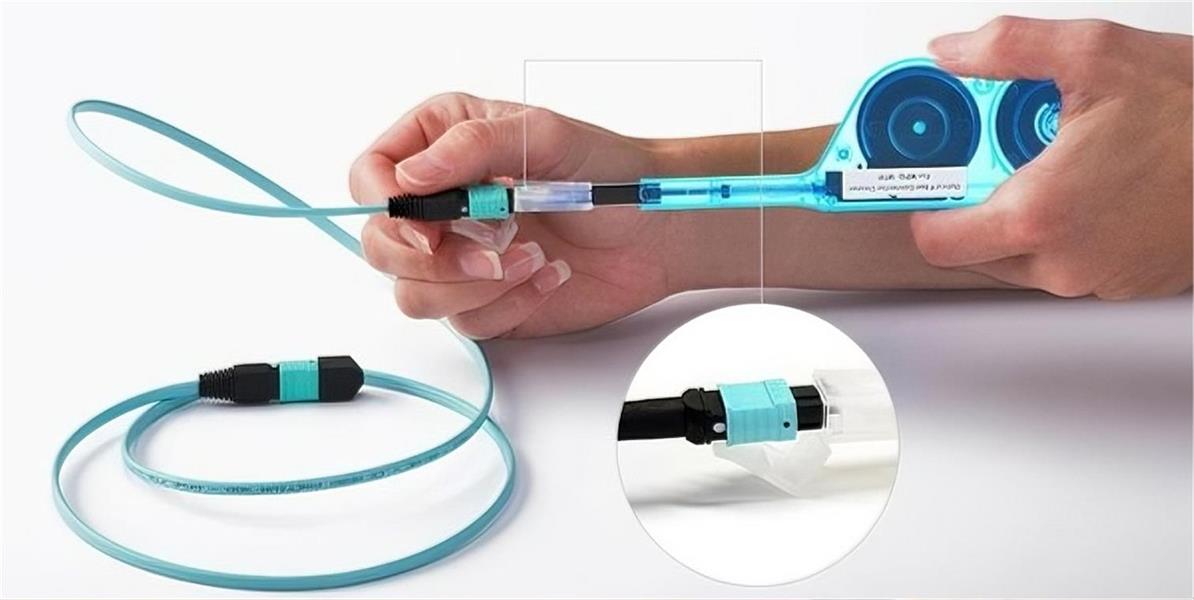
● Clean both the MTP connector and LC connectors using the fiber optic cleaning kit. For MTP connectors, use a dedicated MTP cleaner to remove debris from the ferrule; for LC connectors, use a cleaning stick and lint-free wipe moistened with fiber optic cleaning solution. Allow connectors to dry completely before proceeding—residual moisture can cause signal degradation.
● If necessary, trim the cable jacket to the required length using a precision cutting tool. Ensure the cut is clean and perpendicular to the cable axis to avoid fraying. Strip the outer jacket gently (if additional length is needed) to expose the individual fibers, taking care not to nick or break the glass core.
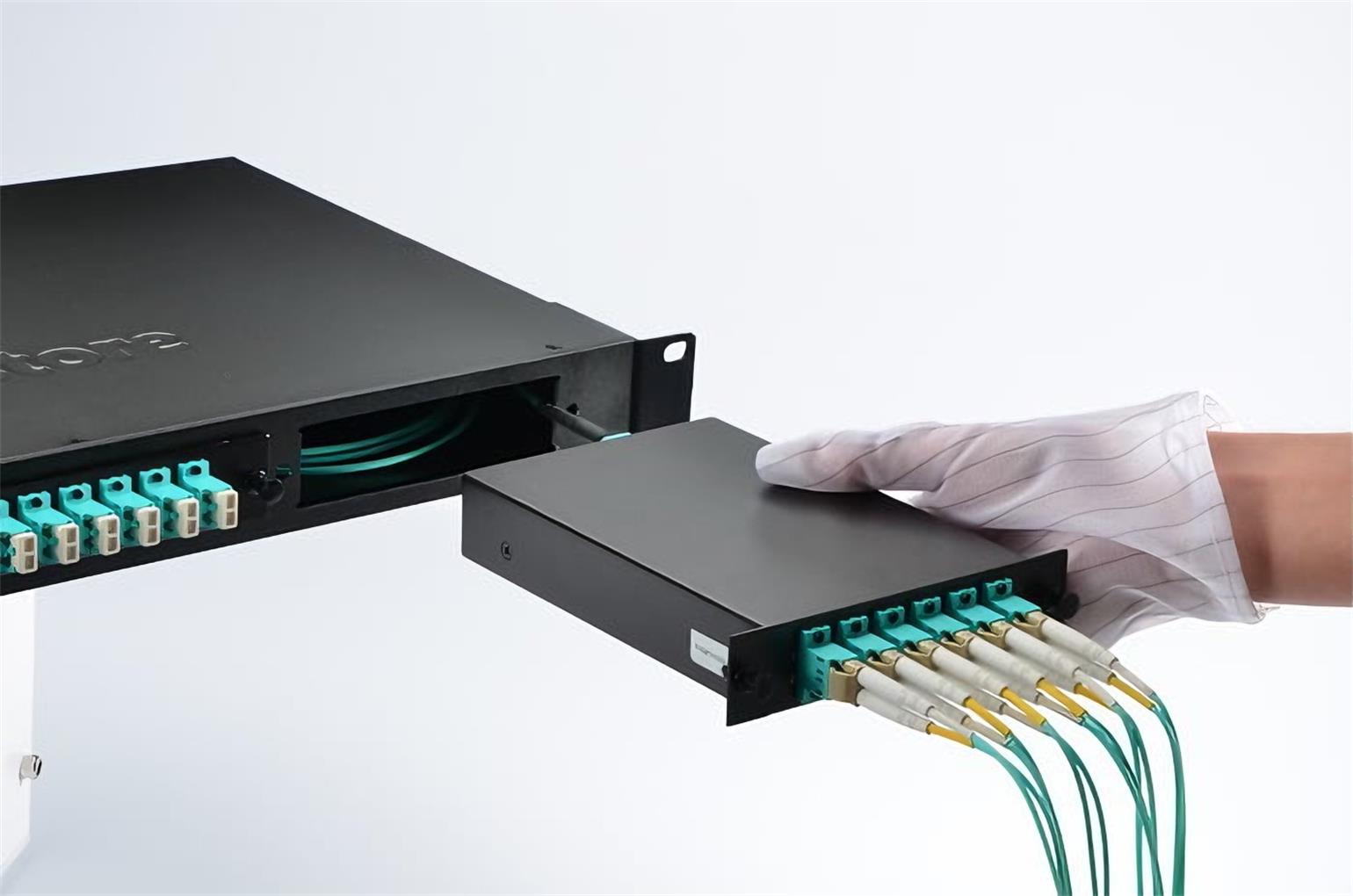
Mount the High-Density Panel (if not already installed)
● Align the panel with the rack’s mounting holes and secure it using screws or bolts, ensuring it is level and stable. Use a torque wrench to tighten fasteners to the manufacturer’s recommended specifications—over-tightening can damage the panel, while under-tightening may cause vibrations that affect connectivity.
● Remove the panel’s front and rear covers (if applicable) to access the MTP and LC ports. Label the ports according to your network’s mapping plan (e.g., “MTP Backbone Port 1,” “LC Server Port 1-6”) to simplify future maintenance and troubleshooting.
Connect the MTP Connector to the Panel
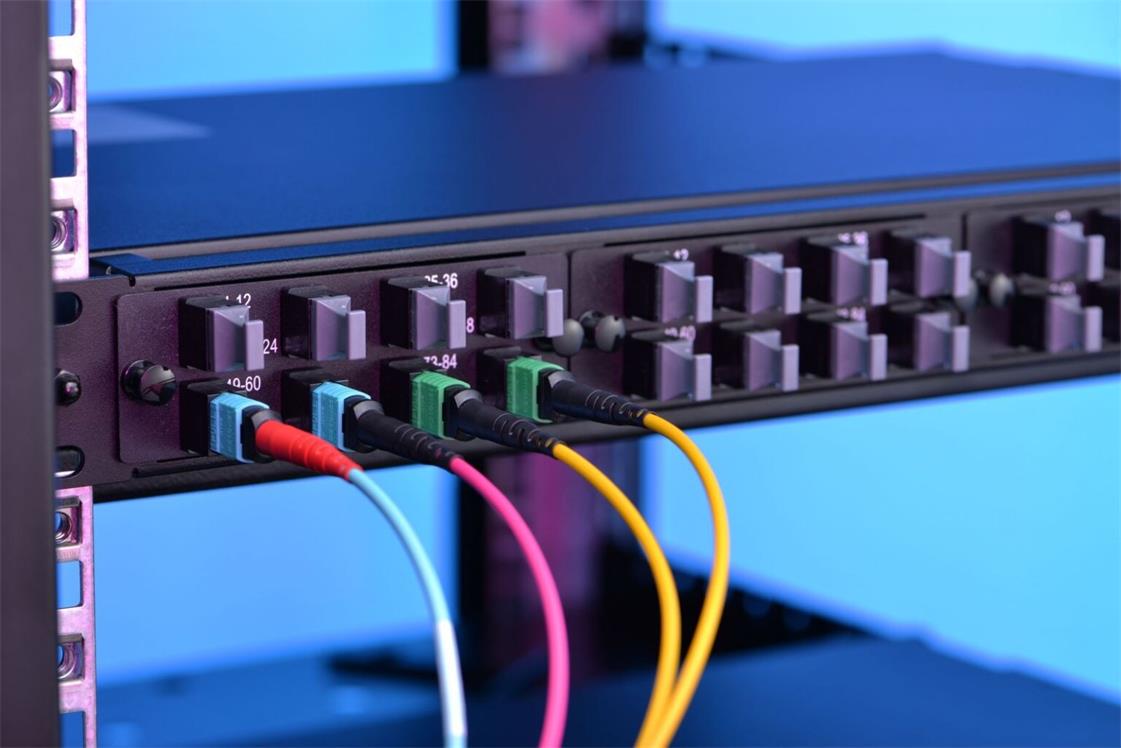
● Identify the MTP port on the high-density panel (typically located on the rear, designated for backbone connections). Align the MTP connector’s key (a small protrusion on the connector body) with the keyway on the port—this ensures correct polarity and fiber alignment.
● Insert the MTP connector into the port firmly but gently, until you hear a clicking sound indicating it is fully seated. Avoid twisting or forcing the connector, as this can damage the ferrule or internal fibers.
● Secure the MTP connector using the panel’s locking mechanism (e.g., a latch or screw-on collar) to prevent accidental disconnection. Ensure the connector is not under tension—use a strain relief bracket to anchor the cable to the rack, maintaining the minimum bend radius.
Route and Connect the LC Duplex Connectors
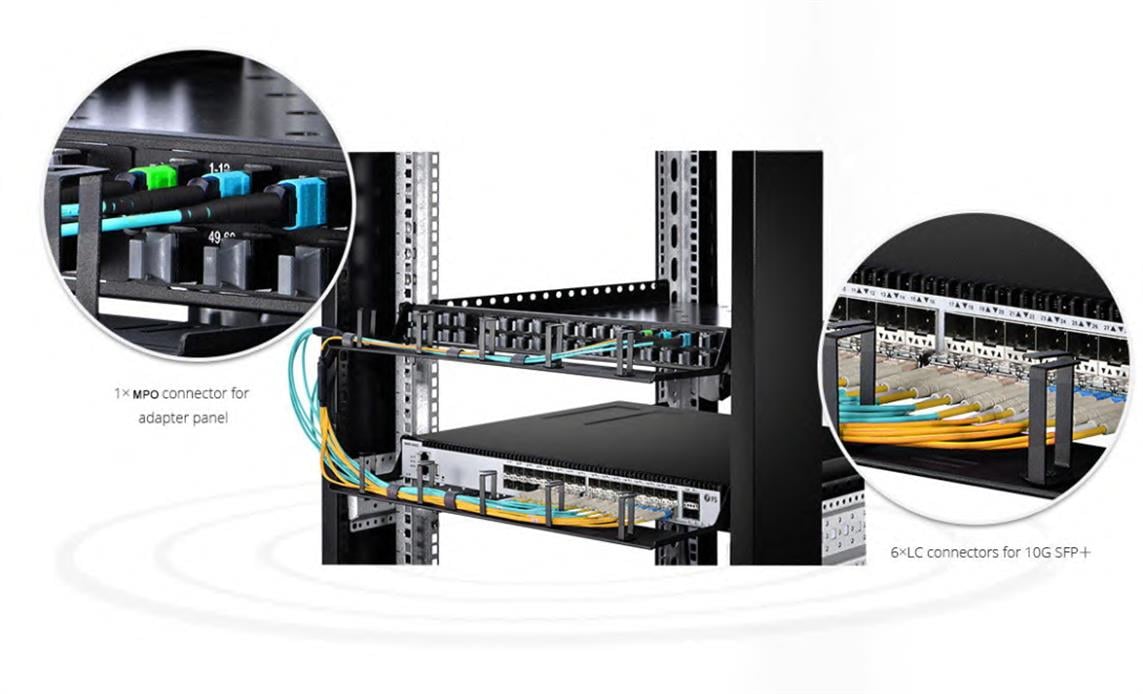
● Route the individual LC duplex breakout cables from the MTP connector to the corresponding LC ports on the panel. Follow the pre-planned cable path, using cable ties and organizers to keep cables neat and organized. Avoid crossing cables excessively, as this can increase insertion loss and make maintenance difficult.
● Maintain the minimum bend radius (10mm for the main cable, 7.5mm for breakout fibers) throughout routing. Do not bend cables at sharp angles or crush them between rack components—this can cause micro-bends in the fiber, leading to signal loss.
● Align each LC connector with its designated port, ensuring the connector’s key (on the LC ferrule) matches the port’s keyway. Insert the LC connector into the port until it clicks into place. For duplex LC connectors, ensure both the transmit (Tx) and receive (Rx) fibers are connected to the correct ports, as specified by your network’s polarity plan (Type A, B, or C).
● Secure the LC connectors using the panel’s retention clips (if available) to prevent accidental disconnection. Arrange the breakout cables in a neat, parallel configuration to optimize airflow and reduce clutter in the high-density panel.
Perform Post-Installation Cable Management
● Use non-abrasive cable ties to bundle the main MTP-LC cable and breakout fibers, leaving slight slack to accommodate thermal expansion and future adjustments. Avoid over-tightening cable ties, as this can compress the cable jacket and damage the fibers.
● Install cable labels on both ends of the cable and at key points along the routing path, including the MTP and LC connectors. Labels should include the cable type, fiber count, polarity, and destination (e.g., “MTP-LC, 12-Fiber OM4, Polarity A, Rack 5-Server 10”).
● Replace the panel’s front and rear covers, ensuring they are securely fastened. Verify that the covers do not press against the cables or connectors—this can cause tension and signal degradation.

Post-Installation Testing and Verification
After installation, rigorous testing is required to confirm that the MTP-LC cable is functioning correctly and meeting performance standards. Skipping this step can result in undetected issues that impact network reliability.
Conduct Insertion Loss (IL) and Return Loss (RL) Testing
● Connect the optical power meter and light source to the MTP-LC cable’s MTP and LC ports, respectively. Set the test equipment to the appropriate wavelength (1310nm or 1550nm for single-mode, 850nm or 1300nm for multimode).
● Measure the insertion loss for each fiber channel. The maximum allowable IL is ≤0.35dB for MTP connectors and ≤0.2dB for LC connectors—any value exceeding this indicates a problem (e.g., contamination, misalignment, or fiber damage).
● Measure the return loss, which should be ≥60dB for MTP connectors and ≥50dB for LC connectors. Low RL values indicate signal reflection, which can degrade network performance.
● Document the test results for each fiber channel, comparing them to the cable’s specifications and industry standards. Retain these records for future reference and compliance audits.
Verify Polarity and Connectivity
● Use a network tester or transceiver to verify that data is transmitted and received correctly across all channels. Ensure that the polarity (Type A, B, or C) is correctly aligned—for example, in Type A polarity, the transmit fiber from the MTP connector should map to the receive fiber of the LC connector, and vice versa.
● Test end-to-end connectivity by sending test packets between the backbone (MTP-connected) and endpoint (LC-connected) devices. Confirm that there are no packet losses, latency issues, or error messages.

Inspect for Physical Issues
● Conduct a final visual inspection of the installation. Check for loose connectors, damaged cables, or improper cable routing (e.g., bent fibers, excessive tension). Ensure that all labels are clear and correctly placed.
● Verify that the high-density panel’s temperature is within the operating range—overheating can indicate poor airflow due to cable clutter. Adjust cable routing if necessary to improve airflow.
Maintenance and Best Practices
Proper maintenance of MTP-LC cable installations in high-density panels is essential to ensure long-term performance and reliability. Follow these best practices to maximize the cable’s lifespan and minimize downtime.
Regular Cleaning and Inspection
● Clean MTP and LC connectors every 3 to 6 months, or whenever connectivity issues arise. Use only fiber optic-specific cleaning tools and solutions—avoid using alcohol or other harsh chemicals, as they can damage the connector’s ferrule.
● Inspect cables and connectors for physical damage (e.g., cracks, fraying, or corrosion) during each cleaning. Replace any damaged components immediately to prevent signal loss.
Avoid Overcrowding and Tension
● Do not add additional cables to the high-density panel beyond its rated capacity—overcrowding increases temperature, EMI, and the risk of accidental cable damage.
● Regularly check for cable tension, especially at connection points. Use strain relief brackets and cable organizers to maintain the minimum bend radius and prevent excessive pulling or twisting.
Document and Update Network Mapping
● Maintain up-to-date network mapping documentation, including cable routes, fiber counts, polarity, and test results. This simplifies troubleshooting, upgrades, and expansions.
● Update documentation whenever changes are made to the installation (e.g., adding new cables, replacing components, or reconfiguring polarity).
Plan for Future Upgrades
● When installing MTP-LC cables, consider future network upgrades (e.g., from 100G to 400G). Choose cables with higher fiber counts (e.g., 24 or 48 cores) and compatible fiber modes (e.g., OM5 multimode for wide-bandwidth applications) to avoid costly re-cabling.
● Ensure the high-density panel has spare ports to accommodate additional cables or equipment.
Summary
Installing MTP-LC cables in high-density panels requires precision, attention to detail, and adherence to industry standards. Proper installation not only maximizes the cable’s performance but also reduces downtime, lowers maintenance costs, and facilitates seamless network upgrades.





No comments have been posted yet.