


.webp)


What is Insertion Loss of Fiber Optic Cable Assemblies?
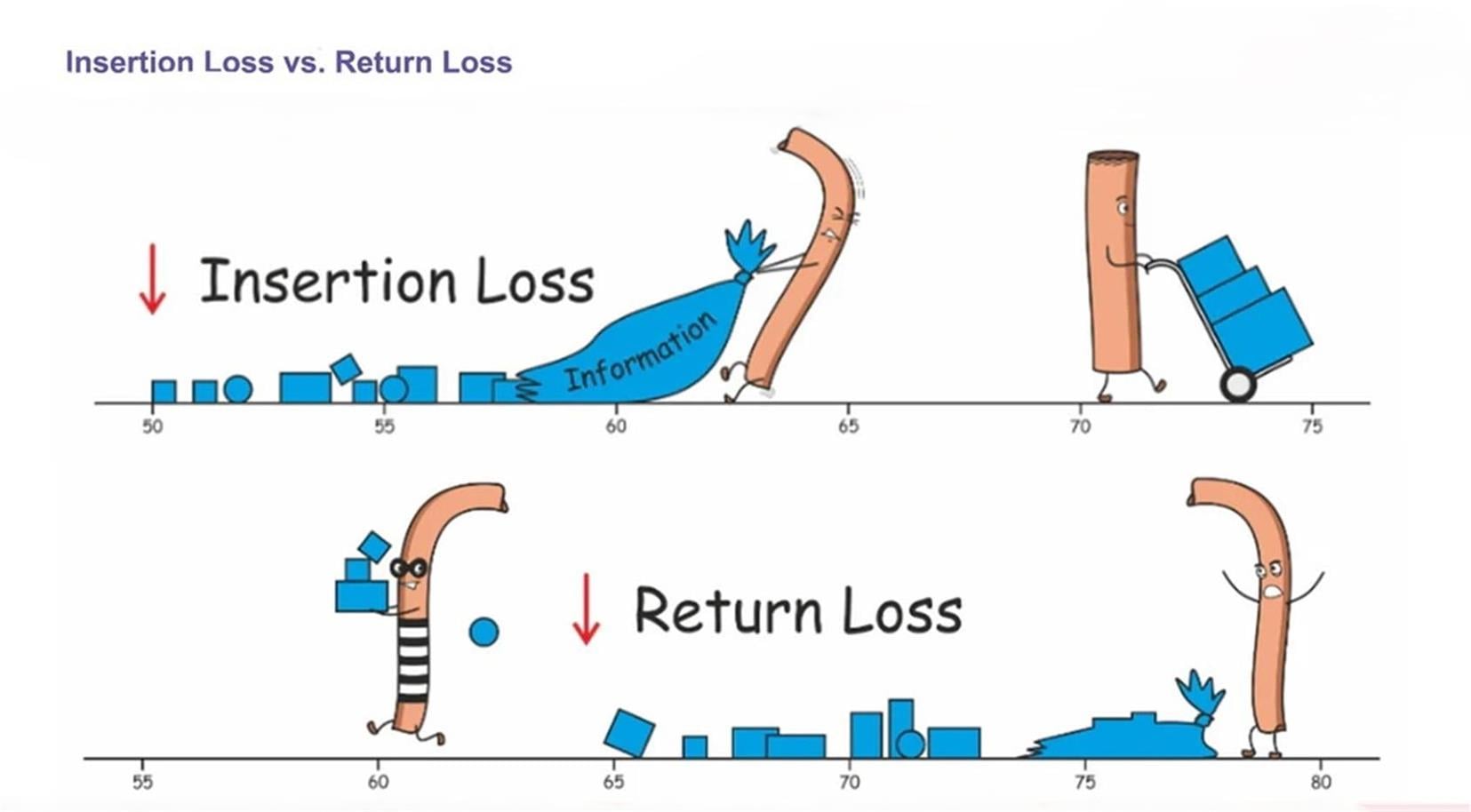
Insertion Loss (IL) is a critical performance parameter for Fiber Optic Cable Assemblies, defined as the total degradation of optical signal power that occurs when the assembly is inserted into a link. It represents the measurable amount of light lost between two fixed points, primarily due to intrinsic factors within the fiber and, more significantly, extrinsic factors introduced by connections and terminations. These extrinsic factors include imperfections in connector alignment, microscopic contaminants on the ferrule end-faces, and inherent reflectance at the connection points. The loss is quantified in decibels (dB) using the standard formula IL = -10 log(Pout / Pin), where Pout is the output power and Pin is the input power. Since this calculation yields a logarithmic value, a lower IL number directly indicates superior performance; for instance, an assembly rated at 0.3dB is objectively more efficient and introduces less signal attenuation than one rated at 0.5dB.
The specific IL value is heavily influenced by the quality of the components and the connection methods employed. For example, a well-executed fusion splice creates a near-seamless joint, typically resulting in a very low loss of less than 0.1 dB, whereas the connection between two separable fiber optic connectors will inherently have a higher, though still minimal, loss due to the tiny air gap between the ferrules. To ensure system reliability, industry standards define maximum acceptable insertion loss thresholds for different assembly types. In a data center environment, common benchmarks include a maximum of 15dB for standard LC patch cords, whether multimode or singlemode. For higher-density MTP/MPO trunk cables, which contain multiple fibers and more connection points, the allowed loss is higher, typically up to 20dB for multimode and 30dB or greater for singlemode variants, accounting for their greater complexity and longer potential reach in optical links.
What is Return Loss of Fiber Optic Cable Assemblies?
Return Loss (RL) is a critical metric that quantifies the amount of reflected light in a fiber optic link. Whenever an optical signal encounters a change in medium, such as at a connector interface or within a component, a small portion of the signal is reflected back toward the source due to discontinuities and impedance mismatches. This reflected power, or "echo," is detrimental to system performance, and Return Loss directly measures its power loss. It is the counterpart to Insertion Loss; while IL measures the signal degraded along the forward path, RL measures the power lost from the signal that is reflected backward.
The value is calculated using the formula RL = -10 log (P_reflected / P_input), where P_reflected is the power of the returned signal and P_input is the initial power. Since the reflected power (P_reflected) is always less than the input power (P_input), the logarithmic ratio is negative, and the formula's negative sign renders the final RL value a positive number. Consequently, a larger Return Loss value is superior, as it indicates a weaker, less significant reflection. Typical RL values range from 15 dB to 60 dB, with higher values denoting better performance. This performance is heavily influenced by the quality of the connector polish. For example, industry standards specify that Ultra Physical Contact (UPC) polished connectors should have an RL greater than 50 dB, while the angled design of Angled Physical Contact (APC) connectors achieves even better performance, typically greater than 60 dB. Standard Physical Contact (PC) connectors require an RL greater than 40 dB. In multimode fiber systems, where reflections are generally less critical, the typical Return Loss values are lower, commonly ranging between 20 and 40 dB.
What Are the Primary Performance Factors on Insertion Loss and Return Loss?
The performance of Fiber Optic Assemblies, specifically their Insertion Loss (IL) and Return Loss (RL), is paramount to a healthy network. Several key factors can detrimentally impact these critical measurements, and understanding them is essential for ensuring optimal signal integrity.
1. The Critical Role of End-Face Quality and Cleanliness
The connection point is a vulnerability. Any imperfection on the meticulously polished end-face of a fiber optic connector, such as scratches, pits, or cracks, will disrupt the perfect passage of light. More commonly, microscopic dust particles pose a significant threat. Given that a single-mode fiber core is only 5 microns in diameter, a speck of dust can partially or completely block the light path, leading to immediate and severe signal attenuation, which manifests as poor IL and RL. Consistent, professional cleaning is not just a best practice but a necessity.
2. Hidden Flaws and Connector Incompatibility
Damage or incompatibility can create subtle yet damaging issues. A fiber that is fractured but still partially transmitting light can cause significant and intermittent IL/RL problems. Furthermore, a critical error involves mating incompatible connector types. For instance, connecting an APC connector (polished at an 8-degree angle to minimize reflections) with a PC or UPC connector (polished with a curved surface) is a fundamental mismatch. This not only prevents proper physical contact, leading to high insertion loss, but also utterly fails to achieve the low return loss that APC connectors are designed for, severely compromising the signal's integrity.
3. The Perils of Excessive Bending
While optical fiber is remarkably flexible, it adheres to strict physical limits. Bending the cable beyond its minimum bend radius forces light to leak out from the core, causing a sharp increase in insertion loss. Consistently tight bends can also lead to permanent, irreversible damage to the glass fiber. As a general rule, the bend radius should not exceed ten times the cable's jacket diameter. For a standard patch cord with a 2mm jacket, this means maintaining a bend radius of at least 20mm to ensure long-term performance and reliability.
How to Test Fiber Insertion Loss?
Direct Testing By Light Source and Power Meter
Phase 1: Preparation and Setup
Step 1: Gather Your Equipment
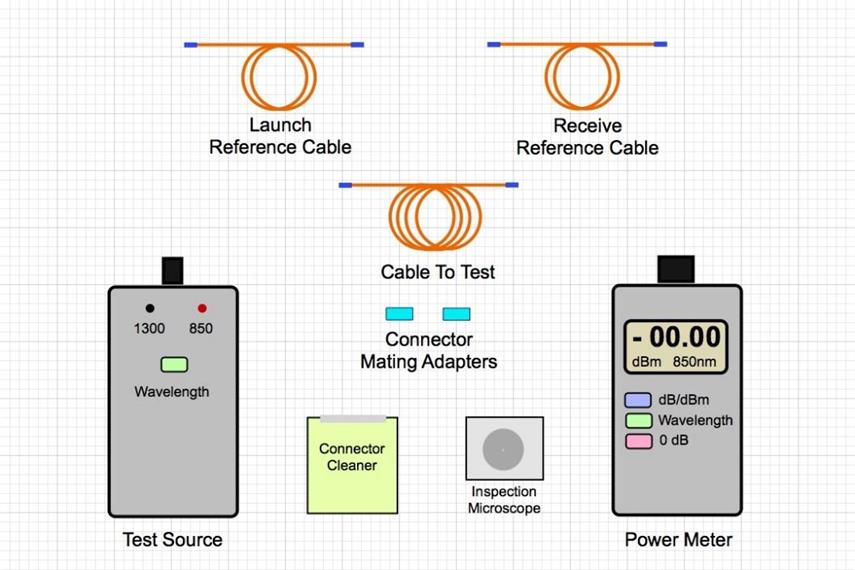
You will need three main items: a stable light source, an optical power meter, and at least two test reference cables (also known as launch cables). Ensure the light source and power meter are set to the same wavelength (e.g., 850 nm, 1310 nm) and that they are compatible with the fiber type you are testing (single-mode or multimode).
You will need three main items: a stable light source, an optical power meter, and at least two test reference cables (also known as launch cables). Ensure the light source and power meter are set to the same wavelength (e.g., 850 nm, 1310 nm) and that they are compatible with the fiber type you are testing (single-mode or multimode).
Step 2: Clean All Connectors
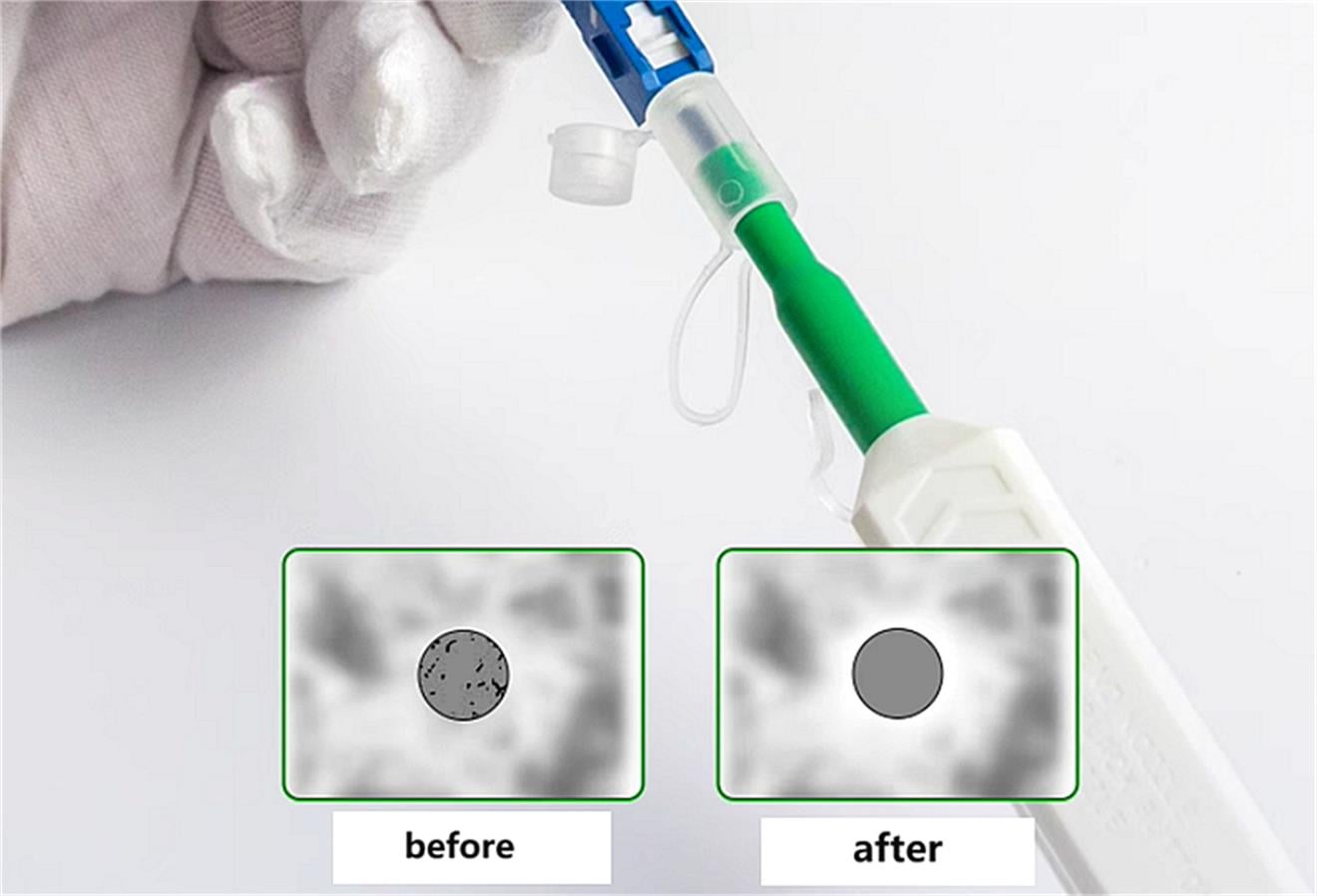
This is the most critical step for an accurate test. Using a dedicated fiber optic cleaner, meticulously clean the connectors on the light source, the power meter, and both ends of your test reference cables. Contamination is the primary cause of high loss and unreliable results.
This is the most critical step for an accurate test. Using a dedicated fiber optic cleaner, meticulously clean the connectors on the light source, the power meter, and both ends of your test reference cables. Contamination is the primary cause of high loss and unreliable results.
Step 3: Perform a Power Meter Self-Test
Turn on the optical power meter. Without any light input, check that it reads a value indicating no signal, such as a very low power level or an "OL" (overload) warning. This verifies the meter is functioning correctly before you begin.
Turn on the optical power meter. Without any light input, check that it reads a value indicating no signal, such as a very low power level or an "OL" (overload) warning. This verifies the meter is functioning correctly before you begin.
Phase 2: Setting the Reference Value (0 dB Point)
Step 4: Create the Reference Circuit
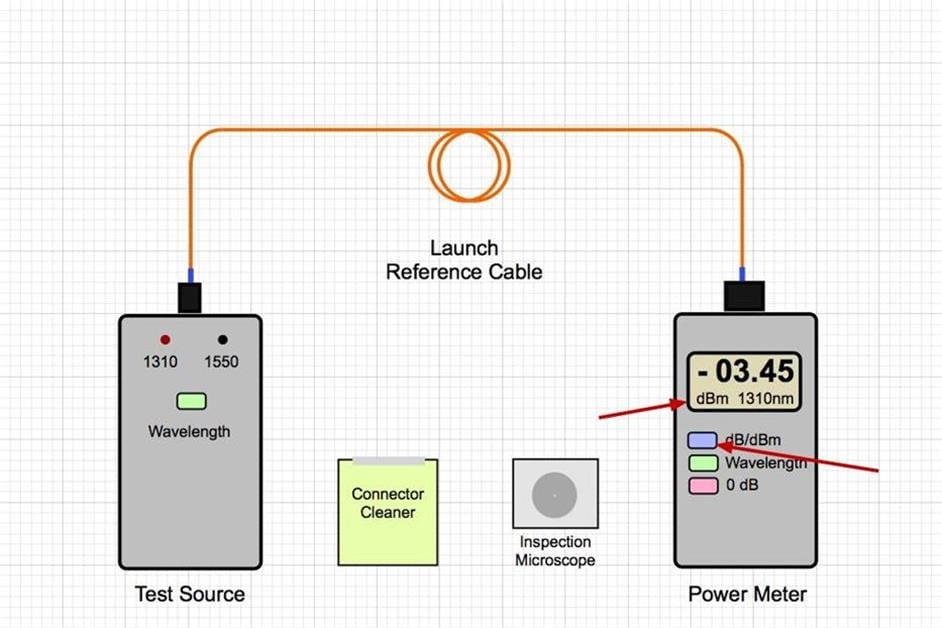
Connect one test reference cable from the light source output to the optical power meter input. If you are using a second reference cable (recommended for link testing), connect it to the power meter and then connect the two reference cables together using a mating adapter.
Connect one test reference cable from the light source output to the optical power meter input. If you are using a second reference cable (recommended for link testing), connect it to the power meter and then connect the two reference cables together using a mating adapter.
Step 5: Establish the 0 dB Reference
Turn on the light source. The power meter will now display a power level in dBm (e.g., -10.00 dBm). Press the "ZERO" or "REFERENCE" button on your power meter. The meter will now set this power level as its reference point and display a loss of 0.00 dB. You have now calibrated your test setup. Do not disturb this connection until the reference is set.
Turn on the light source. The power meter will now display a power level in dBm (e.g., -10.00 dBm). Press the "ZERO" or "REFERENCE" button on your power meter. The meter will now set this power level as its reference point and display a loss of 0.00 dB. You have now calibrated your test setup. Do not disturb this connection until the reference is set.
Phase 3: Testing the Device-Under-Test (DUT)
Step 6: Introduce the Cable or Link
Carefully disconnect the two reference cables from each other at the mating adapter. The link you wish to test (the Device-Under-Test) will now be connected between these two reference cables.
Carefully disconnect the two reference cables from each other at the mating adapter. The link you wish to test (the Device-Under-Test) will now be connected between these two reference cables.
Step 7: Make the Connections
Connect the launch reference cable to one end of your link under test. Connect the receive reference cable to the other end of the link. Ensure all connections are secure and fully seated.
Connect the launch reference cable to one end of your link under test. Connect the receive reference cable to the other end of the link. Ensure all connections are secure and fully seated.
Step 8: Take the Insertion Loss Reading
Look at the display on the optical power meter. It will now show a negative number in decibels (dB). This number is the total end-to-end insertion loss of your link.
Look at the display on the optical power meter. It will now show a negative number in decibels (dB). This number is the total end-to-end insertion loss of your link.
Example: If the meter displays -1.85 dB, the insertion loss of your link is 1.85 dB.
Phase 4: Completion
Step 9: Document the Results
Record the loss value for the wavelength you tested. If required by your standards, repeat the entire process for the second operating wavelength (e.g., test at 850 nm and then at 1300 nm for multimode fiber).
Record the loss value for the wavelength you tested. If required by your standards, repeat the entire process for the second operating wavelength (e.g., test at 850 nm and then at 1300 nm for multimode fiber).
Step 10: Power Down and Safely Store Equipment
Turn off the light source and power meter. Safely coil all cables and store the equipment in its protective cases.
Turn off the light source and power meter. Safely coil all cables and store the equipment in its protective cases.
Indirect Testing By OTDR (Optical Time Domain Reflectometry)
Phase 1: Preparation and Parameter Setting
Step 1: Gather Your Equipment
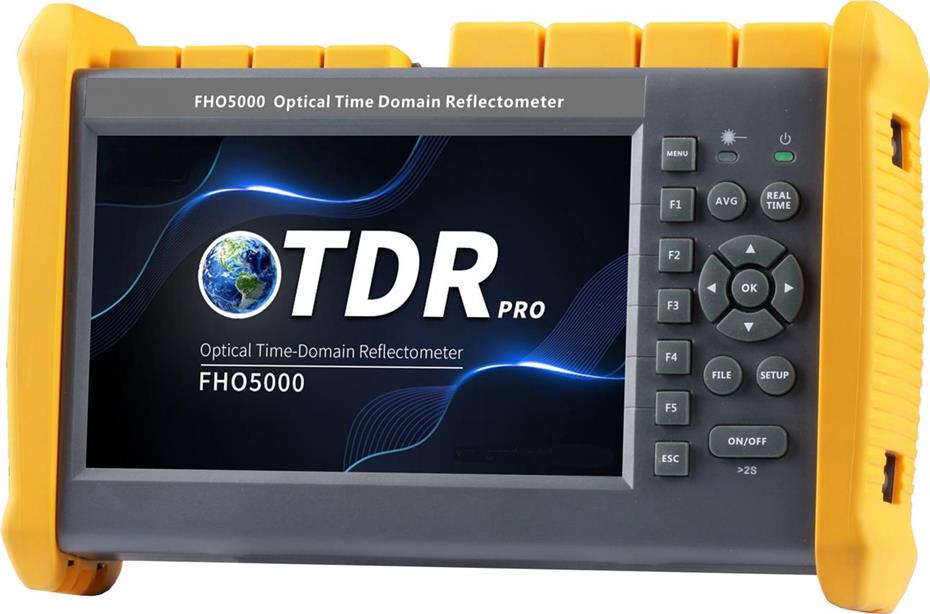
You will need an OTDR unit, launch and receive test reference cables (often called "pulse cables" and "receive cables"), and possibly a launch box to hold the connections. Ensure the OTDR is charged and the connectors match the link under test (e.g., LC, SC).
You will need an OTDR unit, launch and receive test reference cables (often called "pulse cables" and "receive cables"), and possibly a launch box to hold the connections. Ensure the OTDR is charged and the connectors match the link under test (e.g., LC, SC).
Step 2: Clean All Connectors
Just as with light source and power meter testing, this is critical. Meticulously clean the connectors on the OTDR, the reference cables, and the link you are testing. A dirty connector will create a false event on the trace and can damage the OTDR's sensitive receiver.
Just as with light source and power meter testing, this is critical. Meticulously clean the connectors on the OTDR, the reference cables, and the link you are testing. A dirty connector will create a false event on the trace and can damage the OTDR's sensitive receiver.
Step 3: Connect the Reference Cables
Connect a launch reference cable directly to the OTDR's output port. This cable is essential for characterizing the OTDR's own "dead zones" and for accurately measuring the loss of the first connector. If you are testing a full link, you may also connect a receive cable at the far end.
Connect a launch reference cable directly to the OTDR's output port. This cable is essential for characterizing the OTDR's own "dead zones" and for accurately measuring the loss of the first connector. If you are testing a full link, you may also connect a receive cable at the far end.
Step 4: Set the OTDR Parameters
This is the most technical part of the process. You must manually set parameters for an accurate trace:
This is the most technical part of the process. You must manually set parameters for an accurate trace:
Wavelength: Select the operating wavelength (e.g., 1310 nm, 1550 nm).
Pulse Width: Start with a short pulse width (e.g., 10 ns) for resolving closely spaced events near the start. For long fibers, use a longer pulse width (e.g., 1 µs) to inject more light and see further, but this reduces resolution.
Range/Distance: Set the range to be slightly longer than the total fiber length you expect to test.
Acquisition Time: Set a measurement time long enough to produce a clean, smooth trace with a low noise floor (e.g., 30 seconds to 3 minutes).
Phase 2: Acquiring and Analyzing the Trace
Step 5: Acquire the Trace
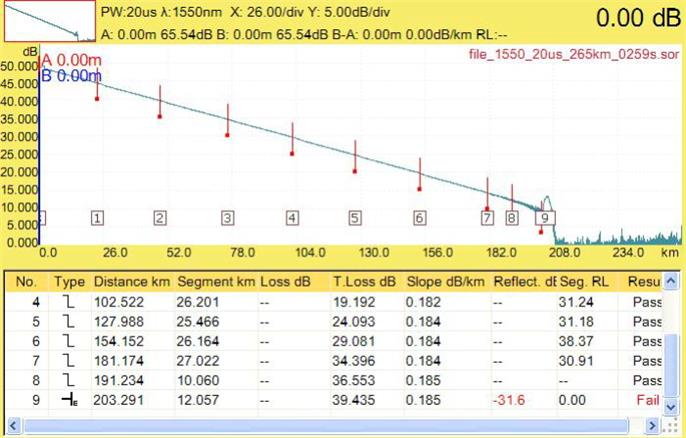
Once the parameters are set, connect the other end of your launch cable to the start of the link you wish to test. Start the acquisition. The OTDR will send out pulses of light and measure the light that is scattered back. It will plot this data as a trace showing power (in dB) versus distance.
Once the parameters are set, connect the other end of your launch cable to the start of the link you wish to test. Start the acquisition. The OTDR will send out pulses of light and measure the light that is scattered back. It will plot this data as a trace showing power (in dB) versus distance.
Step 6: Interpret the OTDR Trace
Learn to read the trace. A typical trace will show:
Learn to read the trace. A typical trace will show:
A launch spike at the very beginning (the connection between the OTDR and the launch cable).
A downward-sloping line, which is the fiber itself. The slope represents the attenuation coefficient (loss per kilometer) of the fiber.
Sudden "dips" or "steps" in the trace, which indicate a loss event like a connector, splice, or bend.
Sharp upward spikes, which indicate a reflective event like a connector or mechanical splice.
The end of the trace is typically marked by a large reflective spike (from an unterminated connector) or a "drop-off" into noise (if the fiber is unterminated).
Step 7: Analyze Events and Measure Loss
Use the OTDR's marker functions to analyze the trace.
Use the OTDR's marker functions to analyze the trace.
Place two markers, one just before and one just after an event (like a connector).
Use the "Loss" or "Event Loss" function. The OTDR will calculate the dB loss between these two points, giving you the insertion loss for that specific event.
Place two markers on a straight section of the fiber slope. The OTDR will calculate the attenuation coefficient (dB/km) for that segment.
Phase 3: Documentation
Step 8: Save and Document the Results
Save the trace and the event table generated by the OTDR. This table provides a log of the distance to and the loss of every event in the link, creating a "fingerprint" of the fiber for future comparison.
Save the trace and the event table generated by the OTDR. This table provides a log of the distance to and the loss of every event in the link, creating a "fingerprint" of the fiber for future comparison.
Testing By Using an Insertion Loss/Return Loss Tester
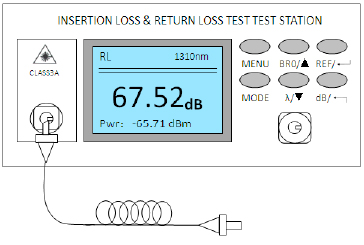
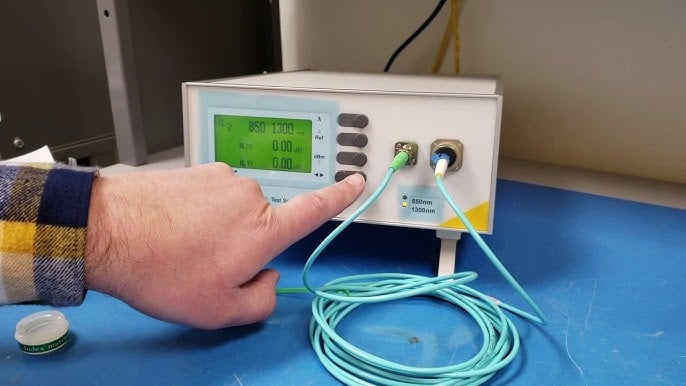
This type of instrument integrates a light source and a power meter into two main units (Main and Remote) and adds the capability to measure Return Loss, which is the amount of light reflected back towards the source.
Phase 1: Preparation and Equipment Setup
Step 1: Identify the Test Units
You will have two main units: the Main Unit (which typically initiates the test and displays results) and the Remote
You will have two main units: the Main Unit (which typically initiates the test and displays results) and the Remote
Unit (which responds to the main unit). Both units contain both a light source and a power meter. Turn both units on.
Step 2: Select the Test Fiber and Set Wavelengths
Using the menu on the Main Unit, select the fiber type you are testing (Multimode or Single-mode). Then, select the wavelengths you need to test. For a full certification, you will typically test at two wavelengths (e.g., 850 nm & 1300 nm for MM; 1310 nm & 1550 nm for SM). Ensure the same settings are active on the Remote Unit.
Using the menu on the Main Unit, select the fiber type you are testing (Multimode or Single-mode). Then, select the wavelengths you need to test. For a full certification, you will typically test at two wavelengths (e.g., 850 nm & 1300 nm for MM; 1310 nm & 1550 nm for SM). Ensure the same settings are active on the Remote Unit.
Step 3: Clean All Connectors
This is the most critical step. Use a dedicated fiber optic cleaner to meticulously clean the connectors on both the Main and Remote units, as well as all reference cables and the connectors of the link under test.
This is the most critical step. Use a dedicated fiber optic cleaner to meticulously clean the connectors on both the Main and Remote units, as well as all reference cables and the connectors of the link under test.
Phase 2: Setting the Reference (0 dB Loss)
This step calibrates the tester to the specific test cords and connectors you are using.
Step 4: Connect for Reference
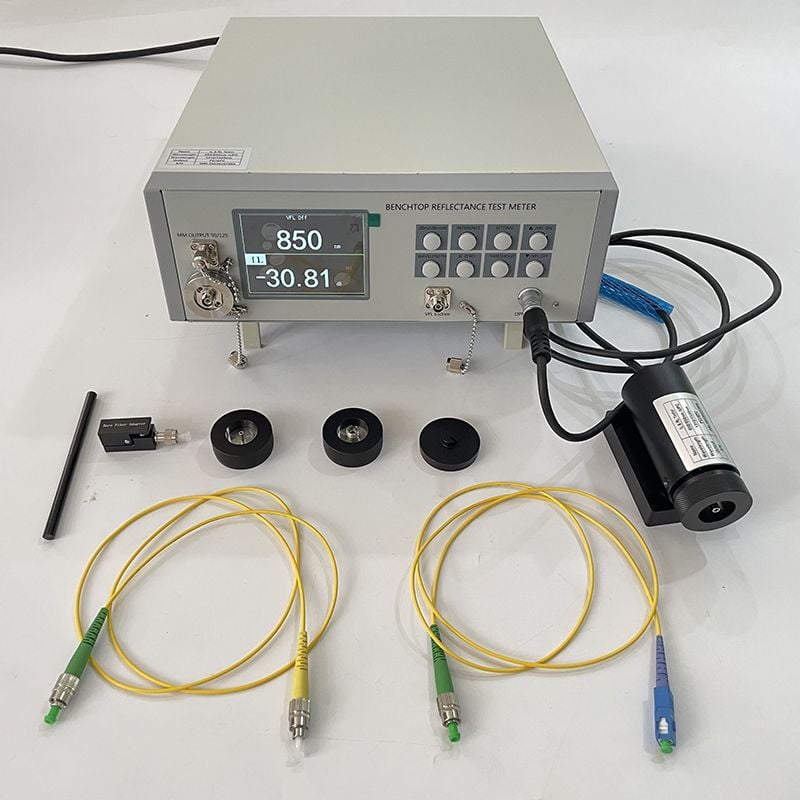
Take your two high-quality reference test cords. Connect one cord to the "OUT" port of the Main Unit and the other to the "OUT" port of the Remote Unit. Then, connect the two free ends of these cords directly together using a mating adapter.
Take your two high-quality reference test cords. Connect one cord to the "OUT" port of the Main Unit and the other to the "OUT" port of the Remote Unit. Then, connect the two free ends of these cords directly together using a mating adapter.
Step 5: Perform the Reference/Zeroing Operation
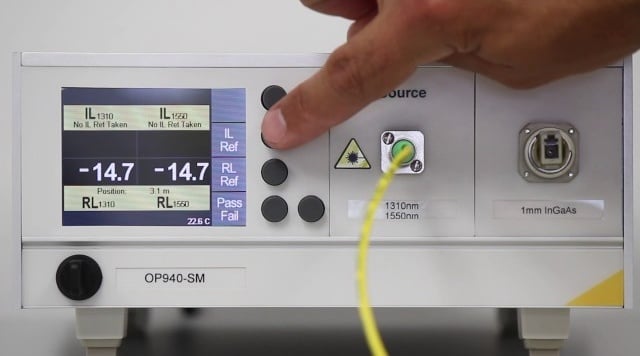
On the Main Unit, navigate to the "Set Reference" or "Zero" function. The tester will now perform a sequence where it measures the loss and return loss of the direct connection between the two units. It sets this as the 0.00 dB reference point for both Insertion Loss (IL) and Return Loss (RL). A successful reference will be confirmed on the display.
On the Main Unit, navigate to the "Set Reference" or "Zero" function. The tester will now perform a sequence where it measures the loss and return loss of the direct connection between the two units. It sets this as the 0.00 dB reference point for both Insertion Loss (IL) and Return Loss (RL). A successful reference will be confirmed on the display.
Phase 3: Testing the Link
Step 6: Connect the Link Under Test
Disconnect the two reference cables from the mating adapter. The link you want to test (the cable plant) will now be connected between these two reference cables.
Disconnect the two reference cables from the mating adapter. The link you want to test (the cable plant) will now be connected between these two reference cables.
Step 7: Run the Automated Test
Initiate the test from the Main Unit. The tester will automatically perform a bi-directional test:
Initiate the test from the Main Unit. The tester will automatically perform a bi-directional test:
The Main Unit's source will send light to the Remote Unit's meter to measure IL in one direction.
The Remote Unit's source will send light to the Main Unit's meter to measure IL in the other direction.
Both units will measure the light reflected back from the entire link to calculate the overall Return Loss.
Step 8: Read and Interpret the Results
The Main Unit's display will show the results. For a passing link, you will typically see:
The Main Unit's display will show the results. For a passing link, you will typically see:
Insertion Loss: This will be the final, bi-directionally averaged loss value in dB (e.g., IL: 1.25 dB). This is the most important number for loss budget.
Return Loss: This value will be a positive number in dB (e.g., RL: 55.2 dB). A higher number means less reflection and is better. You will often compare this to a minimum standard (e.g., >35 dB for UPC, >60 dB for APC).
Phase 4: Completion and Documentation
Step 9: Save the Test Results
Most modern testers allow you to save the results automatically or manually. Save the record for the fiber and wavelength you just tested. The saved record typically includes the IL, RL, wavelength, and a pass/fail indication.
Most modern testers allow you to save the results automatically or manually. Save the record for the fiber and wavelength you just tested. The saved record typically includes the IL, RL, wavelength, and a pass/fail indication.
Step 10: Test the Second Wavelength
If your standard requires testing at a second wavelength, change the wavelength setting on both units and repeat Step 7 to run the test again. No new reference is needed if you are testing the same physical link.
If your standard requires testing at a second wavelength, change the wavelength setting on both units and repeat Step 7 to run the test again. No new reference is needed if you are testing the same physical link.
Step 11: Power Down and Store Equipment
Once all fibers and wavelengths have been tested, safely power down the Main and Remote units. Disconnect all cables, coil them properly, and store everything in its protective case.
Once all fibers and wavelengths have been tested, safely power down the Main and Remote units. Disconnect all cables, coil them properly, and store everything in its protective case.
Your Exact Requirements Determine The Best Approach to Test Fiber IL and RL
The Light Source and Power Meter (LSPM) is the final inspector for a fiber optic link's operational readiness. Its singular, critical application is to answer the question: "Will the data transmission equipment have enough signal power over this entire channel?" When a new permanent link—from a workstation outlet in an office to a patch panel in a data center—is installed, the LSPM is used to certify it. By measuring the total end-to-end insertion loss, it provides a direct, pass/fail verification against the network's loss budget, ensuring that the combined loss of the fiber, all connectors, and all splices will not impair the live network transceivers. It is the fundamental tool for acceptance testing, guaranteeing the channel's performance as a complete system.
The OTDR (Optical Time Domain Reflectometer), in contrast, is the diagnostic surgeon and cartographer for the fiber cable itself. Its specific application is not to certify a link for use, but to characterize its physical integrity and locate faults. When an LSPM test fails or a network goes down, the OTDR is deployed to answer "Where is the problem?" It is indispensable for testing a long-haul outside plant cable after installation, where it creates a "signature" trace that verifies splice quality and pinpoints the exact distance to a break, a faulty connector, or a damaging bend. It excels in analyzing a fusion splice between two cable segments, isolating and measuring its specific loss, which the LSPM cannot do.
The Insertion Loss/Return Loss Tester (OLTS) is the precision auditor for performance-critical components and high-speed networks. Its definitive application is where signal reflection is as critical as signal loss. When certifying a patch cord straight from the factory or testing a link that will use sensitive, high-bandwidth transceivers, the OLTS is required. It performs the same total insertion loss test as an LSPM, but its essential added function is to measure Return Loss. This verifies that reflections from connectors—especially Angled Physical Contact (APC) types—and passive components are sufficiently low to prevent laser destabilization, making it the only tool for certifying links for modern systems like GPON or high-density data centers.
How to Test Fiber Return Loss?
Using an Integrated Optical Loss Test Set (OLTS) - The Standard Method
This is the most accurate and recommended method for measuring the total Return Loss of a complete link or component.
Equipment Needed:
An Integrated OLTS (Optical Loss Test Set) with Return Loss capability. This consists of a Main Unit and a Remote Unit.
Two test reference cables with known good connectors and low reflectance.
A 3-port circulator (often built into the advanced OLTS units). This device directs light from the source to the link and from the link to the detector, enabling the reflection measurement.
Step-by-Step Procedure:
Step 1: Preparation
Turn on both the Main and Remote units.
Select the Test: On the Main Unit, navigate to the "Return Loss" test function.
Set Wavelength: Choose the required wavelength (e.g., 1310 nm, 1550 nm).
Clean All Connectors: This is non-negotiable. Clean the connectors on the OLTS ports, the reference cables, and the link under test.
Step 2: Set the Reference (Calibration) - This is CRITICAL
This step measures the reflection level of your test setup itself and sets it as the "zero" reflection point.
This step measures the reflection level of your test setup itself and sets it as the "zero" reflection point.
Direct Connection: Take your two test reference cables. Connect one to the RL test port of the Main Unit and the other to the Remote Unit.
Mate the Cables: Connect the two free ends of the reference cables directly together using a high-quality mating adapter.
Perform Reference: Initiate the "Set Reference" or "Calibrate" function on the OLTS. The instrument will send a pulse, measure the reflection from the perfect connection you just made, and store this value. It now knows that this connection represents the highest possible RL (lowest possible reflection) for the test setup. A successful reference is essential for an accurate measurement.
Step 3: Test the Device-Under-Test (DUT)
Disconnect: Unplug the two reference cables from the mating adapter.
Insert the Link: Connect the link you want to test (e.g., a patch cord, a permanent installed link) between the two reference cables.
Run the Test: Initiate the RL test from the Main Unit. The OLTS will send a signal, and its built-in circulator will route the reflected light to its detector.
Read the Result: The OLTS will directly display the Return Loss value in dB on the screen. This is the total RL of the entire link, including all connectors and the fiber itself.
Using an OTDR - The Indirect Method
An OTDR can also provide RL information, but it measures something different: Reflectance of individual events. The total ORL (Optical Return Loss) is calculated from the sum of these discrete reflections.
Equipment Needed:
An OTDR with a launch cable.
Step-by-Step Procedure:
Step 1: Acquire a Trace
Connect a long enough launch cable to the OTDR.
Connect the other end of the launch cable to the link under test.
Acquire a standard OTDR trace.

Step 2: Analyze Individual Events
In the OTDR's event table, locate each reflective event (connectors, mechanical splices).
The OTDR will list the Reflectance for each of these events, also in dB. Reflectance is the measure of reflected light from a single point.
Example: A connector might have a Reflectance of -45 dB.
Step 3: Understand the Limitation
The OTDR does not directly measure the total, continuous Return Loss (ORL) of the link. The ORL is a measure of the total reflected power from all sources, including discrete reflections (connectors) and distributed backscatter (the fiber itself). The OTDR can estimate the ORL based on its trace, but this is less accurate than the direct measurement from an OLTS.
The OTDR does not directly measure the total, continuous Return Loss (ORL) of the link. The ORL is a measure of the total reflected power from all sources, including discrete reflections (connectors) and distributed backscatter (the fiber itself). The OTDR can estimate the ORL based on its trace, but this is less accurate than the direct measurement from an OLTS.
Deficiencies and The Best Situation for Use
Integrated Insertion Loss/Return Loss Tester (OLTS) for Return Loss
Deficiencies (Limitations of the correct tool):
Cannot Locate Faults: It provides a single, accurate ORL value for the entire link but gives zero information on where in the link the reflection is coming from. A bad ORL value tells you the link is faulty, but not which connector to clean or replace.
High Cost: It is a specialized, premium instrument significantly more expensive than a basic power meter or even many OTDRs.
Complex Setup: The test requires a careful and correct reference procedure using high-quality cables. An incorrect reference will render all measurements useless.
Application Scenes (When it is the mandatory tool):
Primary Use: To certify the total Optical Return Loss of a complete fiber link against industry standards (TIA, IEC) or system requirements.
Scenario: Fiber Patch Cables and final acceptance testing of any high-speed or analog system (e.g., GPON, CATV, high-data-rate data centers) where laser performance is critically impaired by back-reflections. This is the only tool for certifying that links with APC connectors meet their required >60 dB return loss specification.
Optical Time Domain Reflectometer (OTDR) for Return Loss
Deficiencies (Why it's a poor tool for total Return Loss):
Measures Reflectance, Not Total ORL: An OTDR measures the reflectance (back reflection from a single point, like a connector). It does not directly measure the total Optical Return Loss (ORL), which is the sum of all reflections and backscatter from the entire link. Its ORL calculation is an estimate, not a direct measurement.
Blind to Distributed Backscatter: The core of ORL is the continuous backscatter from the fiber itself (Rayleigh backscatter). An OTDR uses this to work, but it is not designed to accurately integrate this with discrete reflections to provide a true total ORL value for certification.
Inaccurate for Certification: No major standard accepts an OTDR's ORL measurement for link certification. Its value can differ significantly from the true ORL measured by an OLTS.
Application Scenes (When to use it for reflection analysis):
Primary Use: To locate and measure specific reflective events (e.g., a dirty or damaged connector, a mechanical splice) within a link.
Scenario: When a link fails an ORL certification test from an OLTS, the OTDR is deployed to find which specific connector has bad reflectance.
Analogy: The OTDR is the detective that finds the specific criminal (bad connector) after the OLTS (the judge) has declared the entire scene (the link) guilty of high reflection.
Conclusion
In essence, the measurement of both Insertion Loss (IL) and Return Loss (RL) is not merely a technical procedure but a fundamental requirement for ensuring the reliability, performance, and longevity of any fiber optic network. These two metrics serve as the primary vital signs for the health of the optical channel.
We measure Insertion Loss to guarantee signal integrity. It quantifies the total light power attenuated as a signal travels from end to end, answering the critical question: "Is there enough signal reaching the receiver for error-free data transmission?" By verifying that IL is within the system's power budget, we ensure the fundamental operability of the link, preventing data errors, slow speeds, and complete link failure.
We measure Return Loss to guarantee signal stability. It quantifies the amount of light reflected back toward the transmitter, answering the equally critical question: "Is the signal clean and stable enough for the laser to operate correctly?" High reflections disrupt the precise operation of laser diodes, causing noise, jitter, and wavelength instability, which degrade performance in high-speed digital systems and can be catastrophic in analog systems like CATV.
Ultimately, IL and RL are two sides of the same coin. While IL ensures the signal is strong enough upon arrival, RL ensures it was launched cleanly in the first place. Together, they form the cornerstone of a robust fiber optic infrastructure, validating that the physical layer is not just functional but optimized to support current applications and future upgrades, thereby protecting network investments and ensuring uninterrupted communication.
FAQ
Q1: What is insertion loss in fiber connectors?
Insertion loss is the reduction of optical power when a connector is inserted into a link, usually measured in dB. Lower insertion loss means better performance.
Q2: What is return loss in fiber connectors?
Return loss measures the amount of light reflected back toward the source, expressed in dB. Higher return loss values indicate less reflection and better performance.
Q3: How is insertion loss measured?
Insertion loss is commonly measured with an optical power meter and a reference cable by comparing input and output power.
Q4: How is return loss measured?
Return loss is typically measured using an OTDR, which analyzes reflections along the fiber to calculate loss in dB.
Q5: What causes poor insertion loss and return loss?
Causes include dirty or damaged connector end-faces, core misalignment, poor polishing quality, and improper connector mating.
Q6: Which connector type has the best return loss?
APC connectors usually have the highest return loss (~ -65 dB), followed by UPC (~ -55 dB) and PC (~ -40 dB).
Q7: How can insertion and return loss be minimized?
Use high-quality connectors, keep ferrules clean, minimize bends and splices, and prefer factory-terminated cables.
More Information for Fiber Inssertion Loss and Return Loss, Please See:
Fiber Optical Signal Loss: Causes, Symptoms and Troubleshooting
What Is Optical Power Loss? Guide of Automatic Power Reduction





No comments have been posted yet.